
3D Printing, Computer Aided Design (CAD) and G-Code Basics
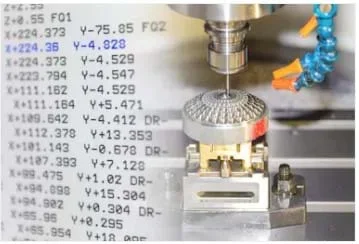 The basics of G-code help us understand manufacturing practices that are used in a variety of industry.Copyright 2018 Pixel B, CC-BY-SA-2.0, Shutterstock, https://www.shutterstock.com/image-photo/cnc-machine-nc-data-scene-use-599144864
Students learn how 3D printing, also known as additive manufacturing, is revolutionizing the manufacturing process. First, students learn what considerations to make in the engineering design process to print an object with quality and to scale. Students learn the basic principles of how a computer-aided design (CAD) model is converted to a series of data points then turned into a program that operates the 3D printer. The activity takes students through a step-by-step process on how a computer can control a manufacturing process through defined data points. Within this activity, students also learn how to program using basic G-code to create a wireframe 3D shapes that can be read by a 3D printer or computer numerical control (CNC) machine.
Advances in manufacturing incorporate various technologies that operate the machining processes that produce various products. These technologies allow engineers to design products that can be manufactured at a faster rate and at an unprecedented scale. The successful implementation of CNC machining in the subtractive manufacturing realm has led engineers to apply the same concepts to 3D printing, also known as additive manufacturing. These advancements improve the prototyping process and make it faster and less costly for engineers to design and test a part. 3D printing has also allowed engineers to create complex geometry that traditional machining methods would not allow because of machine constraints.
After this activity, students should be able to:
- Discuss how the 3D printing process works as well as the various types of 3D printing that are currently used in the manufacturing industry.
- Calculate distance and convert distance into x, y, z coordinate points.
- Write G-code to program a wireframe model.
- Explain how a 3D printer uses x, y, z coordinate points to create an object from a CAD model.
- CCSS.Math.Content.HSG-GMD.B.4 Identify the shapes of two-dimensional cross-sections of three-dimensional objects, and identify three-dimensional objects generated by rotations of two-dimensional objects.
Grades 9-12
Do you agree with this alignment? - CCSS.Math.Content.HSG-GPE.B.7 Use coordinates to compute perimeters of polygons and areas of triangles and rectangles, e.g., using the distance formula.
Grades 9-12
Do you agree with this alignment?
- Students will develop an understanding of the role of troubleshooting, research and development, invention and innovation, and experimentation in problem solving.
Grades K-12
Do you agree with this alignment? - A prototype is a working model used to test a design concept by making actual observations and necessary adjustments.
Grades 9-12
Do you agree with this alignment? - STEL-7S Create solutions to problems by identifying and applying human factors in design.
Grades 6-8
Do you agree with this alignment?
- CCSS.Math.Content.HSG-GMD.B.4 Identify the shapes of two-dimensional cross-sections of three-dimensional objects, and identify three-dimensional objects generated by rotations of two-dimensional objects.
Grades 9-12
Do you agree with this alignment? - CCSS.Math.Content.HSG-GPE.B.7 Use coordinates to compute perimeters of polygons and areas of triangles and rectangles, e.g., using the distance formula.
Grades 9-12
Do you agree with this alignment?
- 9-12.CT.1 use digital resources (e.g., educational software, simulations, models) for problem solving and independent learning
Grades 9-12
Do you agree with this alignment? - 9-12.TC.10 identify common graphic, audio, and video file formats (e.g., jpeg, gif, bmp, mpeg, wav, wmv, mp3, flv, avi, pdf)
Grades 9-12
Do you agree with this alignment?
- HS-ETS1-2 Design a solution to a complex real-world problem by breaking it down into smaller, more manageable problems that can be solved through engineering.
Grades 9-12
This resource focuses on the following Three Dimensional Learning aspects of NGSS:
Science & Engineering Practices- Design a solution to a complex real-world problem, based on scientific knowledge, student-generated sources of evidence, prioritized criteria, and tradeoff considerations.Do you agree with this alignment?
Disciplinary Core Ideas- Criteria may need to be broken down into simpler ones that can be approached systematically, and decisions about the priority of certain criteria over others (trade-offs) may be needed.Do you agree with this alignment?
Do you agree with this alignment? - Design a solution to a complex real-world problem, based on scientific knowledge, student-generated sources of evidence, prioritized criteria, and tradeoff considerations.
Each student/group needs:
- computer with an internet connection
- NC Viewer software (free and available online)
To share with the entire class:
- digital projector
- Additive Manufacturing PowerPoint (pdf)
- Additive Manufacturing PowerPoint (pptx)
- Reference: CAD Model to G-Code Overview (docx)
- Reference: CAD Model to G-Code Overview (pdf)
- Reference: CAD Model to G-Code Full Code (txt)
- Reference: Basic G Codes (docx)
- Reference: Basic G Codes (pdf)
- G-Code Basics Tutorial (docx)
- G-Code Basics Tutorial (pdf)
- Solid Model Parts to G-Code Assignment (docx)
- Solid Model Parts to G-Code Assignment (pdf)
- Part 1 L-Block Answer Key (txt)
- Part 2 U-Block Answer Key (txt)
- Part 3 Bracket Answer Key (txt)
- Part 4 Tool Rest Answer Key (txt)
An understanding of the basics of engineering drawing, such as orthographic views or CAD modeling, basic geometric principles including x, y, z coordinates and computer skills.
Prompt a teacher-led discussion with the following questions:
What is additive manufacturing?
Additive manufacturing is a phrase used to describe using a computer-generated 3D model to create a solid object using a 3D printer. (Additive manufacturing used interchangeably with the phrase 3D printing.) Using the specifications from the computer model, these special printers place layers of material— usually plastic, although technology is allowing the use of metal and other substances for 3D printing—over each other until the object is built. Additive manufacturing is in contrast to subtractive manufacturing, where the user starts with a piece of material, such as metal or plastic, and molds the object using a series of machining processes such as milling, grinding, cutting, or shaping.
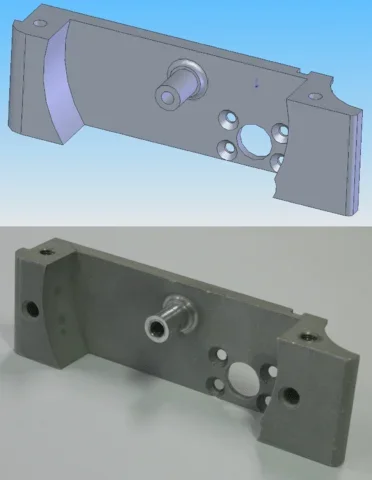 CAD model (above) and its corresponding CNC machined partCopyright 2018 Mike1024, Public Domain, Wikimedia Commons https://commons.wikimedia.org/w/index.php?curid=5270702
How does a 3D printer work?
3D printers use coordinate points from a CAD model, convert those coordinate points into a computer program using G-code, and, using that data, move the tool head in the specified pattern that creates the solid object.
What type of materials can be 3D printed?
Large-scale and mass-market 3D printers can currently print using various types of plastics and metals. However, engineers are experimenting with other materials such as concrete and even organic material!
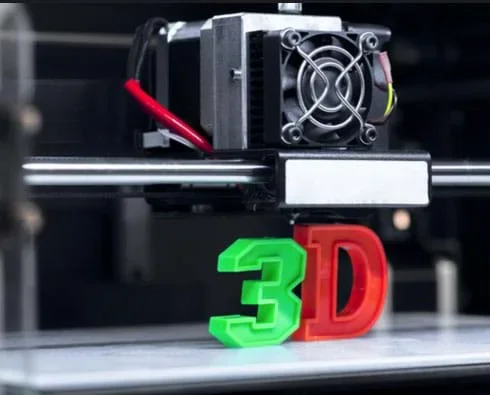 3D printers can help engineers design and build prototypes for their projects.Copyright 2018 FabrikaSimf, CC-BY-SA-2.0, Shutterstock https://www.shutterstock.com/image-photo/white-3d-printing-piece-560236789
What are some advantages and disadvantages with printing in plastic or metal?
A few advantages that come with printing with plastic filament is that the process is less expensive and an engineer can print an object in a short amount of time. The advantages of printing with metal are the object will be stronger and the design may include complex geometry that can be hard to create with traditional machining processes
Disadvantages of plastic include the potential for warping and deformation of an object. Metal can be more expensive and both materials experience issues with tolerancing—shrinkage of material can be hard to predict.
Are there any limitations on what can be made with a 3D printer?
Some printing processes have build plate constrictions. That is, objects printed in plastic of a certain dimension may not fit on the plate where they are being built. Materials may also have limiting factors based upon their molecular makeup.
Can 3D printers produce objects with rounded edges or arcs?
Unfortunately, CAD modeled parts and 3D printed parts cannot create fully rounded edges rounds or arcs because, by definition, they contain an infinite number of points. Software engineers have explored this issue by turning the rounded edges and arcs on a CAD model into a polygonal. Because the polygon contains points are so close together, the model gives the illusion of roundness. See the Reference: CAD Model to G-Code Overview (PDF).
Open and present the Additive Manufacturing PowerPoint Presentation (PPTX). Discuss the various types of 3D printing and highlight G-code programming. The presentation also gives examples of various types of 3D printing processes currently used in the manufacturing industry with examples of advantages and disadvantages for each.
Load a basic program such as the Reference: CAD Model to G-Code Full Code (TXT) Notepad (.txt) into the NC Viewer software > press play and run the simulation. Lead a discussion with students about what they see/think is happening? Answers may include:
The lines represent the tracing of the tool path when the code is running.
Outline of an object is being created as the tool moves.
Tool moves in such a way that it does not retrace its steps.
Color of lines means the tool is moving differently (such as the tool speed).
Optional: Show videos on various types of 3D printers, types of 3D printed parts, or CNC machining and highlight the movement of the tool head around the build area or part. Showing successful and failed print jobs helps students visualize the potential limitations that exist with current 3D printing technology. (YouTube: The Ultimate Beginner’s Guide to 3D Printing, CNC Vertical Mill Video, 3D Printing Video)
Background
Familiarize yourself with the NC Viewer software (See: https://ncviewer.com) and G-code. See the Tutorial: G-Code Basics (PDF) for more details. Show students how to take coordinate points from an object and write the G-code program that a machine will be able to read and replicate. Note the models and programs are only the wireframe version of the model. The activity is setup this way because the sheer length of the code; if we were to program it for a 3D printer, it would be thousands of lines long. The process is to declare an origin of the part then write down the x, y, and z coordinates for each corner of the part, then translate that into a G-code program.
Before the Activity
Present the Additive Manufacturing PowerPoint (PPTX) and highlight the various types of additive manufacturing processes and user considerations.
With the Students
If possible, load all content onto a class website (such as Google Classroom) for students to refer to as they go through the activity. This will make it easier to go between documents during the presentation and helps facilitate answering student questions. You may also make copies of the references and assignments as needed.
Day 1:
- Using the Reference: CAD Model to G Code Overview (PDF), discuss converting a solid model to a stereolithography file. Identify the chord height (point spacing) of the object. Note that an object that appears to have rounded edges does not actually have rounded edges, but instead has multiple polygonals. This is due to the movement of the tooling in additive manufacturing, which cannot create perfect rounds or arcs because, by definition, they make up an infinite number of points. Instead, 3D printers create objects with polygons that contains points that are so close together it gives the illusion of roundness.
- Open Reference: CAD Model to G Code Full Code (TXT) Notepad (.txt) to show students the length of a program that is needed to print a basic object. Let students know they will not be writing a program of this length, but instead they will be creating a wireframe.
- Walk through the Tutorial: G Code Basics (PDF) on writing a program. Use the Reference: Basic G Codes (PDF) document to provide definitions to the various codes:
- Overview of software
- Line code numbers
- Comments
- G-code basics (Use Reference: Basic G Codes (PDF))
- Compiling and running the simulation
Day 2:
As a class:
- Follow the G Code Basics Tutorial (PDF) that will have them program G-code into the compiler and simulate a tool path that outlines an object.
In groups:
- Assign the following program: Solid Model Parts to G Code Assignment (PDF).
- Walk around the room and assist the students as needed. Provide hints to the order of the code. There are multiple ways to create the wireframe model. Discuss how challenging it can be to write this type of code from scratch, which is why we use slicing software to create the G-code program for us. Students can find answers to their assignments in the following Notepad (.txt) files: Part 1 L-Block (TXT), Part 2 U-Block (TXT), Part 3 Bracket (TXT), and Part 4 Tool Rest (TXT).
- additive manufacturing
- A variety of processes in which material is joined or solidified under computer control to create a three-dimensional object, with material added layer by layer; commonly known as 3D printing.
- build plate
- The surface on which a 3D printed object is built.
- build volume
- Total space on which the machine can print the product; volume is determined by several factors, including the size of the build plate.
- computer aided design (cad)
- Software used to create 2D and 3D models of objects to scale.
- computer numerical control (cnc) machine
- Machines that uses coding language to control the machine operation and tooling movement.
- computer program compiler
- Software used to convert programming code into machine code for a microprocessor to read.
- g-code
- Machine code used to control machine operations; the code takes coordinate data points and instructs a machine to move a tool around from point-to-point.
- orthographic drawing
- Type of drawing that represents a three-dimensional object using two-dimensional reference planes.
- sinter
- Process of compacting and forming a solid mass of material by heat or pressure without melting it to the point of liquefaction.
- slicing software
- Type of software used in 3D printers that takes a stereolithography file and creates a coded program that the 3D printer can read.
- stereolithography file
- Type of file used to convert a solid model from CAD software in to coordinate data points. Known as a .stl file.
- subtractive manufacturing
- A variety of processes in which raw material is cut, shaped, or formed to create a finished shape.
- wireframe
- Type of CAD model that just shows the edges (boundaries) of an object.
Pre-Activity Assessment
Discussion: Lead students in a discussion about 3D printing and present the following questions:
- Has anybody used a 3D printer before? If so, what did you print?
- Has anyone used a 3D printed object before? If so, what was it and how did you use it?
- What are some things that we use today that are made with a 3D printer?
- Why do you think 3D printing continues to gain in popularity?
Review: Basics of x, y and z coordinate points.
Activity Embedded Assessment
Observation: Observe students during the program creation and offer assistance with the NC Viewer program. Ensure that all students are on-task and if working in teams each group member is participating. Students should run their final coding by the teacher for feedback.
Post-Activity Assessment
Assignment(s): Once students complete the tutorial, have them begin to write G-code programs in the Solid Model Parts to G-Code Assignment (PDF).
Recommend students to do the following:
- Identify and write down all of the coordinate points they will need to use.
- Organize coordinate points in the order in which they would like the object to be drawn. The key is to try and not have the drawing tool retrace over an existing edge.
Design CAD models and then convert the models to a stereolithography file. Import the stereolithography file for export to a 3D printer.
Use designs for 3D printed objects that are premade from maker sites (such as www.thingiverse.com). Try to setup a print job using the printer’s specific slicing software to create the program.
- For lower grades, provide students with each coordinate point on the wireframe model.
- For higher grades, provide students with dimensions either on a pictorial (3D part) or provide dimensions on an orthographic (2D) drawing for the front, top and and right-side views ). Using spatial visualization, have students convert the 2D drawing into a 3D part then create G-code for the part.
Arcam EBM system. “Ti6Al4V Titanium Alloy.” Arcam.com. Accessed May 3, 2019. http://www.arcam.com/wp-content/uploads/Arcam-Ti6Al4V-Titanium-Alloy.pdf
Dpi Metalworking. “Minimal Quantity Lubrication (MQL).” Accessed May 3, 2019. https://www.dpi-metalworking.de/en/products/metalworking/minimal-quantity-lubrication-mql/276-mimesch-spray-nozzle
GE Additive. “Electron Beam Melting (EBM).” Accessed May 3, 2019. https://www.ge.com/additive/additive-manufacturing/information/electron-beam-melting-technology
Gong, Haijun; Rafi, Khalid; Starr, Thomas; Stucker, Brent. The Effects of Processing Parameters on Defect Regularity in Ti-6Al-4V Parts Fabricated By Selective Laser Melting and Electron Beam Melting. University of Louisville. Louisville, KY. 2013. Accessed May 3, 2019. https://sffsymposium.engr.utexas.edu/Manuscripts/2013/2013-33-Gong.pdf
Gong, Haijun; Gu, Hengfeng; Zeng, Kai; Dilip, J.J.S; Pal, Deepankar; Stucker, Brent; Christiansen, Daniel; Beuth, Jack; Lewandowski, John. Melt Pool Characterization for Selective Laser Melting of Ti-6Al-4V Pre-alloyed Powder. University of Louisville, Louisville, KY. 2014. Accessed May 3, 2019. http://sffsymposium.engr.utexas.edu/sites/default/files/2014-022-Gong.pdf
Contributors
Matthew Jourden
Supporting Program
RET Program, College of Engineering, Michigan State University
Acknowledgements
This material is based upon work supported by the National Science Foundation under grant no. CNS 1300794—a Research Experience for Teachers program titled “Robotics Engineering for Better Life and Sustainable Future” at Michigan State University. Any opinions, findings, and conclusions or recommendations expressed in this material are those of the author and do not necessarily reflect the views of the National Science Foundation.
Copyright
2019 by Regents of the University of Colorado; original © 2016 Michigan State University