
Physical Computing Using Arduinos: Making LEDs Blink and Fade
Students download the software needed to create Arduino programs and make sure their Arduino microcontrollers work correctly. Then, they connect an LED to the Arduino and type up and upload programs to the Arduino board to 1) make the LED blink on and off and 2) make the LED fade (brighten and then dim). Throughout, students reflect on what they've accomplished by answering questions and modifying the original programs and circuits in order to achieve new outcomes. A design challenge gives students a chance to demonstrate their understanding of actuators and Arduinos; they design a functioning system using an Arduino, at least three actuators and either a buzzer or toy motor. For their designs, students sketch, create and turn in a user's manual for the system (text description, commented program, detailed hardware diagram). Numerous worksheets and handouts are provided.
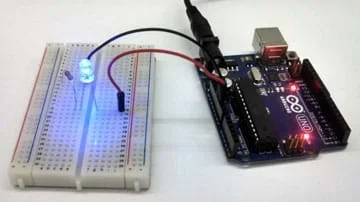 Using an Arduino microcontroller to control an LED.Copyright 2015 Michael Zitolo, School of Engineering, NYU Polytechnic
In order to design and create new interactive devices, engineers must have a basic understanding of circuits, microcontrollers, computer programming and actuators. Many electronic devices that we interact with daily, such as cell phones, cameras, digital thermometers and blenders, possess microcontrollers that control the devices' functions. Actuators, including LEDs, speakers and motors, are essential components of robotic system. These components are incorporated into circuits that can be controlled using microcontrollers. Like computer and electrical engineers, students are challenged in the final assessment to design their own programs to perform certain tasks using Arduinos and circuits they have built.
After this activity, students should be able to:
- Construct viable circuits using Arduinos and simple actuators.
- Develop programs for the Arduino using the functions pinMode(), digitalWrite(), analogWrite(), and delay() to control actuators through digital pins.
- Students will develop an understanding of the role of troubleshooting, research and development, invention and innovation, and experimentation in problem solving.
Grades K-12
Do you agree with this alignment?
- HS-ETS1-2 Design a solution to a complex real-world problem by breaking it down into smaller, more manageable problems that can be solved through engineering.
Grades 9-12
Do you agree with this alignment?
- HS-ETS1-2 Design a solution to a complex real-world problem by breaking it down into smaller, more manageable problems that can be solved through engineering.
Grades 9-12
This resource focuses on the following Three Dimensional Learning aspects of NGSS:
Science & Engineering Practices- Design a solution to a complex real-world problem, based on scientific knowledge, student-generated sources of evidence, prioritized criteria, and tradeoff considerations.Do you agree with this alignment?
Disciplinary Core Ideas- Criteria may need to be broken down into simpler ones that can be approached systematically, and decisions about the priority of certain criteria over others (trade-offs) may be needed.Do you agree with this alignment?
Do you agree with this alignment? - Design a solution to a complex real-world problem, based on scientific knowledge, student-generated sources of evidence, prioritized criteria, and tradeoff considerations.
Each student pair needs:
- 2 computers or laptops, ready to receive a download of the free Arduino IDE software
- 1 Arduino, such as an assembled Arduino Uno R3 for $25
- 1 USB cable
- 12 or more wires/jumper wires
- 2 or more alligator leads/wires
- 1 breadboard, such as a half-size breadboard for $5
- 5 LEDs
- 2 or more 220-ohm resistors
- 1 piezo speaker or buzzer, such as a piezo buzzer (PS1240) for $1.50
- 1 DC motor with a less than 9V rating, such as a "130 size" DC toy/hobby motor with two soldered wires for $2
- Arduino Overview Handout (PDF), one per person
- Activity 1: Getting Started Handout (PDF), one per person
- Activity 2: Making an LED Blink Worksheet (PDF), one per person
- Activity 3: Making an LED Fade Worksheet (PDF), one per person
- Arduino Design Challenge #1 Overview Handout (PDF), one per person
- Homework Handout (PDF), one per person
- Example Student Progress Tracking System Handout (PDF) (optional, for teacher)
- Common Functions for Arduinos Reference Sheet (PDF), as needed
- Activity 4: Using a Photo-Resistor Handout (PDF), one per person (optional, extension)
To share with the entire class:
- capability to project an image of the Arduino on the classroom board (such as the Arduino Overview Handout (PDF))
- (optional) access to the Internet for research and email, plus Word® or Google documents
- Arduino Overview Handout (pdf)
- Arduino Overview Handout (docx)
- Activity 1: Getting Started Handout (pdf)
- Activity 1: Getting Started Handout (docx)
- Activity 2: Making an LED Blink Worksheet (pdf)
- Activity 2: Making an LED Blink Worksheet (docx)
- Activity 2: Making an LED Blink Worksheet Answer Key (pdf)
- Activity 2: Making an LED Blink Worksheet Answer Key (docx)
- Activity 3: Making an LED Fade Worksheet (pdf)
- Activity 3: Making an LED Fade Worksheet (docx)
- Activity 3: Making an LED Fade Worksheet Answer Key (pdf)
- Activity 3: Making an LED Fade Worksheet Answer Key (docx)
- Arduino Design Challenge #1 Overview Handout (pdf)
- Arduino Design Challenge #1 Overview Handout (docx)
- Homework Handout (pdf)
- Homework Handout (docx)
- Homework Handout Answer Key (pdf)
- Homework Handout Answer Key (docx)
- Example Student Progress Tracking System (pdf)
- Example Student Progress Tracking System (docx)
- Common Functions for Arduinos Reference Sheet (pdf)
- Common Functions for Arduinos Reference Sheet (docx)
- Activity 4: Using a Photoresistor Handout (pdf)
- Activity 4: Using a Photoresistor Handout (docx)
Students should be familiar with circuits and the basics of programming, including:
- Voltage, current, resistance, series and parallel circuits;
- Wires, batteries, resistors and breadboards;
- Light bulbs, LEDs and piezo buzzers; and
- Variables and mathematical operations, control structures (if/else statements, for loops, and while loops), functions and simple serial communication.
(optional: If you have a cell phone, or if students have cell phones handy, bring them out to look at during this discussion.)
You've all used cell phones, right? If you want to call someone, what do you do? You press on the "phone" icon and then scroll through your list of contacts, and then select the person you want to call. Simple enough. But how does the phone make this happen? Think about it—what is inside this device that tells it what colors to display? How does it figure out where your finger is pushing?
Well, inside is a tiny computer called a microcontroller. That little device controls the sensors, lights and other electronic components in your phone, which all work together to make an impressive, powerful interactive system.
What if you wanted to create your own phone or some other electronic device? What would you need to learn or figure out? (Possible answers: Identify necessary electrical elements that you could use, learn how to connect these elements to a microcontroller in a viable circuit and program the microcontroller.) Great! But before we can tackle something as advanced as a cell phone, let's start by building some very simple systems—such as a system made of one microcontroller and one LED.
How do we program a microcontroller to make an LED do different things? Well, that's what we're going to figure out today!
Necessary Prior Knowledge
Before starting this activity, students should have a conceptual understanding of current, voltage and resistance, and be able to identify and create series and parallel circuits. An excellent refresher resource can be found at the Physics Classroom. Students must also be capable of simple programming, ideally in C or C++ (the basis for the Arduino programming language). Specifically, students must understand what variables are, how to declare them, and how to perform mathematical operations with them, as well as use control structures like if/else statements, for loops and while loops. Cplusplus has a tutorial for brushing up on these concepts (see the bullets under "Basics of C++" and "Program structure").
Timing Note
While four 60-minute periods work well to conduct the described activities, some activities may span across multiple periods. Throughout the Procedure section, suggested time allotments are provided.
Background
Through these series of activities, students engage in physical computing, which is the process of using electronic components to design devices that interact with humans and the world around them. To do this, students learn how to use simple actuators.
Think of actuators as the inverse of sensors: they are devices that convert electrical signals into "physical actions" in order to affect their surroundings. LEDs and piezo speakers are small and inexpensive actuators that are easy for beginners to work with. An LED (light-emitting diode) is a device that releases light when current runs through it. Similarly, a piezo speaker ("buzzer") is a device that produces sound waves when current flows through it. Small DC motors are also great actuators for beginners, but be sure to use motors with small voltage ratings.
If you want to use a computer to control LEDs, you'll quickly realize that they have no way to be directly connected to the computer. This is where the Arduino comes in. An Arduino is a microcontroller that is conveniently designed to enable physical computing. It is compatible with many different sensors and actuators, easily programmable using a language similar to C/C++, and is inexpensive (less than $30).
The Arduino Uno board can be powered using an external power source (such as a 9V power adaptor or 9V battery) or directly by a computer using a USB cable. The many pins on the board are used for different purposes. GND pins are used for "ground" (0V). If a device needs a constant voltage supply, use 3.3V or 5V pins. In order to collect information from sensors (input) or emit electronic signals to control actuators (output), the board has digital and analog I/O pins. Digital pins can be used for input or output, but only have two states: HIGH (5V) or LOW (0V). In order to simulate voltages between 0V and 5V, the Arduino uses pulse-width modulation (PWM)—the process of essentially fluctuating the state of a digital pin between LOW and HIGH at a fast, specific rate. In these hands-on activities, students connect actuators to digital pins. Avoid letting students use digital pins 0 and 1, as they can interfere with serial communication.
Programming the Arduino is relatively easy, even for people with little to no programming experience. Downloading the Arduino IDE—software that provides a space and resources to create programs (or what they call "sketches") for the Arduino—is free and very easy to use. Every program must contain two functions: setup() and loop(). Whatever is put into the setup() function is executed once by the Arduino; conversely, whatever is written under the loop() function is repeated over and over by the Arduino until it loses power. However, the program is not lost. Once power is restored, the Arduino restarts and executes the program again. For this activity, students must be familiar with four particular functions:
- pinMode(): function used to declare the state of a digital pin (INPUT or OUTPUT)
- digitalWrite(): function to set the state of an (output) digital pin (HIGH or LOW)
- analogWrite(): function to oscillate the state of an (output) digital pin between HIGH and LOW at various rates to simulate voltages between 0V and 5V
- delay(): function to "pause" the Arduino (have it do nothing) in milliseconds.
For a thorough list of Arduino structures and functions, refer to the Arduino Programming Notebook.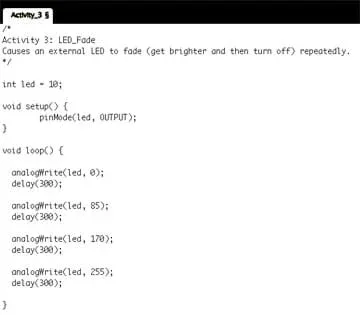 This is a sketch (program) that an Arduino can use to make an LED blink.Copyright 2015 Michael Zitolo, School of Engineering, NYU Polytechnic
Before the Activity
- Make copies of all handouts, one each per person.
- Test all of the equipment. Verify that all Arduinos and actuators work correctly.
- As a test, load the Arduino IDE software on one computer (like students will do by following instructions on the Activity 1: Getting Started Handout (PDF)), so you are aware of any issues that students may encounter, such as requiring administrator approval.
- Gather all materials and place them in bins at the front of the classroom.
- Set up the classroom board with instructions and notes, such as the pre-activity assessment questions.
- Prepare to project an image of the Arduino on the classroom board (such as the one provided on the Arduino Overview Handout (PDF)).
With the Students—Introduction (25 minutes)
- Divide the class into student pairs.
- Administer the Know Your Audience pre-activity assessment, as described in the Assessment section (15 minutes).
- Arduino overview presentation (10 minutes)
- Hand out the Arduino Overview Handout (PDF).
- Project a picture of the Arduino on the classroom board, such as the one on the student handout.
- As a class, review the handout, pointing out the different parts of the Arduino on the projected image.
Activity 1: Getting Started with the Arduino (25 minutes)
- Direct student groups to collect the following materials from the front of the room and then return to their seats (5 minutes). Per student: computer/laptop. Per pair: Arduino, USB cable, LED, breadboard, 2 jumper wires.
- Activity 1 Overview (10 minutes)
- Explain that in order to program the Arduino, students need to download the Arduino IDE, which is the software used for making programs for the Arduino microcontroller.
- Hand out the Activity 1: Getting Started Handout (PDF). Direct students to use the handout as a guide.
- Also explain that though students each work on their own laptops, they share an Arduino with their partners.
- Activity 1 Work Time (10 minutes)
- During this time, students download the Arduino IDE and test their Arduinos, following the handout instructions.
- Assist students as necessary, addressing technical issues as they arise.
- All students must successfully complete Activity 1 before moving forward.
Activity 2: Making an LED Blink (65 minutes)
- Activity 2 Overview (5 minutes)
A. Show students an Arduino correctly connected to an LED using a resistor, two jumper wires and a breadboard (see Figure 1).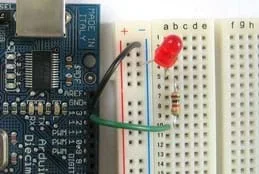 Figure 1. Setup for Activities 2 and 3.Copyright 2012 LadyAda.net Arduino, Arduino Tutorial, Lesson 3 – Breadboard and LEDs http://www.ladyada.net/learn/arduino/lesson3.html
B. Explain that they are going to create this setup (Figure 1), and must do so carefully.
- The resistor is necessary to decrease the current that flows through the LED. Without the resistor, it is possible to burn out the LED.
- The LED has two metal prongs—a long one and a short one. Connect the long one to the wire going to Pin 13. Connect the short one to the wire going to GND.
C. Explain that they will type up a sketch (program) that directs the Arduino to turn the LED on and off repeatedly (make it blink).
D. Hand out the Activity 2: Making an LED Blink Worksheet (PDF). Review the document as a class.
- Explain that, in order to get comfortable creating their own programs, students need to type them up on their own. However, since each student pair is sharing an Arduino and other hardware (breadboard, wires, LED and resistor), they must take turns testing their sketches.
- Require that all reflection questions and alternatives be completed before moving on to the next activity.
- Groups that finish Activity 2 early may move on to Activity 3, with teacher permission.
- Activity 2 Work Time (50 minutes)
- Students use this time to create the setup and type up the code provided. Then they move onto the reflection questions and alternatives.
- During this time, circle the room to track student progress. Address technical issues that may arise, but encourage students to talk with their peers before asking for teacher help.
- Remind students to talk and collaborate with their partners to achieve these tasks, though they must write up their sketches on their own.
- For students who finish early, check that they have completed the worksheet's reflection questions and alternatives, and then give them the Activity 3: Making an LED Fade Worksheet (PDF) so that they can continue working.
- Activity 2 Class Reflection (10 minutes): As a class, review the reflection questions and alternatives.
Activity 3: Making an LED Fade (55 minutes)
- Activity 3 Overview (5 minutes)
A. Explain to students that they are now going to create a new program to make the LED fade instead of blink. This requires the use of pulse-width modulation (PWM). Do not explain what this is; students will research this as part of the activity.
B. Hand out the Activity 3: Making an LED Fade Worksheet (PDF). Review the document as a class.
- Remind students that in order to get comfortable creating their own programs, they need to type them up on their own.
- Require all reflection questions and alternatives to be completed before moving on to the next activity.
- Groups that finish Activity 3 early may move on to the Arduino Design Challenge, with teacher permission.
- Activity 3 Work Time (40 minutes)
- Students use this time to create the setup (same as Activity 2) and type up the code provided. Then, they move onto the reflection questions and alternatives.
- During this time, circle the room to track student progress. Address technical issues that arise.
- Remind students to talk and collaborate with their partners to achieve these tasks, though they must write up their sketches on their own.
- For students who finish early, check that they have completed the reflection questions and alternatives, and then give them the Arduino Design Challenge #1 Overview Handout (PDF) to read or give them a clean-up task.
- Activity 3 Class Reflection (10 minutes): As a class, review the reflection questions and alternatives.
Final Assessment: Arduino Design Challenge (70 minutes)
- Design Challenge: Introduction (5 minutes)
- Introduce the term actuators. Explain that an LED is an example of an actuator. Then introduce two new actuators: piezo speaker (buzzer) and DC motor. These are integrated into circuits in the same way as LEDs, but they just require alligator clips to connect them to the jumper wires.
- Hand out the Arduino Design Challenge #1 Overview Handout (PDF) and review it as a class. Make sure the challenge requirements are clear and emphasize that, for homework, they will need to be able to explain both the software (program) and hardware (setup) of their designs.
- Design Challenge Work Time (45 minutes)
- Students first plan and sketch out their ideas. Once they obtain teacher approval, they get additional materials.
- Students work in teams. For this challenge, it works well if one student codes while the other builds, and then they check each another.
- During this time, walk around to track progress and address technical issues. Note: When possible, avoid giving students the answer right away, especially if they have resources that provide the information. Encourage students to look back at reflections, alternatives, diagrams and prior code, as well as talk with other students about issues they encounter. Push them to use resources other than the teacher.
- Design Presentations (10 minutes)
- Ask students to stand at tables or desks by their designs and be ready to show and explain to their peers how they work.
- While one student stays with the setup to show it to their peers, the other partner visits other tables to see what other groups designed.
- After 5 minutes, ask students to switch roles so all students have the opportunity to see other projects and explain their work.
- During this time, walk around and make note of which students completed the challenge, using the example rubric in the challenge handout (or your own). Require unfinished projects to be completed by students on their own time.
- Clean Up & Final Assessment (10 minutes)
- Stop students and ask them to sketch the setup (hardware) from their designs. Tell them that this must be a detailed sketch that includes all hardware used: Arduino, breadboard, jumper wires, resistors and actuators.
- Ask students to email themselves a copy of the program for their designs; suggest they cut and paste it into a Word® or a Google document for convenience.
- THEN have students clean up.
- Remind students that the design manual/guide is due the day after tomorrow.
- actuator
- A device that affects (or does) something. Examples: LEDs, speakers and motors.
- input
- Signals or information received by a system.
- led
- Acronym for light-emitting diode. An electronic device that emits light when current flows through it. Note that, since it is a diode, current can only flow in one direction through the LED.
- microcontroller
- A small computer on a single chip.
- output
- Signals or information sent by a system.
- physical computing
- The process of designing devices to interact with the world around them.
- sensor
- A device that measures a physical quantity. Often, it is an electrical device whose resistance depends on the physical quantity it measures. Examples: photoresistors, temperature sensors and keyboards.
- serial communication
- A process for communicating with a computer in which data is sent one bit at a time.
Pre-Activity Assessment
Know Your Audience: Before jumping into these activities, find out if any students are already familiar with Arduinos. One way to do this is to write a list of questions on the classroom board, such as:
- What is an Arduino? (If you've never heard of that word before, that's okay!)
- What is a microcontroller?
- What do sensors and actuators do? List as many of each as you can name.
- On a scale from 1 to 5, with 1 representing "no understanding" and 5 representing "complete understanding," rate the following: programming an Arduino, connecting hardware to an Arduino.
Then lead a short class discussion, asking students to share what they think they know about these items. For the last question, have students hold up the number of fingers that corresponds to their answers (a quick visual poll). If some students believe they already know how to use Arduinos, consider asking them to skip the first part of each activity and move directly onto the alternatives. If they can do the alternatives without assistance, they are ready to move onto the extension activity. If students have access to fancier electronic devices (such as LCDs or servo-motors), consider letting them use those to design unique robotic devices with specific purposes.
Activity Embedded Assessment
Tracking Student Progress: During each activity when students are working in pairs (guided by the handouts and worksheets), observe and make note of individual student progress on each task. At the end of each activity, gauge students' depth of comprehension as they discuss and then submit their responses to the reflection questions and alternatives. It is helpful to have a clipboard with a tracking structure in order to document this progress; see the Example Student Progress Tracking System (PDF). If some students require more time to complete the alternatives tasks, follow up with them to remind them to come back during lunch or after school to finish them. If they do not, they will experience more difficulty during later activities.
Post-Activity Assessment
Performance-Based Assessment: Design Your-Own System! To demonstrate their understanding of actuators and Arduinos, students design new systems, as guided by the Arduino Design Challenge #1 Overview Handout (PDF). Provide students with two new components: piezo speaker (buzzer) and DC motor. Though students have not worked with these devices before, they function similarly to LEDs—they have two pins: one that connects to HIGH and the other to LOW. Working in pairs, students must use at least three actuators in their designs, with at least one of them being the buzzer or DC motor. Groups present their functioning systems to their peers and the teacher, explaining what they do and how they work. To complete the project, students submit detailed diagrams of their hardware systems and a thoroughly commented copy of the program. Review their completed "manual" of deliverables to gauge their depth of comprehension.
Homework (optional)
Reflections: At the end of the activities, assign students to complete the Homework Handout (PDF) to write in their notebooks about what they have learned in response to three questions. This requires them to describe the four Arduino functions used (what they do and how they work; see full descriptions in the Common Functions for Arduinos Reference Sheet (PDF)) as well as make connections between what they did during the activity and real-world electronic systems they interact with every day.
Arduinos can be short-circuited. To avoid this, have students double-check their hardware before connecting Arduinos to computers. If an Arduino is being short-circuited, do not touch it; simply unplug the USB cable from the computer and leave the Arduino alone for a few minutes (it may be hot).
For more advanced students who complete the activities quickly and with ease, exploring sensors is a logical next step. Sensors are devices that detect some aspect of the environment around them. Often, they are variable resistors—components whose resistance depends on a physical property. For example, a photoresistor is a sensor that detects light. When the amount of light shown on a photoresistor is increased, the resistance of this element decreases. This change can be detected using an analog pin on the Arduino board. Provide students with a sensor (such as a photoresistor or force-sensitive resistor) and ask them to use the Arduino to collect measurements from the sensor. Activity 4: Using a Photoresistor Handout (PDF) is an example of such an activity.
Jeremy Blum's Arduino Tutorials: https://www.youtube.com/user/sciguy14/videos
Ladyada Arduino Tutorial: http://www.ladyada.net/learn/arduino/index.html
John Boxall's 10 Simple-But-Fun Arduino Projects by Popular Mechanics: http://www.popularmechanics.com/technology/how-to/a3099/10-simple-but-fun-projects-to-make-with-arduino-15603196/
Quarkstream Arduino Blog: https://quarkstream.wordpress.com/
Mr. Z's Programming Page: http://sofphysics.wikispaces.com/Programming+Page
Banzi, Massimo. Getting Started with Arduino. Beijing, China: O'Reilly Media, 2011.
Crowder, Richard M. Automation and Robotics: Tactile Sensing. January 1998. University of Southampton, UK. Accessed August 5, 2014. http://www.southampton.ac.uk/~rmc1/robotics/artactile.htm
Hirzel, Timothy. Pulse-Width Modulation. Arduino. Accessed August 5, 2014. http://arduino.cc/en/Tutorial/PWM
Input/output. Last updated August 6, 2014. Wikipedia, The Free Encyclopedia. Accessed August 7, 2014. http://en.wikipedia.org/wiki/Input/output
Ladyada. Force Sensitive Resistor. Last updated July 30, 2013. AdaFruit Learning Systems. Accessed August 5, 2014. https://learn.adafruit.com/force-sensitive-resistor-fsr/overview
Microcontroller UART Tutorial. 2014. Society of Robots. Accessed August 5, 2014. http://www.societyofrobots.com/microcontroller_uart.shtml
Mrmak, Nebojsa, van Oorschot, Paul, and Pustjens, Jan-Willem. Your Guide to the World of Resistors. 2014. ResistorGuide.com. Accessed August 5, 2014. http://www.resistorguide.com/
Contributors
Michael Zitolo; Lisa Ali
Supporting Program
SMARTER RET Program, Polytechnic Institute of New York University
Acknowledgements
This activity was developed by the Science and Mechatronics Aided Research for Teachers with an Entrepreneurial ExpeRience (SMARTER): A Research Experience for Teachers (RET) Program in the School of Engineering funded by National Science Foundation RET grant no. 1132482. However, these contents do not necessarily represent the policies of the NSF, and you should not assume endorsement by the federal government.
Copyright
2015 by Regents of the University of Colorado; original © 2014 Polytechnic Institute of New York University