
Testing Software Programs with JUnit
 In this activity, students experience the test-driven development approach to software testing, a sub component of the software/systems design process.Copyright National Institute on Drug Abuse http://teens.drugabuse.gov/sites/default/files/NDFW-SBB-in-Schools.jpg
JUnit is a testing method that is included with NetBeans (Java) installs or can be downloaded from the web and included in the Java build. In this activity, students design tests for a provided Java class before the class methods are constructed using a process called test-driven development. To create a design, the software/system design process, which is a specific case of the engineering design process, is followed. After students create a design, it is implemented and tested and if necessary, the design undergoes editing to make sure it functions by testing the Java class correctly. To conclude the activity, students write the methods in the Java class using their tests to debug the program.
This activity is a problem-based learning experience that is designed to give students practice with the design process. Testing computer software (in this case Java classes) is a critical step in the design process that is often overlooked by students. If software engineers do not properly test their software they may produce a poor product with unhappy users at best, or a program that does not function at worst. Both of these situations are unacceptable. Testing is critical to good software development. This activity specifically focuses on this testing. The testing of computer software is actually a mini design cycle inside of the larger design cycle. To properly test, students must analyze, implement, test and edit their products to ensure that they function correctly.
After this activity, students should be able to:
- Discuss the requirements for the code to be written.
- Create JUnit tests that check the requirements.
- Write code that implements the requirements.
- Run JUnit tests and verify that the code passes the tests.
- The design needs to be continually checked and critiqued, and the ideas of the design must be redefined and improved.
Grades 9-12
Do you agree with this alignment? - STEL-1R Develop a plan that incorporates knowledge from science, mathematics, and other disciplines to design or improve a technological product or system.
Grades 9-12
Do you agree with this alignment? - STEL-7AA Illustrate principles, elements, and factors of design.
Grades 9-12
Do you agree with this alignment? - STEL-7W Determine the best approach by evaluating the purpose of the design.
Grades 9-12
Do you agree with this alignment?
- judge the reasonableness of numerical computations and their results
Grades 9-12
Do you agree with this alignment? - know the characteristics of well-designed studies, including the role of randomization in surveys and experiments
Grades 9-12
Do you agree with this alignment?
- 12.1.1.a Formulate a testable hypothesis supported by prior knowledge to guide an investigation
Grades 9-12
Do you agree with this alignment? - 12.1.1.e Use tools and technology to make detailed qualitative and quantitative observations
Grades 9-12
Do you agree with this alignment? - 12.1.3.e Communicate the problem, process, and solution
Grades 9-12
Do you agree with this alignment?
Each group needs:
- computer with internet access
- Java programming environment: install a program like NetBeans (https://netbeans.org/) or other available downloads such as: http://introcs.cs.princeton.edu/java/mac/ (for Mac OS X) or http://textpad.com/ (for Windows)
- JUnit testing tool; all code samples in this activity use version 4 of JUnit, though the code can be adapted to JUnit 3 fairly easily if desired; additional JUnit resources may be found at the websites listed in the Procedure > Before the Activity section
- BowlingGame Java Class (PDF) (students need access to the doc file)
- Test Case Organizational Chart (PDF)
- Testing with JUnit: Performance Assessment (PDF) and Counter Java Class (PDF), one each per student (students need access to the latter doc file as well)
- BowlingGame Java Class (doc)
- BowlingGame Java Class (pdf)
- Test Case Organizational Chart (docx)
- Test Case Organizational Chart (pdf)
- Counter Java Class (doc)
- Counter Java Class (pdf)
- Testing with JUnit: Performance Assessment (docx)
- Testing with JUnit: Performance Assessment (pdf)
- Testing with JUnit: Performance Assessment Answers (docx)
- Testing with JUnit: Performance Assessment Answers (pdf)
Students should have a working knowledge of Java. This lesson/activity set is intended to supplement a programming class to help students understand the importance of the testing phase in the design process, and teach them how to design tests to properly test Java classes. The teacher should have a working knowledge of Java and JUnit testing. In addition, have students complete the associated lesson prior to this activity.
Today's activity will provide you with experience in the implementation of the software/systems design process. This process is cyclical and provides a series of steps that you must work through to create a product that fits predefined criteria and functions correctly. The steps are: requirement analysis, design, implementation, testing, and evolution. The activity is an implementation of this process.
You will be given a Java class, called BowlingGame, with some instructions, and you will create JUnit tests for the class. This activity is also an experience in test-driven development, in which you create your test cases for the Java class before the class has actually been written. By writing tests first, a programmer can focus on what the code should do. By considering expected results in advance, most programmers write better code with fewer errors. After your tests are written, you will fill in the methods in the BowlingGame class and run your tests to help refine the code you are writing.
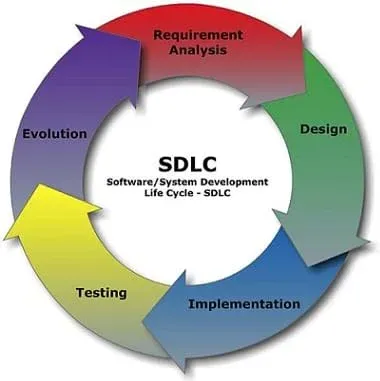 The steps of the software development cycle.Copyright 2012 Cliffydcw, Wikimedia Commons http://commons.wikimedia.org/wiki/File:SDLC_-_Software_Development_Life_Cycle.jpg
Background
Test-driven development in software design is a method that is foreign and/or uncomfortable for many programmers. It designs the tests first, and then the code is written. The goal is to have programmers focus on what the code should do before designing the code. Essentially, it is a design process starting with the testing phase to help analyze the problem. The creation of test cases is a design process in itself. This activity provides students with experience in design and test-driven development through the vehicle of JUnit.
Before the Activity
- Make hard (paper) copies of the Test Case Organizational Chart (PDF) and Testing with JUnit: Performance Assessment (PDF).
- Prepare computers and software for student use, including downloading the MS Word versions of BowlingGame Java Class (PDF) and Counter Java Class (PDF) on each computer so digital versions of those doc files are available for students to use during the activity. The previous sentence provides easily viewable PDF versions of the files; the MS Word (doc) versions are available in the Attachments section.
- Be sure that JUnit has been installed as part of your Java installation. This is likely the case if you taught the associated lesson, Using JUnit to Design Software Testing Programs, prior to this activity (which is highly recommended).
- Refer to the following resources for installation and resource documents:
JUnit home: http://junit.org/
JUnit documentation: https://github.com/junit-team/junit/wiki
JUnit Downloads (current version is 4.11): https://github.com/junit-team/junit/wiki/Download-and-Install
Writing JUnit tests in NetBeans: https://netbeans.org/kb/docs/java/junit-intro.html
Using JUnit with Eclipse: http://onjava.com/pub/a/onjava/2004/02/04/juie.html
With the Students
- Divide the class into small groups of two or three students each, unless you chose to have students work individually.
- Tell students that during the activity they will practice creating code in a test-driven style, which means that they will write tests for the code first and then writing the corresponding code.
- Show students the description of the BowlingGame class, included in BowlingGame Java Class.
- Once students have a chance to examine the class requirements, have them discuss what tests are required to ensure that the class does what it is supposed to do.
- As students plan tests to write, have them complete the first two columns of the chart. (Expand the table with more rows as needed.) Table 1 shows the columns and the first few rows of this chart, as well as example data to get students started.
 Table 1. Example data in the test case organizational chart used in this activity.Copyright 2012 Ryan Stejskal, University of Nebraska Omaha
 - Once students have planned their test cases, have them implement them.
- As students create each test, direct them to fill in the organizational chart with the names of the JUnit test functions they write. An example test function is provided in the first row of the chart.
- Then have students run the JUnit testing tool for their test cases. Remind them that all their test cases are expected to fail at this point since the corresponding code is not written yet—this is normal! Every new test case should fail when it is first created.
- After students write their test cases, direct them to fill in the methods of the BowlingGame class.
- As students write code for the class, ask them to run the tests frequently. Expect them to find that as they progress, their JUnit tests begin to pass. (As students work, remind them that if they expected a test case to pass, but it does not, then they should check both the tested code and the test case itself for errors.
- When students finish the BowlingGame class, have them exchange their classes with each other, and verify that their classes pass each other's tests.
- Conclude by administering the post-activity assessment, as described in the Assessment section.
- edge case
- A test case whose input is near a "boundary" where the program changes from one behavior to another. For example, if a game allows a character to hold four items at a time, then edge cases include collecting the fourth item (the last item that the character can hold) and collecting the fifth item (an item that would exceed the character's carrying capacity).
- error case
- A test case whose EXPECTED result is an error. For example, for a program that divides two numbers, dividing by zero is an error case. A well-written program has a plan in place to handle unexpected data in a reasonable manner; error cases test this plan.
- test case
- A specific set of input for a program or part of a program, along with the expected results of running the program with that input. Note that a test case MUST contain both the input and the output! A test can only help to verify a program's correctness if the expected output can be compared to the actual output of the test case.
- test-driven development
- The software designer creates test cases for a section of code FIRST, before writing the program itself. While to many programmers this seems "backwards," writing tests first helps programmers to focus on what the code SHOULD do. By considering expected results in advance, most programmers write better code with fewer errors.
- test suite
- A collection of test cases that is intended to fully "exercise" a section of a program. A complete test suite should include edge cases and error cases as well as a representative selection of "normal" cases.
Pre-Activity Assessment
- Question students about their knowledge of JUnit as a mechanism for testing Java classes. Example questions:
- How does Java identify a test case in a JUnit class? (Answer: Java identifies a test case in a JUnit class with the @Test annotation.)
- What functions are used to verify that things we expect to be true are actually true? (Answer: Assertion functions, such as assertEquals and assertTrue.)
- Does the fact that a program passes its tests guarantee its correctness, and does it failing its tests guarantee its incorrectness? (Answer: No in both cases. A program that fails one or more tests indicates that either the program or the test is definitely incorrect. Passing all tests provides a degree of confidence in the program, depending on the quality and thoroughness of the test set, but cannot guarantee the correctness of the program.)
- Question students about how the design process relates to creating and using tests for software.
- What are the parts of the software/systems design process? (Answer: Problem/requirement analysis, design, implementation, testing and evolution.)
- How do these relate to program testing? (Answer: Program testing is really just a mini design cycle. The programmer must analyze how to test the program. Then the tests must be designed and written. The programmer needs to test and evaluate the program and its tests to see if they performed correctly. Finally, they might be able to be used elsewhere or improved.)
- Why does the design process work well in the testing phase? (Answer: Properly testing a program is critical to developing a successful software application. It is a difficult to develop proper tests and the design process provides steps that can be followed to solve the problem of developing test cases.)
Activity Embedded Assessment
Observation Questions: As students work through the activity, ask yourself these questions to assess students' progress and comprehension:
- Are students able to identify the tests that need to be created to properly test the BowlingGame class?
- Do students understand how the design process fits into this activity?
- Were students able to properly implement the tests using JUnit?
Post-Activity Assessment
Performance: Hand out to each student the Testing with JUnit: Performance Assessment (PDF) and Counter Java Class (PDF). Evaluate students' comprehension of the subject matter through this assessment that asks them to write JUnit test cases for the Counter class, which counts objects. This performance assessment is based on the Counter class, included in Counter Java Class. (Teacher note: The MS Word document version of the Counter Java Class is available in the Attachments section, while the previous link provides an easily viewable PDF version of the file.) See example answers in the Testing with JUnit: Performance Assessment Answers (PDF).
- Using JUnit to Design Software Testing Programs
- Testing Software Programs with JUnit
Contributors
Ryan Stejskal; Brian Sandall
Supporting Program
IMPART RET Program, College of Information Science & Technology, University of Nebraska-Omaha
Acknowledgements
The contents of this digital library curriculum were developed as a part of the RET in Engineering and Computer Science Site on Infusing Mobile Platform Applied Research into Teaching (IMPART) Program at the University of Nebraska-Omaha under National Science Foundation RET grant number CNS 1201136. However, these contents do not necessarily represent the policies of the National Science Foundation, and you should not assume endorsement by the federal government.
Copyright
2013 by Regents of the University of Colorado; original © 2012 Board of Regents, University of Nebraska