
What is Python?
 Python is a high-level programming language that is very popular among new programmers.Copyright 2008 Python.org, GNU General Public License, Wikimedia Commons: https://commons.wikimedia.org/wiki/File:Python-logo-notext.svg
Coding is a critical tool in most modern applications and can be a useful skill for engineers to apply in a variety of design settings. In this activity, students learn basic coding in Python, a high-level language that is known for its ease of use and various applications. They learn to make sense of basic programming structures such as variables, objects, classes, and instances, and programming concepts such as if-else statements, loops, and functions. In addition, within the discussion of Python syntax, students learn about operators (such as “=”) and their use in programming versus mathematics. After a brief lecture, students complete a Jupyter Notebook activity that will guide them through (1) using a Jupyter Notebook to run pre-written Python code and (2) plotting linear and quadratic functions and editing existing plots using Python code.
Engineers of all disciplines use Python code for plotting and manipulating data, machine learning, and much more. Most programmers, both beginner and advanced, prefer using Python to other languages because of its easier syntax and mass of libraries written for a variety of applications. If an engineer wants to apply some machine learning algorithm to examine some set of data they’re analyzing, they can perform a few internet searches to find (1) the library they need to use and (2) several tutorials for how to use the tools with their data.
After this activity, students should be able to:
- Understand the basic capabilities of Python (if/else statements, loops, functions).
- Use and edit Python code to plot basic functions in a Jupyter Notebook.
- Use problem solving skills to write Python code to accomplish a simple task.
- CCSS.Math.Practice.MP5 Use appropriate tools strategically.
Grades K-12
Do you agree with this alignment?
- Students will develop an understanding of the relationships among technologies and the connections between technology and other fields of study.
Grades K-12
Do you agree with this alignment?
- SEP.12.9-12.4 Use mathematical representations of phenomena or design solutions to describe and/or support claims and/or explanations.
Grades 9-12
Do you agree with this alignment? - DCI.ETS1.B.9-12.12 Both physical models and computers can be used in various ways to aid in the engineering design process. Computers are useful for a variety of purposes, such as running simulations to test different ways of solving a problem or to see which one is most efficient or economical; and in making a persuasive presentation to a client about how a given design will meet his or her needs.
Grades 9-12
Do you agree with this alignment?
Each group needs:
- 1 laptop computer
- What is Python? Pre-Assessment (PDF)
- What is Python? Activity Sheet (PDF)
- What is Python? Post-Assessment (PDF)
- Python Notebook.ipynb (IPYNB)
For the entire class to share:
- 1 laptop computer
- projector
- What is Python? PowerPoint Presentation (pptx)
- What is Python? PowerPoint Presentation (pdf)
- What is Python? Pre-Assessment (docx)
- What is Python? Pre-Assessment (pdf)
- What is Python? Post-Assessment (docx)
- What is Python? Post-Assessment (pdf)
- What is Python? Pre-Assessment Answer Key (docx)
- What is Python? Pre-Assessment Answer Key (pdf)
- What is Python? Post-Assessment Answer Key (docx)
- What is Python? Post-Assessment Answer Key (pdf)
- Jupyter Notebook Guide (pdf)
- What is Python? Activity Sheet (docx)
- What is Python? Activity Sheet (pdf)
- What is Python? Activity Sheet Answer Key (docx)
- What is Python? Activity Sheet Answer Key (pdf)
- Python Notebook (ipynb)
 Programming is quickly becoming a valuable skill for all students, regardless of their major or interests.Copyright 2006 Gflores, Public Domain, Wikimedia Commons: https://commons.wikimedia.org/wiki/File:Computer_keyboard.png
What are some of your favorite websites, video games and apps? (Wait for students to share their answers.) Have you ever wondered how your favorite website, video game, or app works? Have you ever thought about the amount of work that went into writing the software and code for that website, game, or app? The people who write software all write it in some kind of code, or programming language. Can anyone name a coding or computer programming language? (Answers could include C, C#, C++, Fortran, R, Java, JavaScript, Matlab, Swift, PHP, and Perl.)
Today we are going to learn about a programing language called Python that can be used to code software. Who has heard of Python? Python is a computer programming language used to do lots of stuff, like build websites and software, make certain tasks automatic, and conduct data analysis.
Why do we want to learn Python? Coding is becoming an increasingly sought-after skill, particularly in engineering fields. As our world becomes more and more digital (e.g., think about our phones, cars, banks, TVs, hospitals, etc.) - nearly all parts of our lives depend on computer code. Knowing how to code or computer program is not just for programmers—many careers now want people who know how to code.
Python is known for being one of the most favorable programming languages, with new and experienced programmers commending its easy-to-understand syntax and various applications. Python is very commonly used in engineering fields, research, and even some business positions. Python is a great language for beginners and it’s free!
Today we will learn the basics of Python: how to declare variables, create and call functions, use loops, and more! You will also use a pre-written Jupyter Notebook—a newer tool that is specialized for teaching students to write, use and run Python within a web browser. You will learn how to write and interpret code for plotting simple functions like lines and parabolas. After completing this activity, you will better understand how Python code is written and be able to recognize common coding concepts, like if/else statements and loops.
Background
Python is a programming language that emphasizes code readability. Its aim is to use an object-oriented approach to help write clear, logical code for small and large-scale projects. Python is incredibly easy to use and learn for beginners because it has simplified syntax, giving more emphasis on natural language. It is also efficient, reliable, and much faster than most modern languages. Due to its ease of learning and usage, Python codes can be easily written and executed much faster than other programming languages.
Python was created more than 30 years ago, which is a lot of time for a computer language to grow and mature. This means that there are plenty of documentation, guides and video tutorials readily available to the programmer. Plus, Python users can get immediate support to answer their questions and enhance their Python programing knowledge.
Python has a comprehensive standard library which lets developers save time and effort. This library is so extensive because Python is backed by corporate sponsors: Facebook, Amazon Web Services, and Google. Google adopted Python in 2006 and has used it for many applications and platforms since then. With these big players, lots of Institutional effort and money have been devoted to the training and success of the Python language by Google. They have even created a dedicated portal only for Python!
Before the Activity
- Print out the What is Python? Pre-Assessment (PDF), What is Python? Activity Sheet (PDF) and What is Python? Post-Assessment (PDF).
- Have the Python Notebook (IPYNB) opened and ready before class.
- Review the Jupyter Notebook Guide and complete the tutorial before class.
- Make sure students have access to a Google account—they will need this to access Google Colab.
With the Students
- Have students form groups of two and ensure each group has a laptop.
- Hand out the What is Python? Pre-Assessment (PDF) to students — remind them that this assignment is NOT graded and that they are NOT expected to know the correct answers.
- Project the What is Python? PowerPoint (PPTX) onto screen and go through the PowerPoint with the class.
- Slide 2: Explain what Python is.
- Slide 3-4: Describe what variables, objects and classes are. Ask students to compare and contrast variables and objects to check for understanding.
- Slide 5: Describe the basic syntax and rules of Python. The example code shows the proper placement of a variable name in an assignment in Python
- Slide 6-7: Tell students to think of a function in Python as a function in math—it has inputs that are manipulated by the function and outputs that are results from the manipulation
- Slide 8: Describe common data types and operators. Note: Students only need to know bool, int, float, list, and str.
- Slide 9: Describe Input/Output.
- Slide 10: Describe if/else statements.
- Slide 11: Describe for loops.
- Slide 12: Describe while loops. Ask students to compare and contrast for loops and while loops.
- Hand out the What is Python? Activity Sheet (PDF) to students—they may work through the worksheet either alone or in groups of 2-3 students.
- Before sending students to work on the activity, walk them through opening the notebook in Google Colab. There are directions on the What is Python? Activity Sheet (PDF) if students need additional help.
- After students finish the What is Python? Activity Sheet (PDF), hand out the What is Python? Post-Assessment (PDF) to students and have them complete it independently.
- for loop
- A section of code in which an instruction or group of instructions is executed a specific number of times depending on the value of a loop counter.
- function
- A routine that receives zero or more arguments and may return a result.
- loop
- A programmed sequence of instructions that is repeated until or while a particular condition is satisfied.
- method
- A subroutine or function belonging to a class or object, synonym of member function.
- object
- An instantiation of a class or structure.
- object-oriented programming
- Computer programming that organizes software design around data, or objects, rather than functions and logic.
- python
- An interpreted, high-level, general-purpose programming language invented by Guido van Rossum.
- variable
- A named memory location in which a program can store intermediate results and from which it can read them.
- while loop
- A section of computer code in which an instruction or group of instructions is repeated only while a certain condition continues to be met.
Pre-Activity Assessment
Pre-Assessment: Have students complete the What is Python? Pre-Assessment (PDF)—remind them that this assessment is only to know what they currently know.
Activity Embedded (Formative) Assessment
Activity Sheet: Students complete the What is Python? Activity Sheet (PDF).
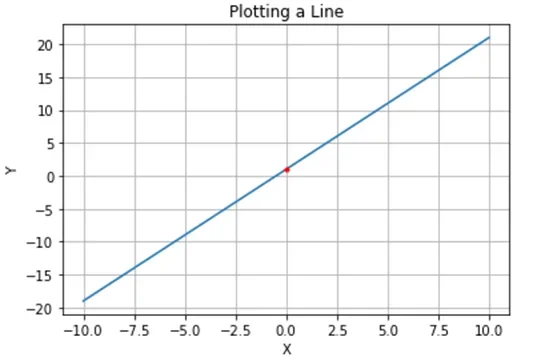 In the activity, you will create plots like the one shown here using Python code!Copyright 2020 Erin Shappell, University of Missouri RET
Post-Activity (Summative) Assessment
Post-Assessment: Have students complete the What is Python? Post-Assessment (PDF) independently.
Make sure students have access to a Google account—they will need this to access Google Colab.
After students complete the Jupyter Notebook activity, ask them to customize one of the plots (line plot, parabola plot, or line through 2 points plot). Then, either group students into groups of 3-4 or have entire class as a group take turns examining their peers’ plots and try to guess the slope, y-intercept, vertex, etc. of the plot.
Optional: Have students complete some basic Python tutorials to become more familiar with the Python code used in the Jupyter Notebook: https://www.learnpython.org/
Contributors
Erin Shappell; Dr. Satish Nair; Keegan Welch; Isabel Banks; Nathan Opsal; Adam Menker
Supporting Program
CyNeuro Lab, College of Engineering, University of Missouri
Acknowledgements
This activity was developed under National Science Foundation grant no. EEC 1801666—Research Experiences for Teachers in Neural Engineering, CyNeuro Lab at the University of Missouri. However, these contents do not necessarily represent the policies of the National Science Foundation, and you should not assume endorsement by the federal government.
Copyright
2021 by Regents of the University of Colorado; original © 2020 University of Missouri