
Flow Charting App Inventor Tutorials
Students design and create flow charts for the MIT App Inventor tutorials in this computer science activity about program analysis. In program analysis, which is based on determining the behavior of computer programs, flow charts are an important tool for tracing control flow. Control flow is a graphical representation of the logic present in a program and how the program works. Students work through tutorials, design and create flow charts about how the tutorials function, and present their findings to the class. In their final assessment, they create an additional flow chart for an advanced App Inventor tutorial. This activity prepares students with the knowledge and skills to use App Inventor in the future to design and create Android applications.
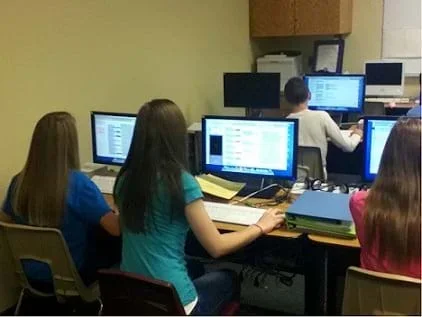 Students at work on App Inventor tutorials.Copyright 2012 Rich Powers, University of Nebraska-Omaha
Software engineers perform program analysis routinely in their work. Program analysis has many valuable applications, which include determining program correctness and program optimization. This lesson, with its focus on flow charting, relates to the program correctness aspect of program analysis. Creating flow charts to determine how and why a program behaves the way it does is one way to implement the software/system design cycle, comparable to the engineering design process. The process of creating flow charts relies on the analysis, design and testing steps in these cyclical and iterative processes.
After this activity, students should be able to:
- Design an accurate flow chart.
- Test a flow chart to determine its accuracy and correctness.
- Explain how flow charts are used as a tool to design and analyze computer programs.
- Requirements for design are made up of criteria and constraints.
Grades 6-8
Do you agree with this alignment? - STEL-7J Evaluate designs based on criteria, constraints, and standards.
Grades 3-5
Do you agree with this alignment? - STEL-7Q Apply the technology and engineering design process.
Grades 6-8
Do you agree with this alignment?
- Communicate the problem, process, and solution. Students should present their results to students, teachers, and others in a variety of ways, such as orally, in writing, and in other forms — including models, diagrams, and demonstrations.
Grades 9-12
Do you agree with this alignment?
- 12.1.3.a Propose designs and choose between alternative solutions of a problem
Grades 9-12
Do you agree with this alignment? - 12.1.3.e Communicate the problem, process, and solution
Grades 9-12
Do you agree with this alignment? - 8.1.3.b Design a solution or product
Grades 6-8
Do you agree with this alignment?
Each group needs:
- computers with App Inventor installed; information for downloading and installing App Inventor is available at http://appinventor.mit.edu/explore/learn.html.
- Google accounts for each student; accounts can be created at www.google.com
To facilitate this activity, the teacher must have a working knowledge of MIT's App Inventor software. This software allows a user to create, simulate and build Android applications that are used on Android devices. This content is very useful in a computer programming environment or a setting in which students want to push the envelope of the typical curriculum. Students are challenged to think logically and sequentially. The process that students use in analyzing different scenarios to create flow charts provides hands-on experiences with a tool that can greatly facilitate the use of the engineering design process in computer science.
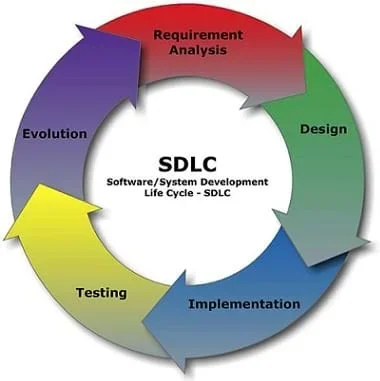 The steps of the software development cycle.Copyright 2012 Cliffydcw, Wikimedia Commons
http://commons.wikimedia.org/wiki/File:SDLC_-_Software_Development_Life_Cycle.jpg
The steps of the software development cycle.Copyright 2012 Cliffydcw, Wikimedia Commons
http://commons.wikimedia.org/wiki/File:SDLC_-_Software_Development_Life_Cycle.jpg
You will be completing tutorials for a software application called App Inventor. App Inventor is an application created by MIT that provides a graphic user interface so people can create Android apps without actually writing code.
This activity culminates with you drawing flow charts of the results of your tutorial experience. A flow chart is a tool that you will use to analyze what programs do, design new programs, and test programs that you have written.
During our activity, you will be working on the analysis step of the software/systems design process.
Background
This activity provides students with experience in the analysis, design and testing phases of the engineering design process, which is very similar to the software development cycle. As students work through a series of developed tutorials for the software application App Inventor, they analyze what the tutorials do, and they create flow charts for the results of the tutorials that they create. Students also gain experience with App Inventor, which they can use in future lessons and activities involving the design process to develop Android applications for mobile devices.
Before the Activity
- Install and set up the App Inventor software on each computer so that it is configured to run App Inventor. For instructions on how to do this, follow the tutorial on the MIT website http://appinventor.mit.edu/explore/setup-mit-app-inventor.html.The website provides a step-by-step process to install the App Inventor software.
- Work through the App Inventor tutorials to gain adequate knowledge to be able to help students with the activity as difficulties arise.
- Divide the class into groups of three students each.
With the Students
- Direct student groups to use a computer with App Inventor installed to work through the "Hello Purr" tutorial at http://appinventor.mit.edu/explore/content/hellopurr.html and three other basic tutorials at http://appinventor.mit.edu/explore/ai2/tutorials.html.
- As the groups work through each tutorial, they should analyze the program. These tutorials guide the user through creating an actual mobile app. It is an active process in which instructions must be followed as the app is created. It is important that students take notes about what they are doing so that they are able to find the tools that they may need to develop other apps in the future.
- Remind students to be careful to learn the structure and environments that they are required to interact with when programming with App Inventor.
- Direct students to observe and document the control flow of the program.
- When each tutorial is complete, have groups design and create flow charts that shows the logic present in the tutorial. Refer to the Paint Pot Flow Chart Example (PDF) as a reference.
- To conclude, have each group give a class presentation about what they learned about how the App Inventor tutorials work. The presentations must include the group's tutorial analysis in the form of flow charts. As presentations are given, students in the audience should note information that they missed, but other groups discovered.
- flow chart
- A diagram that shows a process or represents an algorithm. It shows the steps as various shapes and boxes connected with lines and arrows.
- program analysis
- The process of analyzing the behavior of computer programs.
- program correctness
- When an algorithm or program is performed, it functions correctly according to stated objectives.
- program optimization
- The process of modifying a software system to make it work more efficiently or use fewer resources.
Pre-Activity Assessment
Ask students the following questions about their experience with flow charts and how to design and create one:
- What is a flow chart? (Example answer: A flow chart is a graphical way to represent how a process works. It includes all the steps, actions and decisions that cover what could happen as different choices are made.)
- How could a flow chart be useful in the design process? (Example answer: Flow charts can be used to design solutions to problems because different paths can be easily seen. They also help in determining what actually happens in a program, which can be helpful in finding errors in the program.)
- What are the symbols used in flowcharting? (Example answer: Typically flow charts have ovals for the beginning and the end. Rectangles represent decisions, and diamonds represent choices to be made.)
Activity Embedded Assessment
While students are working through the tutorials, circulate around the room to assess student understanding of the purpose of each tutorial and how each works. While they are drawing flow charts, be available to assess progress and help with implementation.
Post-Activity Assessment
Have students complete a flow chart for one of the advanced App Inventor tutorials at https://appinventor.mit.edu/explore/ai2/tutorials. One suggestion is the Mini Golf app that solves a lot of the problems that students encounter in the follow-on lesson, Curiosity Killed the App, in which students develop apps that can control LEGO robots simulating Mars rover tasks. Mini Golf Flow Chart Example (PDF) provides an example flow chart based on the Mini Golf app.
- Program Analysis Using App Inventor
- Flow Charting App Inventor Tutorials
Contributors
Rich Powers; Brian Sandall
Supporting Program
IMPART RET Program, College of Information Science & Technology, University of Nebraska-Omaha
Acknowledgements
The contents of this digital library curriculum were developed as a part of the RET in Engineering and Computer Science Site on Infusing Mobile Platform Applied Research into Teaching (IMPART) Program at the University of Nebraska-Omaha under National Science Foundation RET grant number CNS 1201136. However, these contents do not necessarily represent the policies of the National Science Foundation, and you should not assume endorsement by the federal government.
Copyright
2013 by Regents of the University of Colorado; original © 2012 Board of Regents, University of Nebraska