
Using Waits, Loops and Switches
Legacy Curriculum
Hey there! This curriculum is no longer being curated or supported. It may contain materials that are no longer available or outdated information. Please use this document for reference.
Students are given a difficult challenge that requires they integrate what they have learned so far in the unit about wait blocks, loops and switches. They incorporate these tools into their programming of the LEGO® MINDSTORMS® robots to perform different tasks depending on input from two touch sensors. This activity helps students understand how similar logic is implemented for other every day device operations via computer programs. A PowerPoint® presentation, pre/post quizzes and worksheet are provided.
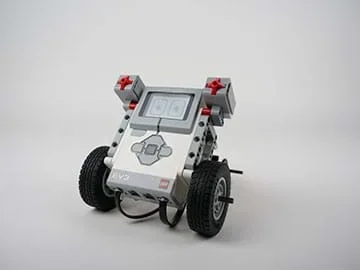 Programs involving loops, switches and wait blocks enable more efficient control of LEGO robots.
Programming tools similar to those that students build into their skill sets from this activity are incorporated into the programming that runs all sorts of devices we use every day. Many of these programs are designed to "wait" until a user does something, such as credit card readers waiting until a card is swiped. In addition, depending on what happens (new sensor input) the program behaves a certain way. For example, if the device was unable to read the card, it might display a message to try again. And once the task is completed with one card, the program "goes back" and gets ready to accept another card swipe. The card reader program is continuously in this loop and designed to respond to various sensory input.
After this activity, students should be able to:
- Explain what loops and switches are.
- Identify programming situations in which loops and switches should be utilized.
- Write programs that utilize loops and switches.
- CCSS.Math.Practice.MP1 Make sense of problems and persevere in solving them.
Grades K-12
Do you agree with this alignment?
- Students will develop an understanding of the attributes of design.
Grades K-12
Do you agree with this alignment? - Students will develop an understanding of engineering design.
Grades K-12
Do you agree with this alignment? - Students will develop abilities to apply the design process.
Grades K-12
Do you agree with this alignment? - STEL-1J Develop innovative products and systems that solve problems and extend capabilities based on individual or collective needs and wants.
Grades 6-8
Do you agree with this alignment? - STEL-7R Refine design solutions to address criteria and constraints.
Grades 6-8
Do you agree with this alignment?
- CCSS.Math.Practice.MP1 Make sense of problems and persevere in solving them.
Grades K-12
Do you agree with this alignment?
- MS-ETS1-1 Define the criteria and constraints of a design problem with sufficient precision to ensure a successful solution, taking into account relevant scientific principles and potential impacts on people and the natural environment that may limit possible solutions.
Grades 6-8
This resource focuses on the following Three Dimensional Learning aspects of NGSS:
Science & Engineering Practices- Define a design problem that can be solved through the development of an object, tool, process or system and includes multiple criteria and constraints, including scientific knowledge that may limit possible solutions.Do you agree with this alignment?
Disciplinary Core Ideas- The more precisely a design task's criteria and constraints can be defined, the more likely it is that the designed solution will be successful. Specification of constraints includes consideration of scientific principles and other relevant knowledge that is likely to limit possible solutions.Do you agree with this alignment?
Crosscutting Concepts- The uses of technologies and any limitations on their use are driven by individual or societal needs, desires, and values; by the findings of scientific research; and by differences in such factors as climate, natural resources, and economic conditions.Do you agree with this alignment?
- All human activity draws on natural resources and has both short and long-term consequences, positive as well as negative, for the health of people and the natural environment.Do you agree with this alignment?
Do you agree with this alignment? - Define a design problem that can be solved through the development of an object, tool, process or system and includes multiple criteria and constraints, including scientific knowledge that may limit possible solutions.
- MS-ETS1-4 Develop a model to generate data for iterative testing and modification of a proposed object, tool, or process such that an optimal design can be achieved.
Grades 6-8
This resource focuses on the following Three Dimensional Learning aspects of NGSS:
Science & Engineering Practices- Develop a model to generate data to test ideas about designed systems, including those representing inputs and outputs.Do you agree with this alignment?
Disciplinary Core Ideas- Models of all kinds are important for testing solutions.Do you agree with this alignment?
- The iterative process of testing the most promising solutions and modifying what is proposed on the basis of the test results leads to greater refinement and ultimately to an optimal solution.Do you agree with this alignment?
Do you agree with this alignment? - Develop a model to generate data to test ideas about designed systems, including those representing inputs and outputs.
Each group needs:
- LEGO MINDSTORMS EV3 robot, such as the EV3 Core Set (5003400) at https://education.lego.com/en-us/products/lego-mindstorms-education-ev3-core-set/5003400#lego-mindstorms-education-ev3; follow the bevel bot building instructions on the manual; the sensors are included in the core set
- LEGO MINDSTORMS EV3 Software version 1.3.1, available for free at https://www.lego.com/en-us/mindstorms/downloads/download-software
- computer, loaded with EV3 1.3.1 software
- Waits, Loops and Switches Pre/Post Quiz (PDF), two each per student
- Waits, Loops and Switches Worksheet (PDF), one per student
- Loops and Switches Presentation (PPTX), one per group (printout from lesson for reference)
To share with the entire class:
- Using Waits, Loops and Switches Presentation (PPTX), a Microsoft® PowerPoint® file
- computer and projector to show the presentation
Alternative: LEGO MINDSTORMS NXT Set:
Note: This activity can also be conducted with the older (and no longer sold) LEGO MINDSTORMS NXT set instead of EV3; see below for those supplies:
- LEGO MINDSTORMS NXT robot, such as the NXT Base Set
- LEGO MINDSTORMS Education NXT Software 2.1
- computer, loaded with NXT 2.1 software
- Using Waits, Loops and Switches Presentation (EV3 version) (pptx)
- Using Waits, Loops and Switches Presentation (EV3 version) (pdf)
- Using Waits, Loops and Switches Presentation (NXT version) (pptx)
- Using Waits, Loops and Switches Presentation (NXT version) (pdf)
- Waits, Loops and Switches Pre/Post Quiz (docx)
- Waits, Loops and Switches Pre/Post Quiz (pdf)
- Waits, Loops and Switches Pre/Post Quiz Answer Key (docx)
- Waits, Loops and Switches Pre/Post Quiz Answer Key (pdf)
- Loops and Switches Presentation (student reference handout; pptx) (EV3 version)
- Loops and Switches Presentation (student reference handout; pdf) (EV3 version)
- Loops and Switches Presentation (student reference handout; pptx) (NXT version)
- Loops and Switches Presentation (student reference handout; pdf) (NXT version)
- Waits, Loops and Switches Worksheet (docx)
- Waits, Loops and Switches Worksheet (pdf)
- Waits, Loops and Switches Worksheet Answer Key (docx)
- Waits, Loops and Switches Worksheet Answer Key (pdf)
Completion of the How Do You Make a Program Wait? lesson and its associated activity.
Suppose you need to program a robot to carry a load back and forth between two points 100 times. It would be very tedious to write the same set of blocks 100 times in your program. A loop allows you to easily make your program repeat a set of steps until a condition is satisfied.
People react differently to different stimuli. For example, in order to be comfortable outside, we dress in a particular way depending on the weather. If it is hot, we wear t-shirts and shorts, if it is a little colder maybe jeans and a sweater. And when it is snowing, we put on heavy coats, boots and gloves. Similarly, we can design programs to respond differently, depending on whether different conditions are satisfied.
Switches enable programs to respond differently based on whether certain conditions are satisfied. For instance, to program a calculator, one could use a switch to direct the calculator to perform the correct operations depending on whether plus (+), minus (-), multiply (x) or divide (/) keys are pressed. Today we will study about how you can incorporate loops and switches into programs.
Before the Activity
- Gather materials and make copies of the Waits, Loops and Switches Pre/Post Quiz (PDF), two each per student, and the Waits, Loops and Switches Worksheet (PDF), one per student. The quizzes and worksheet are provided as separate attachments, and also embedded in the presentation to make it easier to go through them as a class, if desired.
- The content previously presented in the Loops and Switches Presentation (PPTX) in the associated lesson, How Do You Make Loops and Switches?, is essential for students to understand and remember in order to complete this activity. Thus, it is recommended that a copy of this presentation be provided for each group as a reference.
- Assemble the LEGO MINDSTORMS EV3 bevel bots for each group, following the instructions in the manual.
- In advance, perform the entire activity so as to be familiar with all details, especially the programming solution on slides 5-8.
- Present the activity challenge to students using the 11-slide Using Waits, Loops and Switches Presentation (PPTX), a PowerPoint file. Set up a computer/projector to show the presentation to the class.
- Arrange for enough computers so you have one for each student group. Make sure each computer has the LEGO software loaded.
With the Students
- Administer the pre-quiz by handing out paper copies (also on slide 2). The answers are provided for the teacher on slide 3.
- (slide 4) Introduce students to the activity challenge in which they combine wait blocks, loops and switches to perform a task. After attaching two touch sensors (1 and 4), program the LEGO robots to perform the following:
- Stay at rest and display "Ready" on the screen
- Move forward and display "forward" whenever touch sensor 4 is pressed.
- Move backward and display "reverse" whenever touch sensor 1 is pressed.
- Stay at rest and display "stop" when no buttons are pressed.
- Divide the class into student pairs and distribute the worksheets.
- Expect each student pair to come up with a LEGO MINDSTORMS EV3 program design to meet the activity challenge by completing the worksheet, including providing the settings for each block in the program.
- Once students have designed their programs, guided by the worksheet, direct them to create the program using the LEGO MINDSTORMS EV3 software.
- Oversee students as they download and test their programs using LEGO bevel bots with touch sensors installed. If a program does not work correctly, have students troubleshoot to isolate the problem to determine which block needs adjustment or which block setting might be incorrect. Encourage students to talk with their group partners to figure out and fix any problems. Each time the group alters its program, have them download the revised program and test it; by doing this, they are experiencing first-hand the iteration process that is typical in the design process.
- Once all groups have made their programs work as intended (or the time allotted for developing programs is over), review the programming solution (on slides 5-8) with the class. Have students share and discuss their observations, experiences and difficulties in creating successful programs.
- Administer the post-quiz by handing out paper copies (also on slide 9). Answers are on slide 10. Vocabulary are provided on slide 11.
- brainstorming
- Thinking of ideas as a group.
- iteration
- Doing something again, especially with the intent to make improvements.
- loop
- A command or "operator" that repeats a set of commands.
- switch
- In programming, a switch is an object that gives different commands depending on which state it is in
Pre-Activity Assessment
Pre-Quiz: Administer the three-question Waits, Loops and Switches Pre/Post Quiz (PDF) (also on slide 2) to assess what students retained about loops and switches from the associated lesson. Answers are provided on the Waits, Loops and Switches Pre/Post-Quiz Answer Key (PDF) (and slide 3). Administer the same quiz at lesson end.
Activity-Embedded Assessment
Worksheet & Iterations: Make sure that students first complete the Waits, Loops and Switches Worksheet (PDF) and have a good idea of what they want to program before using the LEGO software to create and test their programs. Like engineers, it is rare for students to create programs perfectly on the first attempt, so expect them to take some time and repeated efforts to make them work as intended. The teacher should, however, know the solution well (provided in the slides) and ask pertinent questions to guide students to successful solutions. Review students' worksheet answers to gauge their comprehension of the concepts covered.
Post-Activity Assessment
Post-Quiz: At activity end, administer the Waits, Loops and Switches Pre/Post Quiz (PDF) again by handing out paper copies (also on slide 9). Expect students to be able to provide more in-depth responses to the questions on the post-quiz after completing the activity. Compare students' answers to their pre-quiz answers to assess their comprehension of the activity content. Answers are provided on the Waits, Loops and Switches Pre/Post-Quiz Answer Key (PDF) (and slide 10).
NXT User's Guide. Accessed Jul 17, 2013 http://goo.gl/wuhSUA
Contributors
Riaz Helfer; Pranit Samarth; Satish S. Nair
Supporting Program
GK-12 Program, Computational Neurobiology Center, College of Engineering, University of Missouri
Acknowledgements
This curriculum was developed under National Science Foundation GK-12 grant no. DGE 0440524. However, these contents do not necessarily represent the policies of the National Science Foundation, and you should not assume endorsement by the federal government.
Copyright
2014 by Regents of the University of Colorado; original © 2013 Curators of the University of Missouri