
Remote Control Using Bluetooth
Legacy Curriculum
Hey there! This curriculum is no longer being curated or supported. It may contain materials that are no longer available or outdated information. Please use this document for reference.
 Students use Bluetooth wireless to guide LEGO robotsCopyright (top left) 2011 Jnmasek, Wikimedia Commons; (bottom left) 2009 Google via Wikimedia Commons; (right) 2004 Microsoft Corporation, One Microsoft Way, Redmond, WA 98052-6399 USA. All rights reserved. http://commons.wikimedia.org/wiki/File:Bluetooth.svg http://commons.wikimedia.org/wiki/File:Android_robot.svg http://office.microsoft.com/en-us/images/results.aspx?qu=remote&ex=1#ai:MP900430788|mt:2|
Building on what they learned about wired and wireless electrical connections in the associated lesson, students use Android phones to take advantage of Bluetooth wireless connections to remotely guide LEGO® MINDSTORMS® EV3 robots through a maze. They compare this wireless remote control navigation to their previous experiences navigating LEGO robots via programming. A PowerPoint® presentation and pre/post quizzes are provided.
Many computer scientists, as well as other engineers and researchers, must be able to understand electrical connections in order to design programs that allow these devices to exchange and interpret information. We rely on these wire and wireless connections every day. For instance, when navigating a browser to a website, the browser must be able to successfully send HTML requests to the website's server. The server must receive and then correctly interpret the request and respond with the relevant files so that the browser can load the website. More and more we depend on multiple electrical devices being able to find and connect with each other wirelessly. Bluetooth is a popular type of wireless electrical connection used by many devices, such as the WiiMote and the Wii.
After this activity, students should be able to:
- Explain what a wireless connection is.
- Explain how a LEGO robot can use a Bluetooth connection to communicate with other devices.
- Guide a LEGO MINDSTORMS EV3 robot through a maze using a Bluetooth device.
- CCSS.Math.Practice.MP1 Make sense of problems and persevere in solving them.
Grades K-12
Do you agree with this alignment?
- Test and evaluate the solutions for the design problem.
Grades 3-5
Do you agree with this alignment? - STEL-1J Develop innovative products and systems that solve problems and extend capabilities based on individual or collective needs and wants.
Grades 6-8
Do you agree with this alignment? - STEL-4G Judge technologies to determine the best one to use to complete a given task or meet a need.
Grades 3-5
Do you agree with this alignment? - STEL-7I Apply the technology and engineering design process.
Grades 3-5
Do you agree with this alignment? - STEL-7R Refine design solutions to address criteria and constraints.
Grades 6-8
Do you agree with this alignment?
- CCSS.Math.Practice.MP1 Make sense of problems and persevere in solving them.
Grades K-12
Do you agree with this alignment?
- Describe how new technologies have helped scientists make better observations and measurements for investigations (e.g., telescopes, electronic balances, electronic microscopes, x-ray technology, computers, ultrasounds, computer probes such as thermometers)
Grade 5
Do you agree with this alignment?
- 3-5-ETS1-2 Generate and compare multiple possible solutions to a problem based on how well each is likely to meet the criteria and constraints of the problem.
Grades 3-5
This resource focuses on the following Three Dimensional Learning aspects of NGSS:
Science & Engineering Practices- Generate and compare multiple solutions to a problem based on how well they meet the criteria and constraints of the design problem.Do you agree with this alignment?
Disciplinary Core Ideas- Research on a problem should be carried out before beginning to design a solution. Testing a solution involves investigating how well it performs under a range of likely conditions.Do you agree with this alignment?
- At whatever stage, communicating with peers about proposed solutions is an important part of the design process, and shared ideas can lead to improved designs.Do you agree with this alignment?
Crosscutting Concepts- Engineers improve existing technologies or develop new ones to increase their benefits, to decrease known risks, and to meet societal demands.Do you agree with this alignment?
Do you agree with this alignment? - Generate and compare multiple solutions to a problem based on how well they meet the criteria and constraints of the design problem.
- MS-ETS1-3 Analyze data from tests to determine similarities and differences among several design solutions to identify the best characteristics of each that can be combined into a new solution to better meet the criteria for success.
Grades 6-8
This resource focuses on the following Three Dimensional Learning aspects of NGSS:
Science & Engineering Practices- Analyze and interpret data to determine similarities and differences in findings.Do you agree with this alignment?
Disciplinary Core Ideas- There are systematic processes for evaluating solutions with respect to how well they meet the criteria and constraints of a problem.Do you agree with this alignment?
- Sometimes parts of different solutions can be combined to create a solution that is better than any of its predecessors.Do you agree with this alignment?
- Although one design may not perform the best across all tests, identifying the characteristics of the design that performed the best in each test can provide useful information for the redesign process—that is, some of the characteristics may be incorporated into the new design.Do you agree with this alignment?
Do you agree with this alignment? - Analyze and interpret data to determine similarities and differences in findings.
Each group needs:
- Android phone; borrow for this purpose since the activity cannot be performed without a cell phone that uses the Android operating system at this time; in the future, such apps for other phones may become available, so check the internet for this possibility
- LEGO MINDSTORMS Commander app, download from the Google Play store at https://play.google.com/store/apps/details?id=com.lego.mindstorms.robotcommander
- LEGO MINDSTORMS EV3 robot, such as EV3 Core Set (5003400) at https://education.lego.com/en-us/products/lego-mindstorms-education-ev3-core-set/5003400#lego-mindstorms-education-ev3
- LEGO MINDSTORMS Education EV3 Software 1.2.1, free online, you have to register a LEGO account first at https://www.lego.com/en-us/mindstorms/downloads/download-software
- computer, loaded with EV3 1.2.1 software
- Remote Control Using Bluetooth Pre-Quiz (PDF), one per student
- Remote Control Using Bluetooth Post-Quiz (PDF), one per student
Alternative: LEGO MINDSTORMS NXT Set:
Note: This activity can also be conducted with the older (and no longer sold) LEGO MINDSTORMS NXT set instead of EV3; see below for those supplies:
- LEGO MINDSTORMS NXT robot, such as the NXT Base Set
- computer, loaded with NXT 2.1 software
To share with the entire class:
- Remote Control Using Bluetooth Presentation (PPTX), a Microsoft® PowerPoint® file
- computer and projector to show the presentation
- ruler, tape and boxes, to set up a robot maze, like that shown in Figure 1 and slide 10
- Remote Control Using Bluetooth Presentation (EV3 version) (pptx)
- Remote Control Using Bluetooth Presentation (EV3 version) (pdf)
- Remote Control Using Bluetooth Presentation (NXT version) (pptx)
- Remote Control Using Bluetooth Presentation (NXT version) (pdf)
- Remote Control Using Bluetooth Pre-Quiz (EV3 version) (pdf)
- Remote Control Using Bluetooth Pre-Quiz (EV3 version) (docx)
- Remote Control Using Bluetooth Pre-Quiz (NXT version) (pdf)
- Remote Control Using Bluetooth Pre-Quiz (NXT version) (docx)
- Remote Control Using Bluetooth Pre-Quiz Answer Key (EV3 version) (pdf)
- Remote Control Using Bluetooth Pre-Quiz Answer Key (EV3 version) (docx)
- Remote Control Using Bluetooth Pre-Quiz Answer Key (NXT version) (pdf)
- Remote Control Using Bluetooth Pre-Quiz Answer Key (NXT version) (docx)
- Remote Control Using Bluetooth Post-Quiz (EV3 version) (pdf)
- Remote Control Using Bluetooth Post-Quiz (EV3 version) (docx)
- Remote Control Using Bluetooth Post-Quiz (NXT version) (pdf)
- Remote Control Using Bluetooth Post-Quiz (NXT version) (docx)
- Remote Control Using Bluetooth Post-Quiz Answer Key (EV3 version) (pdf)
- Remote Control Using Bluetooth Post-Quiz Answer Key (EV3 version) (docx)
- Remote Control Using Bluetooth Post-Quiz Answer Key (NXT version) (pdf)
- Remote Control Using Bluetooth Post-Quiz Answer Key (NXT version) (docx)
Experience building and programming LEGO MINDSTORMS EV3 taskbots.
In the "age of the internet," the ability to design programs that utilize electrical connections grows ever more important. Every time you direct a web browser to a website, the browser sends multiple requests to a web server, which then responds with the correct information to load the website. Think of all the internet access you use and depend upon every day. That represents s a great number of electrical connections and information passed around!
Learning to program devices to interact with one another results in extremely efficient data transmission as well as enabling machines to perform various tasks precisely in sync with one another.
Before the Activity
- Gather materials and make copies of the Remote Control Using Bluetooth Pre-Quiz (PDF) and Remote Control Using Bluetooth Post-Quiz (PDF), one each per student. The quizzes are provided as separate attachments, and also embedded in the presentation to make it easier to go through them as a class, if desired.
- Assemble the LEGO MINDSTORMS EV3 taskbots for each group, following the instructions in the base set manual.
- In a classroom or hallway, use tape, boxes and/or walls to set up a robot maze that resembles the diagram in Figure 1 and slide 10.
- In advance, perform the entire activity so as to be familiar with all details and instructions (slides 4-9), including downloading the app and successfully guiding a robot through the maze using a phone.
- Present the activity challenge to students using the 13-slide Remote Control Using Bluetooth Presentation (PPTX), a PowerPoint file. Set up a computer/projector to show the presentation to the class.
- Arrange for enough computers so you have one for each student group. Make sure each computer has the LEGO software loaded.
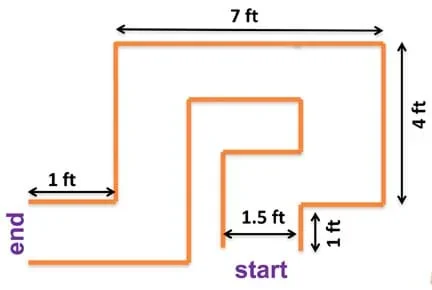 Figure 1: Set up a maze in the classroom for the LEGO robots to navigate.
With the Students
- Administer the pre-quiz by handing out paper copies (also on slide 2). The answers are provided for the teacher on slide 3.
- (slide 4) Divide the class into student pairs and introduce today's activity challenge: Each pair works together to use an Android phone to remotely guide a LEGO MINDSTORMS EV3 taskbot through a maze.
- Direct students to follow the detailed instructions on slides 4-9 to wirelessly connect the Android phones to the EV3 robots. This includes downloading the LEGO MINDSTORMS Commander app from the Google Play store, and making unique EV3 brick names in order to minimize Bluetooth connection confusion.
- Then, have students use the remote control buttons (arrow keys) on their Android phones to guide their EV3 taskbots through the maze (slide 10).
- Once all groups have successfully navigated their taskbots through the maze, summarize the activity by reviewing what electrical connections are, why wireless connections are especially useful and highlighting the key concepts.
- Lead a class discussion, inviting students to share their observations, experiences, conclusions and questions about the programming challenge activity. Ask the students:
- Which was easier—using remote control to go through the maze or programming the LEGO taskbot to go through with movement blocks?
- For what other situations might Bluetooth be useful for completing tasks?
- Administer the post-quiz by handing out paper copies (also on slide 11). Answers are on slide 12 Vocabulary are provided on slide 13.
- android
- Android is a Linux-based operating system designed primarily for touchscreen mobile devices such as smartphones and tablet computers. Initially developed by Android, Inc.
- bluetooth
- A type of wireless electrical connection used for communication between two devices. Bluetooth is a standard developed by electronics manufacturers that allows any sort of electronic equipment—from computers and cell phones to keyboards and headphones—to make their own connections, without wires, cables or any direct action from a user.) Bluetooth® is a registered trademark of Bluetooth SIG, Inc.
- electrical connection
- The link or bond that passes electricity between two or more things.
Pre-Activity Assessment
Pre-Quiz: Before starting the activity, administer the four-question Remote Control Using Bluetooth Pre-Quiz (PDF) (also on slide 2) to assess students' retention about wired and wireless electrical connections from the associated lesson. Answers are provided on the Remote Control Using Bluetooth Pre-Quiz Answer Key (PDF) (and slide 3).
Activity-Embedded Assessment
Observation: Oversee students as they follow the slide instructions to wirelessly connect the Android phones to the EV3 robots. Observe their engagement and logic in order to gauge their comprehension of what is being done in order to be able to command the robot movements through wireless electrical connections. Ask pertinent questions to help students through any necessary troubleshooting.
Post-Activity Assessment
Post-Quiz: At activity end, administer the three-question Remote Control Using Bluetooth Post-Quiz (PDF) (also on slide 11). Answers are provided on the Remote Control Using Bluetooth Post-Quiz Answer Key (PDF) (and slide 12). Review students' answers to assess their understanding of the concepts explored in the activity.
In a class with multiple EV3 bricks trying to use Bluetooth, it is very helpful to change the EV3s' names to unique names so that they are easily distinguishable from the other EV3 devices.
EV3 User's Guide. Accessed Jul 17, 2016 http://why.gr/wp-content/uploads/2015/03/EV3-User-Guide-EN.pdf
Contributors
Riaz Helfer; Sachin Nair; Pranit Samarth; Satish S. Nair
Supporting Program
GK-12 Program, Computational Neurobiology Center, College of Engineering, University of Missouri
Acknowledgements
This curriculum was developed under National Science Foundation GK-12 grant no. DGE 0440524. However, these contents do not necessarily represent the policies of the National Science Foundation, and you should not assume endorsement by the federal government.
Copyright
2014 by Regents of the University of Colorado; original © 2013 Curators of the University of Missouri