
Biomimetic Flinging Design: T-Shirt Launchers
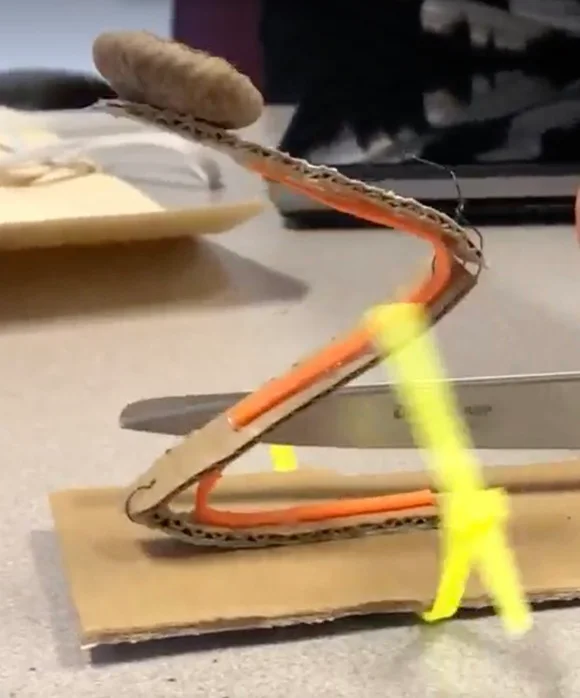 Design after testing.Copyright Tufts University Center for Engineering Education and Outreach and TERC
Students use biomimicry and digital 3D modeling to design a T-shirt launcher inspired by flinging mechanisms found in nature. They investigate springtails, click beetles, and violet and impatiens seed pods, conducting structure/function analyses to identify biological structures, properties, and actions that enable these organisms to fling themselves or their seeds. Students then learn key Tinkercad and Sim Lab skills through tutorials and a pinwheel skill-building project. Using their biological research, they plan and create a biomimetic T-shirt launcher in Tinkercad, test its performance in Sim Lab, gather peer feedback, and iteratively improve their design.
Mechanical engineering focuses on designing, analyzing, and improving devices and systems that involve forces, motion, and moving parts. To develop solutions to real-world problems, mechanical engineers often study how existing systems work and may use biomimicry to draw inspiration from the structures and functions found in plants and animals. Engineers then use computer-aided design (CAD) software to translate these ideas into digital models that can be tested, evaluated, and revised. CAD models also allow engineers to explore how components and mechanisms work together and communicate their ideas to collaborators and clients before investing the time and resources needed to build and revise physical prototypes.
After this activity, students should be able to:
- Apply the concept of structure and function to analyze how organisms fling themselves or objects.
- Use basic Tinkercad features to build a 3D digital model.
- Use Tinkercad motors and Sim Lab to add motion to a 3D digital model.
- Use computer-aided design to create a digital prototype with moving parts.
- Implement a biomimetic design process.
- Investigate the strengths and weaknesses of different nature-inspired design ideas.
- CCSS.Math.Content.6.G.A Solve real-world and mathematical problems involving area, surface area, and volume.
Grade 6
Do you agree with this alignment? - CCSS.Math.Content.7.G.B Solve real-life and mathematical problems involving angle measure, area, surface area, and volume.
Grade 7
Do you agree with this alignment?
- STEL-1J Develop innovative products and systems that solve problems and extend capabilities based on individual or collective needs and wants.
Grades 6-8
Do you agree with this alignment? - STEL-7U Evaluate the strengths and weaknesses of different design solutions.
Grades 6-8
Do you agree with this alignment?
- CCC.6.6-8.4 Complex and microscopic structures and systems can be visualized, modeled, and used to describe how their function depends on the relationships among its parts, therefore complex natural structures/systems can be analyzed to determine how they function.
Grades 6-8
Do you agree with this alignment? - MS-ETS1-1 Define the criteria and constraints of a design problem with sufficient precision to ensure a successful solution, taking into account relevant scientific principles and potential impacts on people and the natural environment that may limit possible solutions.
Grades 6-8
This resource focuses on the following Three Dimensional Learning aspects of NGSS:
Science & Engineering Practices- Define a design problem that can be solved through the development of an object, tool, process or system and includes multiple criteria and constraints, including scientific knowledge that may limit possible solutions.Do you agree with this alignment?
Disciplinary Core Ideas- The more precisely a design task's criteria and constraints can be defined, the more likely it is that the designed solution will be successful. Specification of constraints includes consideration of scientific principles and other relevant knowledge that is likely to limit possible solutions.Do you agree with this alignment?
Crosscutting Concepts- The uses of technologies and any limitations on their use are driven by individual or societal needs, desires, and values; by the findings of scientific research; and by differences in such factors as climate, natural resources, and economic conditions.Do you agree with this alignment?
- All human activity draws on natural resources and has both short and long-term consequences, positive as well as negative, for the health of people and the natural environment.Do you agree with this alignment?
Do you agree with this alignment? - Define a design problem that can be solved through the development of an object, tool, process or system and includes multiple criteria and constraints, including scientific knowledge that may limit possible solutions.
- MS-ETS1-2 Evaluate competing design solutions using a systematic process to determine how well they meet the criteria and constraints of the problem.
Grades 6-8
This resource focuses on the following Three Dimensional Learning aspects of NGSS:
Science & Engineering Practices- Evaluate competing design solutions based on jointly developed and agreed-upon design criteria.Do you agree with this alignment?
Disciplinary Core Ideas- There are systematic processes for evaluating solutions with respect to how well they meet the criteria and constraints of a problem.Do you agree with this alignment?
Do you agree with this alignment? - Evaluate competing design solutions based on jointly developed and agreed-upon design criteria.
- MS-ETS1-3 Analyze data from tests to determine similarities and differences among several design solutions to identify the best characteristics of each that can be combined into a new solution to better meet the criteria for success.
Grades 6-8
This resource focuses on the following Three Dimensional Learning aspects of NGSS:
Science & Engineering Practices- Analyze and interpret data to determine similarities and differences in findings.Do you agree with this alignment?
Disciplinary Core Ideas- There are systematic processes for evaluating solutions with respect to how well they meet the criteria and constraints of a problem.Do you agree with this alignment?
- Sometimes parts of different solutions can be combined to create a solution that is better than any of its predecessors.Do you agree with this alignment?
- Although one design may not perform the best across all tests, identifying the characteristics of the design that performed the best in each test can provide useful information for the redesign process—that is, some of the characteristics may be incorporated into the new design.Do you agree with this alignment?
Do you agree with this alignment? - Analyze and interpret data to determine similarities and differences in findings.
Each group needs:
- 1 internet-enabled laptop or computer
- access to the Padlet site with plant and animal inspirations: https://padlet.com/jazzxu/flinging-gsuey4t7aqx0e5e9
- access to Tinkercad: https://www.tinkercad.com
- Biomimetic Flinging Design Challenge Brief (PDF) (1 per group)
- Structure/Function Analysis Worksheet (PDF) (1 per student)
- Design Planning Worksheet (PDF) (1 per student)
- Progress Report (PDF) (1 per student)
- Revisiting Structure/Function Analysis Worksheet (PDF) (1 per student)
- Updated Design Worksheet (PDF) (1 per student)
- Final Reflection Worksheet (PDF) (1 per student)
- Biomimetic Flinging Design Challenge Brief (pdf)
- Structure/Function Analysis Worksheet (docx)
- Structure/Function Analysis Worksheet (pdf)
- Structure/Function Analysis Worksheet Answer Key (docx)
- Structure/Function Analysis Worksheet Answer Key (pdf)
- Design Planning Worksheet (docx)
- Design Planning Worksheet (pdf)
- Progress Report (docx)
- Progress Report (pdf)
- Revisiting Structure/Function Analysis Worksheet (docx)
- Revisiting Structure/Function Analysis Worksheet (pdf)
- Updated Design Sketch Worksheet (docx)
- Updated Design Sketch Worksheet (pdf)
- Final Reflection Worksheet (docx)
- Final Reflection Worksheet (pdf)
Students should be:
- Familiar with biomimicry as a design approach. See Activity 1 Introduction to Biomimicry: Airborne Transport Design for an introduction to biomimicry.
- Familiar with the steps of the engineering design process.
- Optional: Familiar with navigating 3D graphical environments on a computer. Prior experience is helpful but not required.
Have you ever been to a sporting event where they launch souvenir T-shirts into the crowd? How do they get the T-shirts all the way up to fans sitting in the highest levels of the stadium? What would a device need to do to launch a T-shirt that far? (Pause to hear student ideas.)
Your job in this challenge is to design a new and improved T-shirt launcher that could fling a T-shirt high into the stands of a sports stadium. But instead of starting from scratch, we’re going to look to nature for ideas.
To tackle this challenge, we’ll use biomimicry, an approach to engineering that takes inspiration from the natural world to solve problems. Plants and animals have evolved some pretty clever ways to move themselves or other objects through the air. We’re going to investigate three examples: click beetles, springtails, and the seed pods of plants such as violets and impatiens.
Each of these organisms accomplishes the task of flinging in a different way. Click beetles have a special latch-like structure in their bodies that allows them to store energy and then release it very quickly, propelling themselves into the air. Springtails have a forked, tail-like structure called a furcula that is normally held underneath their bodies. When released, the furcula snaps against the ground and launches the springtail into the air. Some plants, including violets and impatiens, have seed pods that build up and release energy as their structures change shape, sending seeds away from the parent plant.
As we investigate these organisms, we’ll conduct a structure/function analysis. This means we’ll look closely at the different structures, or parts, of each organism and identify the properties and actions that help those parts perform the function of flinging. We’ll ask questions such as: What part of the organism is involved? What is special about its shape or other properties? How does it move? How do the different parts work together? And, most important for our challenge, what could engineers learn from it?
Then you’ll take what you’ve learned from nature and apply it to your own T-shirt launcher design. You won’t build a physical launcher. Instead, you’ll use a computer-aided design (CAD) program called Tinkercad to create a 3D digital model. Before you begin designing your launcher, you’ll complete some Tinkercad skill-building activities so that you can practice creating and manipulating 3D objects and making parts move in Sim Lab.
Once you’re familiar with those tools, you’ll plan your T-shirt launcher and decide how features from one or more of the organisms you studied could inspire its design. You’ll build your model in Tinkercad, add moving components and virtual motors as needed, and use Sim Lab to see how your design behaves. Just like engineers working on a real design problem, you probably won’t get everything exactly right on your first attempt—and that’s part of the process. You’ll test your design, identify what works and what could be improved, get feedback from other teams, and revise your model.
At the end of the challenge, we’ll share our designs and compare the different solutions. You’ll explain how your launcher works, which organism inspired your design, and how you translated structures, properties, or actions from that organism into features of your launcher. We’ll also reflect on what worked, what didn’t work, and what we might change if we had another opportunity to improve our designs.
Background
Biomimicry
Biomimicry is an engineering approach that looks to living organisms and natural systems for ideas that can help solve human problems. Rather than simply copying what an organism looks like, biomimicry often involves investigating how a biological structure performs a particular function and translating the underlying strategy into an engineered design. In this activity, the relevant function is flinging: rapidly accelerating an object or organism so that it moves through the air.
Structure/Function
A structure/function analysis helps identify features of an organism that contribute to a particular function. A structure is a physical part of an organism, while properties describe characteristics of that structure, such as its shape, size, flexibility, stiffness, or orientation. Actions describe what the structure does, such as bending, compressing, rotating, unfolding, or snapping. Understanding the relationships among parts, properties, and actions can help engineers identify biological strategies that can be adapted to a design problem.
Flinging Mechanisms in Nature
This activity explores three biological examples of flinging: click beetles, springtails, and the seed pods of plants such as violets and impatiens. Although their structures differ considerably, all three demonstrate ways of storing and rapidly releasing energy to produce motion.
Click beetles can launch themselves into the air without using their legs to jump. A specialized mechanism between sections of the beetle's body acts as a latch. The beetle bends its body and stores elastic energy in its body structures. When the latch releases, that stored energy is rapidly converted into motion, causing the beetle's body to snap and propel it into the air. This mechanism illustrates how a system can store energy and release it quickly to generate a powerful movement.
Springtails are tiny arthropods that use a forked appendage called a furcula to propel themselves away from danger. The furcula is normally folded underneath the body and held in place. When released, it rapidly swings downward and strikes the surface beneath the springtail. The resulting force propels the springtail into the air. The furcula provides a useful example of how a hinged or rotating structure can rapidly transfer stored energy into motion.
Violets, impatiens, and some other plants use explosive seed dispersal to move seeds away from the parent plant. As their seed pods mature, changes within the pod create mechanical stresses in its tissues. When the pod reaches a critical point or is disturbed, its structures rapidly bend, twist, split, or curl. The sudden movement releases stored elastic energy and propels the seeds outward. These plants demonstrate how changes in shape and the rapid release of stored energy can produce a launching action without a motor.
Across these biological examples, several mechanical principles are important. Energy can be stored in a structure and then converted into kinetic energy, or energy of motion. Latches can hold structures in position until stored energy is released, while flexible, hinged, or rotating components can direct that energy into movement. The shape, size, angle, stiffness, and arrangement of components can also affect the direction and distance of the resulting motion. These principles provide connections between biological structures and mechanical engineering.
Digital Modeling and Simulation
Computer-aided design (CAD) allows engineers to develop and revise three-dimensional representations of their ideas before constructing physical prototypes. In this activity, Tinkercad is used to create digital models, while Sim Lab allows moving components to be connected and their behavior simulated. Axle connectors allow components to rotate around an axis, while slider connectors constrain components to linear movement. Motors can provide motion to components within a simulation.
Before teaching the activity, become familiar with the Tinkercad and Sim Lab features used in the provided tutorials, including creating and manipulating shapes, grouping objects, using the Extrude tool, adding connectors and motors, and running simulations. It is helpful to complete the pinwheel skill builder and experiment with a simple launching mechanism beforehand so you can anticipate common modeling and simulation challenges.
Digital simulations are models rather than exact representations of real-world behavior. Their primary purpose in this activity is to allow designs to be visualized, tested, compared, and revised. Encourage consideration of how changing variables such as component shape, size, orientation, angle, type of motion, and placement of moving parts affects the simulated launch. The emphasis should be on using evidence from testing to make design decisions and iteratively improve the model.
Before the Activity
- Print copies of worksheets.
- Biomimetic Flinging Design Challenge Brief (PDF) (1 per group)
- Structure/Function Analysis Worksheet (PDF) (1 per student)
- Design Planning Worksheet (PDF) (1 per student)
- Progress Report (PDF) (1 per student)
- Revisiting Structure/Function Analysis Worksheet (PDF) (1 per student)
- Updated Design Worksheet (PDF) (1 per student)
- Final Reflection Worksheet (PDF) (1 per student)
- Make sure students can access the curated Padlet site of plant and animal inspirations: https://padlet.com/jazzxu/flinging-gsuey4t7aqx0e5e9
- To prepare to guide students in investigating these plant and animal inspirations (curated on the Padlet site), review the provided sample answers on the Structure/Function Analysis Worksheet Answer Key (PDF).
- Ensure all groups have access to Tinkercad.
During the Activity
Day 1: Pre-Assessment, Ask, and Research (60 minutes)
Pre-Assessment Engagement
- Before introducing the activity, ask students, “Have you ever seen a T-shirt launcher?” Tally students’ responses on the board.
- Invite students who have seen a T-shirt launcher to briefly describe where they saw it and what it did.
- Ask students, “How do you think a T-shirt launcher works?”
- Encourage students to share their initial ideas about how a launcher might propel a T-shirt through the air.
- Record a few ideas on the board.
- Explain that students will return to these ideas as they investigate ways that plants and animals propel or “fling” objects in nature.
(Optional) Review Biomimicry
- If students did not complete Activity 1 (Introduction to Biomimicry and Airborne Transport Design), or have not otherwise been introduced to biomimicry, you’ll want to take a few minutes to familiarize them with the approach. Show the video “The World is Poorly Designed. But Copying Nature Helps.” (6:49 minutes) to explain biomimicry and illustrate what it looks like when engineers use it to design solutions.
Introduce Design Challenge
- Divide the class into groups of two to three students.
- Distribute one Biomimetic Flinging Design Challenge Brief (PDF) to each group or display Image 1 for students to view. (See Image 1.)
- Use the design challenge slide and introductory script to pose the T-shirt launcher design challenge.
- Explain that students will use biomimicry to design a T-shirt launcher.
- The design challenge goal is to build a Tinkercad model of a device that could distribute a T-shirt high up to the upper seats in a sports stadium.
- Review the design criteria and constraints with students.
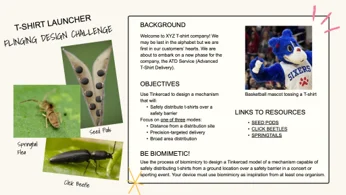 Biomimetic flinging design challenge briefCopyright Tufts University Center for Engineering Education and Outreach and TERC
Introduce the Biological Inspirations
- Use the images and resources on the provided Padlet website to introduce students to the three biological inspirations for the T-shirt launcher challenge: springtails, click beetles, and violet and impatiens seed pods.
Review Structure/Function Analysis
- Introduce or review the process of structure/function analysis. Explain that scientists can study how biological structures contribute to particular functions by identifying:
- Parts: The physical structures of the organism (nouns).
- Properties: The characteristics of those structures (adjectives).
- Actions: What those structures do (verbs).
- Optional: Model a structure/function analysis of one of the organisms as a class. Refer to Activity 1 (Introduction to Biomimicry and Airborne Transport Design) of this unit for a sample anchor chart demonstrating the structure/function analysis process.
Biological Investigation
- Assign each group one biological inspiration: springtails, click beetles, or violet and impatiens seed pods.
- Distribute one Structure/Function Analysis Worksheet (PDF) to each student.
- Have each group use the Padlet resources to analyze the parts, properties, and actions of their assigned organism. (Sample answers are included in the Structure/Function Analysis Worksheet Answer Key (PDF).)
- As students study their assigned plant or animal, circulate the room and support their work. Support the use of mathematical thinking in students’ analysis, including measurement of angle and consideration of ratio and proportion and scale (e.g., At what angles do the seed pod walls meet? Is this relationship between the click beetle’s head and back important for how it carries out the function of flinging?)
Share Findings
- Discuss as a whole class the results of students’ structure/function analysis work. It can be helpful to make a three-column chart (see example in Activity 1 (Introduction to Biomimicry and Airborne Transport Design)) for each of the three organisms, listing the parts, properties, and actions that support flinging.
Day 2: Research: Explore Tinkercad (60 minutes)
Introduction to Tinkercad
- Explain that Tinkercad (tinkercad.com) is a free, browser-based 3D modeling program that students will use to create a digital model of their T-shirt launcher and simulate how it operates.
- If students are familiar with Tinkercad, skip to the Tinkercad Skill Builders below. If students are unfamiliar with Tinkercad, show them the following custom tutorial videos created for this challenge. Have students follow along with the instructions as they watch. In addition, students may want to watch the video at 1.5 times the speed.
- Get started and log in (0:48 minutes)
- Creating and editing objects in Tinkercad (4:09 minutes)
- Using Extrude tools to create unique shapes (4:33 minutes)
- Grouping objects (4:00 minutes)
Tinkercad Skill Builders
- As a skill-builder activity, challenge students to design a pinwheel in Tinkercad.
- Explain that the pinwheel skill builder will give students practice creating a digital model with both stationary and moving components, skills they will later apply to their T-shirt launcher designs.
- Describe the activity criteria:
- Their pinwheel should include at least two decorative elements
- One will be stationary.
- One will be moving.
- Give students the rest of the class period to create their Tinkercad account and then make a pinwheel of their desired shape and materials in Tinkercad.
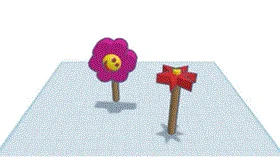 Example pinwheel designs created in Tinkercad in this skill-builder activity.Copyright Jazz’s Tinkercad
Day 3: Research: Sim Lab and Mechanical Motion (60 minutes)
- Give students approximately 10 minutes to continue working on their pinwheel project.
- Introduce students to Sim Lab.
- Have students watch the following Sim Lab tutorials in the following order to learn how to add and simulate motion in their digital models:
- Introduction to Sim Lab (1:47 minutes)
- Axle connectors (5:17 minutes)
- Slider connectors (4:42 minutes)
- Throwing objects (1:31 minutes)
- Give students the remainder of the class period to make their pinwheels interactive using the available connectors and motion tools in Sim Lab. Encourage students to experiment with how different connectors affect the movement of components and remind them that they will apply these skills when designing their T-shirt launchers.
Day 4: Imagine, Plan, and Create (60 minutes)
Brainstorm and Plan
- Re-display Image 1 and review the design challenge criteria and constraints with the students.
- Distribute one Design Planning Worksheet (PDF) to each student.
- Give students time to brainstorm possible T-shirt launcher designs and then document their selected design idea on the Design Planning Worksheet (PDF).
- Encourage students to use their Structure/Function Analysis Worksheet (PDF) as they develop their designs.
- Remind students to create a sketch that:
- Shows the major components or parts of the T-shirt launcher.
- Identifies the Tinkercad shapes, connectors, motors, or other features they plan to use.
- Shows how the launcher will move and propel the model T-shirt.
- Identifies the structures, properties, or actions inspired by their biological inspiration(s).
- As students brainstorm and plan, circulate among the groups and ask them to explain their biological inspiration and how their proposed design is similar to and different from the biological system. Encourage students to explain how specific structures, properties, or actions from their biological inspiration will contribute to the function of their launcher.
Begin Digital Prototype
- Have students begin in Tinkercad. Note: In the digital simulation, students should use a sphere to represent the bundled T-shirt.
- Have students begin constructing their initial T-shirt launcher models in Tinkercad.
- Encourage students to experiment with different shapes, materials, connectors, motors, and arrangements as they translate their design sketches into digital models.
- Encourage students to test their launchers frequently in Sim Lab as components become functional rather than waiting until their entire models are complete.
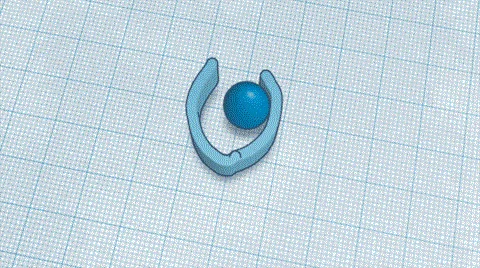 Example of a biomimetic, seedpod-inspired T-shirt launcher design, modeled in Tinkercad and tested in Tinkercad Sim Lab and TERC.Copyright Pragyee’s Tinkercad
Day 5: Create, Test, and Redesign (60 minutes)
Complete and Test the Initial Prototype
- Have students finish their initial T-shirt launcher models in Tinkercad.
- Support students in troubleshooting connectors, moving components, and simulation behavior.
- Have each group conduct an initial formal test of its launcher in Sim Lab and record observations about its performance.
 Design before testing.Copyright Tufts University Center for Engineering Education and Outreach and TERCDesign after testing.Copyright Tufts University Center for Engineering Education and Outreach and TERC
Analyze, Document Progress, and Gather Feedback
- Distribute the Progress Report (PDF).
- In the first 5 minutes, have students use their observations and test results to document the performance of their prototypes and identify features that worked well and features that could be improved.
- Pair each group with another group.
- Have students share their prototypes and test results with each other and compare the strengths and weaknesses of their different nature-inspired design approaches.
- Encourage students to give and receive constructive feedback about how their designs might be improved.
- Have students add relevant peer feedback to their Progress Report (PDF).
Redesign, Test, and Iterate
- Have students use their test results, Progress Report (PDF), and peer feedback to identify changes they want to make to their prototypes.
- Encourage students to revisit their Structure/Function Analysis Worksheet (PDF) for additional inspiration. Ask them to consider whether they could better incorporate a useful structure, property, or action from their designs.
- Have students update their design sketches before gathering additional materials or rebuilding their prototypes.
- Have students modify their prototypes and test them again against the design criteria.
- Encourage students to continue the design-test-improve cycle as time allows, using evidence from each test to inform their next design modification.
- Optional: Distribute the Revisiting Structure/Function Analysis Worksheet (PDF) and Updated Design Worksheet (PDF) to provide additional structure for the redesign and iteration process.
Day 6: Present and Reflect
Share Out Prototypes
- Have students share their updated prototypes with the class.
- As students present, have them:
- Identify which organism(s) they took inspiration from.
- What worked and what didn’t.
- Break down the structure/function behind their design.
- Facilitate a class discussion about the relationship between the biological structures students observed and the engineered structures they created.
Reflection
- Distribute one Final Reflection Worksheet (PDF) to each student.
- Have students complete the Final Reflection Worksheet (PDF) to reflect on their use of biomimicry, the performance of their designs, and the changes they made during the engineering design process.
- fling (verb)
- To move or push (something) suddenly into the air.
- launch (verb)
- To set (a boat) in motion by pushing it or allowing it to roll into the water.
- abdomen (noun)
- The part of the body between the chest and the legs; the belly.
- mechanism (noun)
- A system of parts that work together to do something.
- stationary (adjective)
- Not moving; staying in one place.
- conformal (adjective)
- Matching the shape of something else.
- dispersing (verb)
- To spread out or scatter in different directions.
- biomimicry (noun)
- A practice that learns from and mimics the strategies used by living organisms to solve challenges comparable to the ones we face as individuals and societies.
Pre-Activity Assessment
Before the activity begins, ask the class a question and tally their responses on the board. Ask whether anyone has seen a T-shirt launcher and if they know how it works. Let students share their ideas about T-shirt launchers, whether they have seen any T-shirt launchers or not, and whether they have any ideas about how it works.
Activity Embedded (Formative) Assessment
Structure/Function Analysis: As students conduct the structure/function analysis, ask questions such as, “What part do you think helps with the flinging?”, “What is the function of a part?”, and “Which organism/plant do you think has the best mechanism that can be adopted for T-shirt launchers?”
Design Check-Ins: As students plan, build, test, and improve their prototypes, circulate among the groups and ask questions to assess students’ understanding of structure and function and their application of biomimicry. Ask questions such as, “What organism/plant are you inspired from to make their design?”
Peer Feedback: Encourage students to share their prototypes and test results with one another and then give and receive constructive feedback about ways their designs could be improved. Have students complete the Progress Report (PDF) to document their test results, identify features that worked well and features that could be improved, and record relevant peer feedback.
Worksheets and Design Documentation: Throughout the activity, review students’ Structure/Function Analysis Worksheet (PDF), Design Planning Worksheet (PDF), Progress Report (PDF), Revisiting Structure/Function Analysis Worksheet (PDF), Updated Design Worksheet (PDF), and Final Reflection Worksheet (PDF) to assess their understanding of structure and function, application of biomimicry, design decisions, and use of evidence to improve their designs.
Post-Activity (Summative) Assessment
Final Design Share-Out: Have groups present their final prototypes to the class. Ask students to identify the organism or organisms that inspired their designs, explain how specific biological structures, properties, or actions influenced their design choices, and describe how testing and iteration led to changes in their prototypes.
Final Reflection: Review students’ Final Reflection Worksheet (PDF) to assess their understanding of biomimicry, structure and function, the performance of their designs, and how they used evidence from testing and feedback to improve their engineering solutions.
Students will be designing in Tinkercad, so if any problems with Tinkercad arise, it’s recommended to go through the help on Tinkercad's website.
Contributors
William Church, Debra Bernstein, Mike Cassidy, Kristen Wendell, Geling (Jazz) Xu, Tyrine Pangan, Ethan Danahy, Pragyee Shrestha
Supporting Program
Tufts University Center for Engineering Education and Outreach (CEEO) in Medford, Massachusetts; Technical Education Research Centers (TERC) in Cambridge, Massachusetts.
Acknowledgements
This material is based upon work supported by the National Science Foundation (NSF) under Grant No. 2300433. Any opinions, findings, conclusions, or recommendations expressed in this material are those of the author(s) and do not necessarily reflect the views of the National Science Foundation.