

Quick Look
- Grade Level:
- 11 (10 – 12)
- Time Required:
- 1 hours 15 minutes
- Group Size:
- 2
- Subject Areas:
-
Computer Science Science and Technology -
NGSS Performance Expectations:

HS-ETS1-2 HS-ETS1-3 HS-ETS1-4
Summary
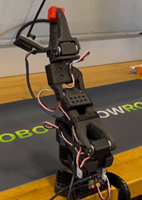
This activity introduces students to the real-world challenges robotic systems face in modern warehouses, where machines must sort thousands of items accurately, safely, and efficiently. Students explore core concepts such as joint motion, coordinate systems, sensing, and basic programming logic to understand how robots move and make decisions. Thinking like robotic engineers, students then work in teams to program the SO-101 robotic arm to complete a pick-and-place challenge, moving objects from a pickup area to specific sorting bins based on color or size.Engineering Connection
Robotics engineers design, build, and program robots that can perform tasks safely, accurately, and efficiently. They combine knowledge of mechanical systems, electronics, sensors, and computer programming to create machines that can sense their environment and respond with the right movements. Robotics engineers often work on automated systems—such as robotic arms used for sorting, assembly, or surgery—by developing the hardware and writing the software that controls each step. Their work helps solve real-world problems in industries such as manufacturing, healthcare, space exploration, and everyday consumer technology.
Learning Objectives
After this activity, students should be able to:
- Program a robotic arm to perform a precise pick-and-place task using coordinate-based or block-style coding.
- Collaborate with peers to troubleshoot, refine, and optimize robotic movement sequences for accuracy and speed.
- Apply real-world engineering design practices to model an automated sorting system based on criteria such as object size or color.
Educational Standards
Each Teach Engineering lesson or activity is correlated to one or more K-12 science,
technology, engineering or math (STEM) educational standards.
All 100,000+ K-12 STEM standards covered in Teach Engineering are collected, maintained and packaged by the Achievement Standards Network (ASN),
a project of D2L (www.achievementstandards.org).
In the ASN, standards are hierarchically structured: first by source; e.g., by state; within source by type; e.g., science or mathematics;
within type by subtype, then by grade, etc.
Each Teach Engineering lesson or activity is correlated to one or more K-12 science, technology, engineering or math (STEM) educational standards.
All 100,000+ K-12 STEM standards covered in Teach Engineering are collected, maintained and packaged by the Achievement Standards Network (ASN), a project of D2L (www.achievementstandards.org).
In the ASN, standards are hierarchically structured: first by source; e.g., by state; within source by type; e.g., science or mathematics; within type by subtype, then by grade, etc.
NGSS: Next Generation Science Standards - Science
| NGSS Performance Expectation | ||
|---|---|---|
|
HS-ETS1-2. Design a solution to a complex real-world problem by breaking it down into smaller, more manageable problems that can be solved through engineering. (Grades 9 - 12) Do you agree with this alignment? |
||
| Click to view other curriculum aligned to this Performance Expectation | ||
| This activity focuses on the following Three Dimensional Learning aspects of NGSS: | ||
| Science & Engineering Practices | Disciplinary Core Ideas | Crosscutting Concepts |
| Design a solution to a complex real-world problem, based on scientific knowledge, student-generated sources of evidence, prioritized criteria, and tradeoff considerations. Alignment agreement: | Criteria may need to be broken down into simpler ones that can be approached systematically, and decisions about the priority of certain criteria over others (trade-offs) may be needed. Alignment agreement: | |
| NGSS Performance Expectation | ||
|---|---|---|
|
HS-ETS1-3. Evaluate a solution to a complex real-world problem based on prioritized criteria and trade-offs that account for a range of constraints, including cost, safety, reliability, and aesthetics, as well as possible social, cultural, and environmental impacts. (Grades 9 - 12) Do you agree with this alignment? |
||
| Click to view other curriculum aligned to this Performance Expectation | ||
| This activity focuses on the following Three Dimensional Learning aspects of NGSS: | ||
| Science & Engineering Practices | Disciplinary Core Ideas | Crosscutting Concepts |
| Evaluate a solution to a complex real-world problem, based on scientific knowledge, student-generated sources of evidence, prioritized criteria, and tradeoff considerations. Alignment agreement: | When evaluating solutions it is important to take into account a range of constraints including cost, safety, reliability and aesthetics and to consider social, cultural and environmental impacts. Alignment agreement: | New technologies can have deep impacts on society and the environment, including some that were not anticipated. Analysis of costs and benefits is a critical aspect of decisions about technology. Alignment agreement: |
| NGSS Performance Expectation | ||
|---|---|---|
|
HS-ETS1-4. Use a computer simulation to model the impact of proposed solutions to a complex real-world problem with numerous criteria and constraints on interactions within and between systems relevant to the problem. (Grades 9 - 12) Do you agree with this alignment? |
||
| Click to view other curriculum aligned to this Performance Expectation | ||
| This activity focuses on the following Three Dimensional Learning aspects of NGSS: | ||
| Science & Engineering Practices | Disciplinary Core Ideas | Crosscutting Concepts |
| Use mathematical models and/or computer simulations to predict the effects of a design solution on systems and/or the interactions between systems. Alignment agreement: | Both physical models and computers can be used in various ways to aid in the engineering design process. Computers are useful for a variety of purposes, such as running simulations to test different ways of solving a problem or to see which one is most efficient or economical; and in making a persuasive presentation to a client about how a given design will meet his or her needs. Alignment agreement: | Models (e.g., physical, mathematical, computer models) can be used to simulate systems and interactions—including energy, matter, and information flows—within and between systems at different scales. Alignment agreement: |
Common Core State Standards - Math
-
Model with mathematics.
(Grades
K -
12)
More Details
Do you agree with this alignment?
-
Use appropriate tools strategically.
(Grades
K -
12)
More Details
Do you agree with this alignment?
-
Use units as a way to understand problems and to guide the solution of multi-step problems; choose and interpret units consistently in formulas; choose and interpret the scale and the origin in graphs and data displays.
(Grades
9 -
12)
More Details
Do you agree with this alignment?
-
Apply geometric concepts in modeling situations
(Grades
9 -
12)
More Details
Do you agree with this alignment?
International Technology and Engineering Educators Association - Technology
-
Explain how the world around them guides technological development and engineering design.
(Grades
9 -
12)
More Details
Do you agree with this alignment?
-
Assess how similarities and differences among scientific, mathematical, engineering, and technological knowledge and skills contributed to the design of a product or system.
(Grades
9 -
12)
More Details
Do you agree with this alignment?
-
Develop a plan that incorporates knowledge from science, mathematics, and other disciplines to design or improve a technological product or system.
(Grades
9 -
12)
More Details
Do you agree with this alignment?
-
Demonstrate the use of conceptual, graphical, virtual, mathematical, and physical modeling to identify conflicting considerations before the entire system is developed and to aid in design decision making.
(Grades
9 -
12)
More Details
Do you agree with this alignment?
-
Document trade-offs in the technology and engineering design process to produce the optimal design.
(Grades
9 -
12)
More Details
Do you agree with this alignment?
-
Optimize a design by addressing desired qualities within criteria and constraints.
(Grades
9 -
12)
More Details
Do you agree with this alignment?
Materials List
Each group needs:
- 1 laptop computer with coding software (free download – Windows/Linux/Ubuntu)
- 1 SO-ARM101 Assembled Version (WOWROBO)
- 9 assorted small objects (different colors – suggestion: 3D print 1”x1”x1” cubes)
- 3 small bins or containers
Note: For a similar project that doesn’t require as expensive materials, consider doing a DIY project like this: Making an Impressive Working Robotic Arm from Cardboard.
Worksheets and Attachments
Visit [www.teachengineering.org/activities/view/clem-3014-robotics-pick-place-challenge-activity] to print or download.Pre-Req Knowledge
Students should have:
- A basic understanding of robotic arm components (e.g., joints, gripper, base rotation).
- Familiarity with coordinate systems and how positions are defined in 2D or 3D space.
- The ability to write or interpret simple code (e.g., block-based logic or Arduino syntax).
- Problem-solving skills such as debugging and logical sequencing of commands.
- A basic understanding of measurement and estimation (e.g., distance, angle, time delays).
Introduction/Motivation
Imagine a warehouse where robots are responsible for sorting thousands of products every hour. Think of companies like Amazon, Walmart, and FedEx. What are the main challenges you think a robot must overcome to do this accurately? (Let students offer their thoughts. Write their suggestions on the whiteboard.)
These are great ideas. Let’s talk about some of the examples of challenges robots must overcome in warehouse sorting:
- Identifying different types of objects: At Amazon fulfillment centers, robots handle everything from books and toys to electronics and clothing. Challenge: The robot must recognize what type of object it’s looking at, even when items vary in color, packaging, or shape.
- Sorting based on criteria: In places like Walmart distribution centers, items must be sorted by size (small phone charger vs. large cereal box), shape (round can vs. flat envelope), material (glass, plastic, metal, fabric), weight (light items vs. heavy items that require extra care). Challenge: Robots need sensors and AI to detect these features accurately before sorting.
- Dealing with damaged or irregular items: At FedEx sorting hubs, packages are often dented, ripped, or misshapen from transport. Challenge: A robot must detect when a package is damaged, broken, or leaking and decide: Should it be removed from the line? Does it need special handling? Does it need to be rerouted for inspection?
- Handling items safely without dropping or crushing them: Sorting items like glass perfume bottles, electronics, or fragile home goods requires precise grip control. Challenge: Robots must pick items with the right amount of force—not too tight, not too loose.
We are now going to watch a video. As we watch it, I want you to think about what criteria (or what questions you would have) if you were to design and build a robotic sorting machine.
(Show this video: “Robots Working Together – UR Cobots, Effimat and MiR Robots” [1:20 minutes])
What possible questions did you come up with? (Let students offer their thoughts. Potential questions could be:
- What type of objects do robots need to sort?
- What criteria? By size, shape, material, weight…
- What if the object is damaged/broken?
- Have you or anyone you know received any broken items from Amazon or FedEx? What happened?)
Today we are going to become robotic engineers and use the engineering design process to program a robotic arm to complete a pick-and-place challenge that simulates a real-world sorting task. Working in teams, you will use coding and problem-solving strategies to move objects from a pickup place to specific sorting bins based on color or size. Let’s get started!
Procedure
Background
Core Concepts of Robotic Motion
Robotic motion is built on understanding how a robot moves through space using joints, motors, and actuators that work together to create precise, repeatable actions. Motion involves concepts such as degrees of freedom (how many independent ways a robot can move), kinematics (how joint movements translate into end-effector motion), and dynamics (how forces, mass, and acceleration affect movement). Robots rely on sensors to detect position, speed, and obstacles so they can adjust their actions in real time. Together, these concepts allow robots to perform tasks such as picking and placing objects, navigating environments, and interacting safely with people.
Coordinate Systems
Robots operate using coordinate systems (i.e., mathematical “maps” that define where objects, joints, and movements exist in space.) The two most common systems are Cartesian coordinates (x, y, z positions in 3D space) and joint coordinates (angles or positions of each joint). These systems allow the robot to understand both its own configuration and the location of items it needs to interact with. By converting between coordinate systems through transformations, a robot can plan accurate paths, avoid collisions, and place its end effector exactly where it needs to go.
Basic Programming Logic
Basic programming logic for robotics involves giving the robot clear, step-by-step instructions using commands, conditions, and loops. Commands tell the robot what action to take, such as moving to a position or gripping an object. Conditional statements let the robot make decisions based on sensor input (e.g., “if the object is detected, then close the gripper”). Loops allow the robot to repeat actions efficiently until a task is complete. This logical structure enables robots to perform predictable, reliable, and adaptable behaviors in response to their environment.
Teacher Summary of Activity
This activity simulates a real task in automated manufacturing systems, where robotic arms are programmed to sort or assemble parts with precision and efficiency. As students plan, prototype, test, and refine their approach, they apply key steps of the engineering design process to solve a real-world challenge. They explore concepts of motion—such as joint articulation, torque, angles, and gripper control—to understand how mechanical movement affects accuracy. Because the robot’s actions rely on coordinate geometry, students learn to translate object locations into specific X-Y-Z positions or directional steps using the robot’s coding platform. To support this work, teachers should be familiar with the robot’s control software, know how to troubleshoot common issues such as misalignment or missed grabs, and guide students in breaking the task into small, logical sequences. Teachers should also understand the core concepts of robotic motion, coordinate systems, and basic programming logic so they can help students connect engineering, math, and problem-solving throughout the activity.
Engineering Design Process Mapping
- Ask: Identify the Need & Constraints
Corresponding Activity Part: Bellringer + Challenge Introduction
What Happens: Students are presented with the real-world scenario of using a robotic arm to automate pick and place. They define the goal (accurate pick and place items), the audience (automated systems), and the constraints (object types, time, robot limitations, code accuracy).
- Research the Problem
Corresponding Activity Part: Activating Strategy + Robot Arm Refresher Worksheet
What Happens: Students learn about robot mechanics, robotic arms in manufacturing, and how robots are programmed for pick-and-place tasks. They may explore videos or demonstrations showing real-world systems.
- Imagine: Develop Possible Solutions
Corresponding Activity Part: Team Planning & Brainstorming
What Happens: Students brainstorm how they could get the robot to perform the task—e.g., what motions are needed, how to grip objects, what path to follow. Teams generate multiple ideas, sketch layouts, and talk through different programming approaches.
- Plan: Select a Promising Solution
Corresponding Activity Part: Team Finalization of Pick and Place Strategy & Code Sequence
What Happens: Students choose the best sorting strategy and develop a step-by-step code plan. They decide on drop-off zones, movement order, and gripper actions based on what’s most promising for accuracy and efficiency.
- Create: Build a Prototype
Corresponding Activity Part: Programming the SO-101 Robot Arm and teleoperating
What Happens: Students write and upload their initial program to the robot and teleoperate the pick and place task. This becomes their first prototype (e.g., a working version of their design solution).
- Test and Evaluate Prototype
Corresponding Activity Part: Test Runs & Debugging
What Happens: Students run their program and teleoperate the leader arm to test performance. They observe the robot’s accuracy, timing, and object placement, then discuss what worked and what didn’t. Teachers use formative check-ins to guide reflection and improvement.
- Improve: Redesign as Needed
Corresponding Activity Part: Code Revisions & Retesting
What Happens: Teams refine their code to improve timing, precision, and object handling. They repeat the cycle (test–evaluate–revise), learning from mistakes to enhance their final solution.
Before the Activity
- Set up the SO-ARM101, ensuring both robots (leader and follower) are connected to a power source.
- Make sure computers are working and the program is installed.
- Test basic movement functions (rotate, grip, release).
- Set up testing area:
- Lay out three small bins for sorting.
- Place a cube randomly in the workspace (robot area).
- Make copies of the Robot Arm Worksheet (1 per student)
- Make copies of the Engineering Design Process Packet (1 per student)
- Make copies of the Activity Rubric (1 per group)
- (optional) Make copies of the Industry Presentation Instructions (1 per group)
During the Activity
Introduction
- Divide the class into groups of three or four students (it depends on how many robots you have).
- Within each team, assign roles such as driver (controls the robot), note-taker (records observations and ideas), troubleshooter (identifies problems in code or motion), and timekeeper (manages pacing).
- Hand out one Engineering Design Process Packet to each student.
Ask
- Read and discuss the challenge: Program a robotic arm to move objects from a pickup area to specific sorting bins based on color or size.
- Encourage students to think critically about what the robot must “know” and do to complete the task accurately.
- Have students fill out the Ask section of the Engineering Design Process Packet.
- Give each group a copy of the Activity Rubric.
- Read through the Activity Rubric to clarify the success criteria, including accuracy, efficiency, teamwork, and problem-solving.
Research the Problem
- Briefly revisit Cartesian coordinates, basic programming logic, and robot anatomy (base, joints, gripper) using the Teacher Guide to ensure all students have foundational knowledge.
- Give each student a Robot Arm Worksheet.
- Give students 5 minutes to complete the worksheet
- Give students time to research robot mechanics, robotic arms in manufacturing, and how robots are programmed for pick-and-place tasks. They may explore videos or demonstrations showing real-world systems.
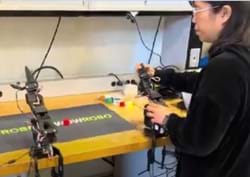
- Optional: Perform a demonstration of how SO-101 picks and places.
Imagine: Develop Possible Solutions
- Give students 15 minutes to discuss multiple ways to approach the challenge.
- Remind students to consider movement paths, gripping methods, and sorting criteria.
- Have each team sketch 3-4 layouts or flow diagrams and consider potential challenges for each approach in their Engineering Design Process Packet.
Plan: Plan: Select a Promising Solution
- Give students 10 minutes to choose ONE solution.
- Instruct them to outline the step-by-step coding sequence for the robot in the Plan section of the Engineering Design Process Packet. (Note: Decisions include object pickup order, bin selection, and gripper actions.)
Build a Prototype (Algorithm)
- Give students time to code and teleoperate the SO-101 leader arm.
Test and Evaluate Prototype
- Once programmed, students make observations on the robot follower’s performance, noting errors or misalignments, and documenting results in their Engineering Design Process Packet.
- As students test their robot, remind them to evaluate accuracy and efficiency, identify issues, and note potential code adjustments. Emphasize iterative problem-solving: test, observe, discuss, and revise.
- Have students answer the questions in the Test section of the Engineering Design Process Packet.

Improve: Redesign as Needed
- Have students take 5 minutes to review their performance notes, discuss what worked or failed, and identify strategies for improvement in the Improve section of their Engineering Design Process Packet.
- Give students time to refine their code and retest, aiming for smoother, more precise, and efficient pick-and-place operations.
- Have students record their improvements and observations in the Iterate section of the Engineering Design Process Packet.
Challenge Round
- Give each team 5 minutes to compete to sort 10 items accurately and efficiently.

Optional: Group Industry Presentation
- Have each group create an Industry Panel presentation using Industry Presentation Instructions.
Vocabulary/Definitions
actuator: A component of a machine that is responsible for moving or controlling a mechanism or system.
algorithm: A finite sequence of well-defined instructions used to solve a class of problems or perform a computation.
coordinate system: A system that uses one or more numbers, or coordinates, to uniquely determine the position of a point or other geometric element.
debugging: The process of finding and resolving defects or problems within a computer program that prevent correct operation.
iteration: The repetition of a process in order to generate a sequence of outcomes, with each cycle often building on the previous one.
Assessment
Pre-Activity Assessment
Research: Students learn about robot mechanics, robotic arms in manufacturing, and how robots are programmed for pick-and-place tasks. They may explore videos or demonstrations showing real-world systems.
Robot Arm Worksheet: Students complete the Robot Arm Worksheet to assess what they know at the beginning of the activity.
Activity Embedded (Formative) Assessment
Team Check-ins: While students build and test their algorithm, the teacher circulates, listening and questioning: “What is the robot doing vs. what you expected?” “How are you deciding where to place each object?”
Post-Activity (Summative) Assessment
Pick and Place Challenge Rubric: Observe teams sorting 9 objects – score using the Activity Rubric.
Troubleshooting Tips
- Robot lagging – close all tabs and restart
- Connection error (motors, cameras) – calibrate again
Activity Scaling
- For lower grades: Simplify the sorting task to just one object and use left, right, up, and down instead of coordinate system.
- For younger students, use a pseudocode and give start points for the Ask and Plan steps in the engineering design process.
- For upper grades, ask students to create a design brief and perform self-assessment and peer evaluation.
- For older students, add constraints such as budget and pre-define the robot work envelope.
- For more advanced students, include real-world parameters such as speed and arm positions and randomize object positions.
Subscribe
Get the inside scoop on all things Teach Engineering such as new site features, curriculum updates, video releases, and more by signing up for our newsletter!References
Hugging Face. “Imitation Learning on Real‑World Robots.” LeRobot Documentation, Hugging Face, https://huggingface.co/docs/lerobot/il_robots. Accessed 14 July 2025.
Copyright
© 2026 by Regents of the University of Colorado; original © 2025 Clemson UniversityContributors
Erika Shiota Montandon, Advisor: Bing Li, Ph.D., Associate Professor and Mentor: Abhishek Sharma, Ph.D. StudentSupporting Program
Research Experience for Teachers (RET), ClemsonAcknowledgements
This digital library content was developed by the Engaging and Enabling Teachers through Advanced Manufacturing Research RET Site at Clemson University under National Science Foundation grant number 2206962. However, these contents do not necessarily represent the policies of the NSF and you should not assume endorsement by the federal government.
Last modified: January 16, 2026
User Comments & Tips