
Molecules: The Movement of Atoms
Legacy Curriculum
Hey there! This curriculum is no longer being curated or supported. It may contain materials that are no longer available or outdated information. Please use this document for reference.
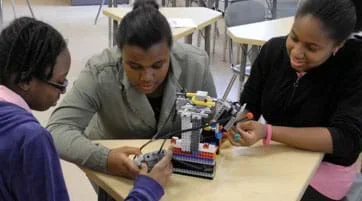 Students experimenting with their molecular model robot.Copyright 2011 Jennifer S. Haghpanah, AMPS Program, Polytechnic Institute of NYU
Students work as engineers to learn about the properties of molecules and how they move in 3D space through the use of LEGO® MINDSTORMS® EV3 robotics. They design and build molecular models and use different robotic sensors to control the movement of the molecular simulations. Students learn about the size of atoms, Newman projections, and the relationship of energy and strain on atoms. This unique modular modeling activity is especially helpful in providing students with a spatial and tactile understanding of how molecules behave.
Many types of engineers apply programming to solve everyday challenges. For example, some chemical engineers are exploring design of the ideal molecule to cure cancer or ways to save energy—through the use of "hyper molecular modeling." Other chemical and biomedical engineers use programs (such as PyRosetta) to find the protein with the most energy conserved in a system. Programming languages such as IDL, C++ and Java are used by engineers to create applications for Apple and Android devices, generate new robots, analyze scientific research, and much more.
After this activity, students should be able to:
- Design a LEGO robot.
- Program a robot with LEGO EV3 MINDSTORMS software.
- Program color and ultrasonic sensors to detect different colored and sized model molecules.
- Program the response from the light and ultrasonic sensors to the display screen.
- Explain steric hindrance of molecules and terms such as Newman projections, staggered and eclipsed.
- Describe how energies relate to staggered and eclipsed.
- STEL-3G Explain how knowledge gained from other content areas affects the development of technological products and systems.
Grades 6-8
Do you agree with this alignment?
- HS-ETS1-2 Design a solution to a complex real-world problem by breaking it down into smaller, more manageable problems that can be solved through engineering.
Grades 9-12
Do you agree with this alignment?
- HS-ETS1-2 Design a solution to a complex real-world problem by breaking it down into smaller, more manageable problems that can be solved through engineering.
Grades 9-12
This resource focuses on the following Three Dimensional Learning aspects of NGSS:
Science & Engineering Practices- Design a solution to a complex real-world problem, based on scientific knowledge, student-generated sources of evidence, prioritized criteria, and tradeoff considerations.Do you agree with this alignment?
Disciplinary Core Ideas- Criteria may need to be broken down into simpler ones that can be approached systematically, and decisions about the priority of certain criteria over others (trade-offs) may be needed.Do you agree with this alignment?
Do you agree with this alignment? - Design a solution to a complex real-world problem, based on scientific knowledge, student-generated sources of evidence, prioritized criteria, and tradeoff considerations.
Each group needs:
- LEGO MINDSTORMS EV3 robot, such as EV3 Core Set (5003400) at https://education.lego.com/en-us/products/lego-mindstorms-education-ev3-core-set/5003400#lego-mindstorms-education-ev3
- LEGO MINDSTORMS Education EV3 Software 1.2.1, free online, you have to register a LEGO account first; at https://www.lego.com/en-us/mindstorms/downloads/download-software
- LEGO EV3 Intelligent Brick, available at https://shop.lego.com/en-US/EV3-Intelligent-Brick-45500
- Molecular modeling kit to build atoms with bonds (for example, Molecular Visions: The Flexible Molecular Module Kit, part #595, available at https://www.etsy.com/listing/99279210/molecular-visions-the-molecular-model)
- color sensor (included in the molecular modeling kit)
- ultrasonic sensor (included in the molecular modeling kit)
- 3 plastic sticks (included in the molecular modeling kit)
- 2 plastic balls of the same size (0.5 inch to 3 inches diameter; included in the molecular modeling kit)
- 1 Styrofoam ball, larger in size than the two plastic balls (such as 4 inches in diameter; available at arts and crafts stores)
- 2 sheets of the same colored construction paper, enough to cover a Styrofoam ball
- tape or glue, to adhere the paper to the ball, and the sticks to the motors
- Molecular Modeling Worksheet (PDF), one per person
To share with the entire class:
- computer, loaded with EV3 1.2.1 software
- LEGO MINDSTORMS EV3 data logging program (comes with the LEGO EV3 programming software)
- ChemDraw software (download a free trial version at http://scistore.cambridgesoft.com/ScistoreSoftwareDisplay.aspx?VendorID=1; refer to the CS ChemDraw User's Guide at https://revvitysignals.com/products/research/chemdraw?gclid=Cj0KCQjwzdOlBhCNARIsAPMwjbxdE-sgLTcJwZP0DxRCrP0MYaILdFwrVZYNDqO58vgurEUEzlU2zEMaAvPeEALw_wcB)
- Note: one computer per group is ideal, but if only one computer is available, then conduct the activity with the entire class a group.
Note: This activity can also be conducted with the older (and no longer sold) LEGO MINDSTORMS NXT set instead of EV3; see below for those supplies:
- LEGO MINDSTORMS NXT robot, such as the NXT Base Set
- computer, loaded with NXT 2.1 software
Students should be familiar with basic chemistry, including atoms, and with ChemDraw and LEGO EV3 applications. Refer to the guides listed in the Materials List for how to use these programs.
In some Hollywood movies, such as Avatar or Ironman, the scientific and engineering heroes found ways to modify molecules to save the world. For example, in Avatar, researchers genetically engineered Na'vi bodies that could survive on Pandora. In Ironman, Tony Stark used molecules to repair his chest injury so he could fight crime.
Molecules have been used to fight some of the many human challenges in the world. For example, curcumin is a small molecule that is an anti-tumor, anti-amyloid and anti-inflammatory. Researchers are using this powerful molecule to find cures for cancer. Vitamin A is another small molecule that is used in anti-aging creams. Some molecules can convert sunlight into energy, and are used in organic solar cells. Kevlar (poly paraphenylene terephthalamide) molecules are spun into incredibly high strength fibers that are used in body armor and advanced sports equipment. In all of these cases, the structure of the molecule helps give it its desirable properties.
When engineers want to create a molecule to solve a problem, they need to think about what kind of structure is required to achieve the desired function. However, formulating an image of how molecules move is hard to do in your head! This is especially true for more complicated molecules. In studying existing molecules or designing new ones, engineers use molecular models to help them visualize molecular structure. To help us understand how engineers use molecular design to solve complex problems, we will develop a model to simulate the movement of molecules in 3D space with the aid of robotics and technology.
When you hear the word molecule, what comes to mind? Can you formulate an image of the moving molecules in your head? I bet it is difficult to imagine how molecules will behave when they are surrounded by other different molecules. To help us with that, we have simulated the movement of molecules in 3D space with the aid of robotics and technology.
In this activity, you will expand your knowledge of the movement of molecules in 3D space. You will learn new vocabulary words such as Newman projections and staggered/eclipsed conformations. You will learn about the size of atoms and how the size affects the steric strain of the molecule. You will also learn some new technology — how to program the movement of molecules with the aid of LEGO robots.
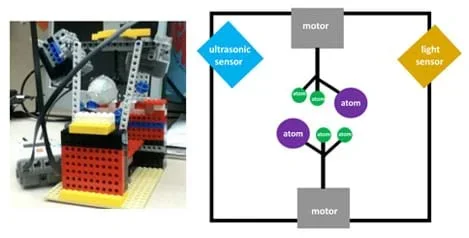 Figure 1. A molecular model robot and a diagram of its primary components.Copyright 2011 Jennifer S. Haghpanah, AMPS Program, Polytechnic Institute of NYU
Background
Student groups design molecular models and try to control how fast the molecules move with the color and ultrasonic sensors (see Figure 1). Specifically, they monitor the movement of the molecules through the display screen on the EV3 brick, which shows the output of the sensor on the EV3 screen. Students work in groups during the entire activity.
To begin, they brainstorm several design ideas and make sketches of their molecular modeling robot designs. Then they build their molecular modeling robots in groups and submit them to class critique, modifying their designs to incorporate feedback and suggestions for improvement, and make sure that their designs work (should be similar to Figure 1). Expect students be able to show the teacher that they can control the speed of the molecules with the aid of the sensors.
The staggered and eclipsed conformation positions can be shown through the programming of the robot. The robot can turn the atoms around, resulting in a molecular model simulations that are visual and tangible to students.
Before the Activity
- Gather materials and make copies of the Molecular Modeling Worksheet (PDF).
- Divide the class into groups of five students each.
- Ask students to make predictions, as described in the Assessment section.
With the Students—Design and Build the Robot
- Have student groups brainstorm several design ideas for their molecular modeling robots and make sketches. They could use the design shown in Figure 1 as the base of the design and brainstorm ideas for how to add the two sensors, which could be placed in numerous locations in order to control the speed of the molecule movement. Once designs are finalized, have them (or the teacher) pull together all the needed parts.
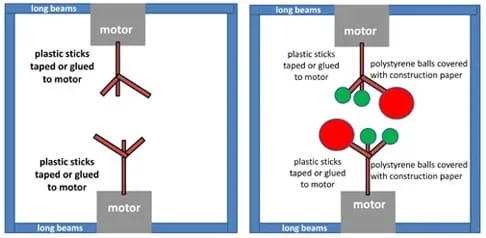 Figure 2. The robotic base composed of long beams, motors and sticks, with three balls attached to the sticks.Copyright 2011 Jennifer S. Haghpanah, AMPS Program, Polytechnic Institute of NYU
 - Suggest that they begin by creating the backbone of the robot using long LEGO beams and small motors (see Figure 2, left).
- Attach the plastic sticks to the motors using tape or glue (see Figure 2, left). (Note, the sticks provided in the modular modeling kit already come with 30°, 60° and 90° angles.)
- Cover the Styrofoam balls with colored construction paper. Use enough tape to make sure the paper covers the balls since the sensors only recognize a Styrofoam ball if the paper is around it. Make sure that two of the three balls are the same size and color, and smaller in size and different in color from the third ball. Make two sets of these balls and attach them to the sticks (see Figure 2, right).
- After the students make their molecular modeling robots, have them show their designs to the class for critiques from their colleagues (for example, unstable construction). Once they receive critiques, they improve their robots before moving on.
- Add the sensors to the set-up, so the balls move just below the sensors (color and ultrasonic) and can get detected by the sensors. On the bottom, place a motor with stick and balls attached, but no sensors. See Figure 1 for generally how the set-up should look. Have students attach the ultrasonic sensor to the robot's port 4 and the color sensor to the robot's port 3. Then have students go to the view function on the EV3 brick to verify whether the sensors are working (see Figure 3). (Note: the color sensor detects color changes; the ultrasonic sensor detects distance changes. Students can figure out where the sensors go by whether the sensors are able to detect the balls or not. Through experimentation, they can optimize the sensor positions.)
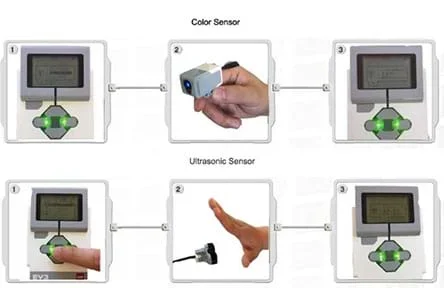 Figure 3. The different view functions of the robot EV3 brick.Copyright LEGO MINDSTORMS Education http://cache.lego.com/downloads/education/9797_LME_UserGuide_US_low.pdf
 - With functioning sensors, hold another class critique: What is working? What is not working? (For example, poor sensor locations that do not enable controlling of the molecule movement or the ball is not completely covered by construction paper so the ultrasonic sensor cannot see it.). Make improvements before moving on.
With the Students—Program the Robot
- Have students program their robots to detect the different sizes of atoms with the ultrasonic sensor, and staggered (atoms/balls are 30˚ away from one another) and eclipsed (atoms/balls line up with one another) conformations with the color sensor and the ultrasonic sensor. Students must do a bit of trial and error in order to learn how to do this. Use the EV3 guide to help with this programming.
- Use the ultrasonic sensor in the common palette (see Figure 4) to recognize when the large Styrofoam ball is close or far away. Make the motor move faster when the large ball is closer to the ultrasonic sensor or slower when the larger ball is further away from the ultrasonic sensor.
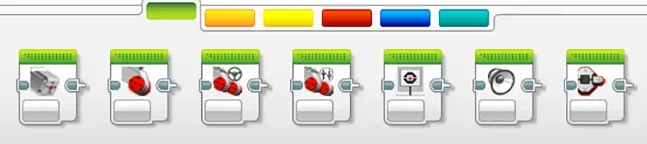 Figure 4. The common palette contains important buttons for programming.Copyright LEGO MINDSTORMS Education http://cache.lego.com/downloads/education/9797_LME_UserGuide_US_low.pdf
 - After students are able to demonstrate to their classmates that they can operate the ultrasonic sensors, have them try programming the color sensors so they recognize the different ball colors (see Figure 5). For example, perhaps program the motor to move at different speeds when it sees a certain color.
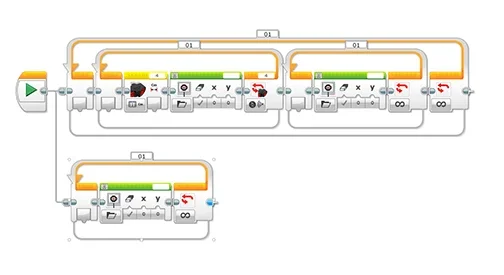 Figure 5. Programming for the color sensor.Copyright 2011 Jennifer S. Haghpanah, AMPS Program, Polytechnic Institute of NYU
 - Once students have grasped programming the color sensor, they can begin to think about how to monitor the output of the sensors via data logging. They can use trial and error to figure out how to set up their experiments. They can select the sensor they want to monitor and look at the output of the sensor at certain time points, using the data logging program. Refer to the Figure 6 image of the data logging program for the fields to use to set up an experiment to conduct.
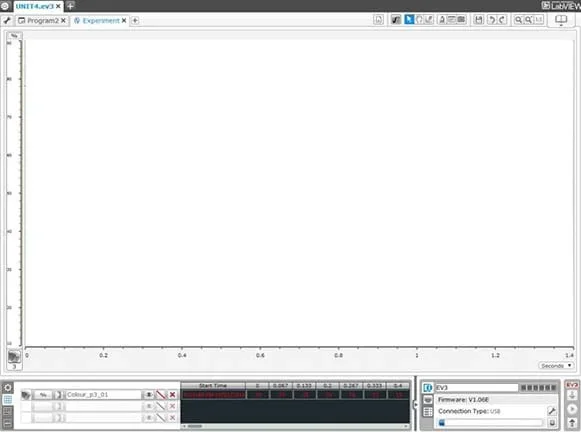 Figure 6. Data logging program and experiment setup.Copyright (top) The NXT Step: LEGO MINDSTORMS EV3 Blog and (bottom) National Instruments Data Logging http://4.bp.blogspot.com/_qCeWif_tICQ/SWgx6NhBTgI/AAAAAAAAAyA/Qb5EQqgcYYU/s1600-h/Picture+5.png http://zone.ni.com/reference/en-XX/help/372962A-01/lvnxt/mindstorms_datalog/
 - While students are using their robots and moving the molecules around, teach the vocabulary words. Suggest that students look at the worksheet questions and start thinking about the answers. Refer to the Figure 7 images for help in understanding some of the vocabulary terms.
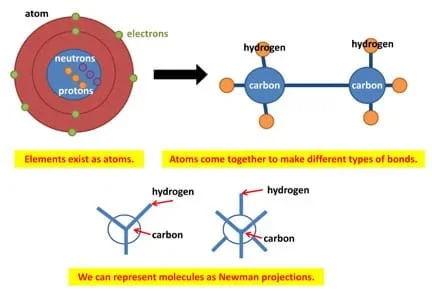 Figure 7. Images to aid in explaining the vocabulary terms.Copyright 2011 Jennifer S. Haghpanah, AMPS Program, Polytechnic Institute of NYU
 - Teach students about ChemDraw to assist in their understanding of the models with the aid of this application. Have students first explore the ChemDraw application, and then learn how to create the models in 3D space using the tutorial found at http://www.camsoft.co.kr/services/documentation/chemdraw_8_english.pdf. Also refer to the ChemDraw guide. Creating molecules is a trial and error process. Suggest they explore the ChemDraw buttons and try to create an ethane molecule (see Figure 8).
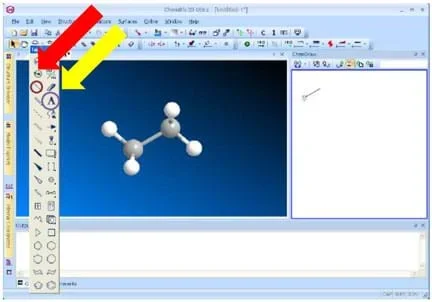 Figure 8. Use the circled buttons to create a model of ethane in ChemDraw.Copyright Robert A Scott, XAS Tutorials, Department of Chemistry, University of Georgia http://rscott.myweb.uga.edu/TutXAS3D.html
 - Once students have created their molecules, review the definitions of staggered and eclipsed conformations. Refer to the Figure 9 images to assist in making the connection between the 3D ChemDraw program and the 3D robotic simulations. Expect students to be able to visualize the staggered and eclipsed conformations on the robot when it is moving.
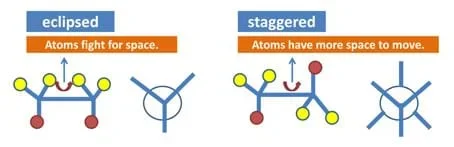 Figure 9. Images to help in explaining the vocabulary terms.Copyright 2011 Jennifer S. Haghpanah, AMPS Program, Polytechnic Institute of NYU
- atom
- A basic unit of matter comprised of a dense nucleus with protons + neutrons and a cloud of electrons surrounding the nucleus.
- eclipsed conformation
- The maximum energy conformation in which the adjacent atoms are in the closest proximity to one another.
- newman projections
- Used to visualize chemical conformations of carbon-carbon bonds with the front carbon represented as a dot and the back carbon represented as a circle.
- staggered conformation
- The energy minimum conformation, in which the substituents have the maximum distance from one another and require torsion angles of 60°.
- steric hindrance
- When two atoms in a molecule try to fight for space and face overlapping electron clouds, which causes an increase in the energy for the molecule.
Pre-Activity Assessment
Guessing Game: Ask students to predict: Which conformation requires the most energy? (Answer: Eclipsed conformation because of steric hindrance.)
Activity Embedded Assessment
Design a Robot: Ask students what they learned from the robot design and what they learned from the ChemDraw program. (Answer: ChemDraw shows students the molecules with the appropriate sizes and energies, but the molecular modeling robot provides insight on how the robot moves with the different sizes atoms.)
Post-Activity Assessment
Worksheet: Have students complete the Molecular Modeling Worksheet (PDF) late in the activity or at activity end. Review their drawings and answers to gauge their comprehension of the material.
If time permits, challenge students to design their own molecular robot programs to do the same thing but in a different way. For example, vary the size and color of the molecular model atoms so the sensors respond differently and create programs that work with them, generating different data logging results. The robot should be able to recognize different ball sizes with the ultrasonic sensor and different colored atoms with the color sensor. Provide students with different sizes of Styrofoam balls and colors of construction paper to do this.
Challenge students to design a new molecule to deliver a drug in the body. Students should think about where the drug will bind to the molecule (or perhaps whether the molecule will "cage" the drug), and how the molecule will travel through the body (including how hindered the molecule will be due to its structure). Is the goal of this drug to be easy or difficult to break down and release the drug? If time allows, students can model these novel molecular designs with ChemDraw and/or their robots (this new molecule may require robot modification).
- For advanced students, work with them to create the robot program in advance of conducting the main part of the activity. Or, once students complete their finalized (class-approved) robot designs, show them the molecular model robot and how it works with the sensors, and give them time to experiment, perhaps creating their own robot programs, as described in the Activities Extensions section.
Contributors
Jennifer S. Haghpanah; Jill Fonda; Noam Pillischer; Jin Kim Montclare
Supporting Program
AMPS GK-12 Program, Polytechnic Institute of New York University
Acknowledgements
This activity was developed by the Applying Mechatronics to Promote Science (AMPS) Program funded by National Science Foundation GK-12 grant no. 0741714. However, these contents do not necessarily represent the policies of the NSF, and you should not assume endorsement by the federal government.
Copyright
2013 by Regents of the University of Colorado; original © 2011 Polytechnic Institute of New York University