
Creative Engineering Design: Tinkercad 3D Design & EV Concept Car Workshop
 Word Cloud describing CADCopyright 2022 Madhav-Malhotra-003, CCO 1.0 DEED, Wikimedia, https://commons.wikimedia.org/wiki/File:Computer_Aided_Design_Word_Cloud.png
Students follow a guided engineering skills workshop presentation using the free online Tinkercad web app to design a model 3D EV concept car design. Tinkercad offers students an introduction to learning basic computer-aided design (CAD) skills. Teachers can create and manage classes, activities, etc. in Tinkercad to enable students to explore CAD in both in-school and online learning environments.
Engineers use CAD for prototyping, education, collaboration, and quick design tasks. It serves as a valuable tool for introducing individuals to the world of 3D design and can be an asset in the early stages of the engineering design process.
Introduce and engage students in learning and applying basic computer-aided design (CAD) skills, which is part of an essential engineering skill set.
Support teachers to build their capacity in CAD by offering a ready-to-teach introduction to 3D design workshop that students can complete with minimal assistance.
Offer students a creative opportunity to focus on the “Imagine” step of the Engineering Design Process, as they build an understanding of 3D design via the Tinkercad web app.
After this activity, students should be able to:
- Use Tinkercad to introduce CAD concepts
- Design a 3D model EV concept car
- Apply the “Imagine” step of the Engineering Design Process
- SEP.12.9-12.3 Create a computational model or simulation of a phenomenon, designed device, process, or system.
Grades 9-12
Do you agree with this alignment? - CCC.4.9-12.10 Models (e.g., physical, mathematical, computer models) can be used to simulate systems and interactions—including energy, matter, and information flows—within and between systems at different scales.
Grades 9-12
Do you agree with this alignment? - DCI.ETS1.B.9-12.12 Both physical models and computers can be used in various ways to aid in the engineering design process. Computers are useful for a variety of purposes, such as running simulations to test different ways of solving a problem or to see which one is most efficient or economical; and in making a persuasive presentation to a client about how a given design will meet his or her needs.
Grades 9-12
Do you agree with this alignment?
Each student/pair needs:
- 1 laptop/computer with internet connection: Windows, Mac, or Chrome OS recommended (but not needed)
- Free Tinkercad Account (Go to https://www.Tinkercad.com)
For the entire class:
- 1 teacher laptop/computer with access to the internet
- Tinkercad Account (Go to https://www.Tinkercad.com)
- Projector
Do you know what CAD stands for? CAD means computer-aided design. Using a computer and CAD software, engineers, architects, builders, artists, interior and fashion designers, plus many others use CAD to efficiently create precise 2D drawings and 3D models. Have you ever used CAD software or know someone who does?
CAD is a fantastic tool that engineers use to design physical products in a time- and cost-effective way that can change our world for the better. For example, automotive, electrical, and mechanical engineers use CAD to develop new transportation technologies like electric and hydrogen-powered vehicles that do not emit air pollutants or greenhouse gasses while they drive, thus helping to improve air quality and climate impacts of our transportation system. Do you know of any examples of how CAD shapes our world?
In this Tinkercad 3D Design & EV Concept Car workshop, students will first be introduced to CAD through the Tinkercad 3D Design online application to help build spatial visualization skills, which is an essential skill set for engineering. Once students are comfortable with the Tinkercad 3D Design interface, they will design their own model EV concept car project simulating what automotive engineers do using the software.
Mastering Tinkercad is an easy-to-learn first step toward pursuing more sophisticated and advanced CAD software, so have fun and be creative!
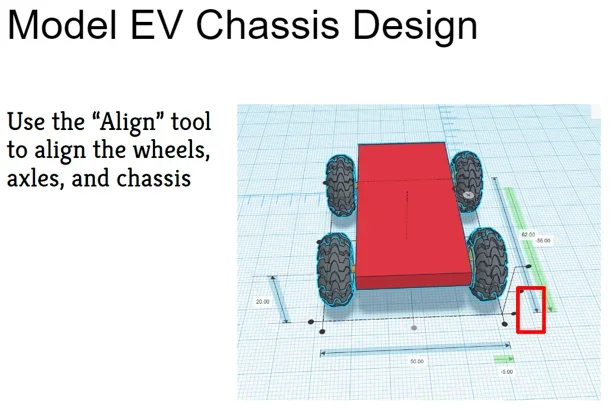 Screenshot of Tinkercad 3D Design EV Concept Car Skills Workshop Slides.Copyright 2021 Jennifer Taylor
Background
Beforehand, teachers should familiarize themselves with the Tinkercad web application by setting up an educator account:
- Go to Tinkercad.com > Sign Up > select “Educators” > agree to terms > sign in with Google email or other school email
- Once the account is set up, click on the upper right account icon > select “Profile” > for “How will you use Tinkercad?” select “Teacher” to enable classes to be created
- Add classes by selecting “Create a New Class” > set up class > select the class and share the class link with students to join Tinkercad
- Review the “Classrooms” tab for guidance for integrating classes and students in Tinkercad
- Review the “Resources” tab for guidance and ideas on using Tinkercad, etc.
- NOTE: Google Workspace admins may need to allow login to Google for Tinkercad (details here)
Before the Activity
- Teachers should review the Tinkercad Model EV Concept Car Workshop Presentation to become familiar with its content and format.
- Teachers should set up the PowerPoint and projector before class.
- Suggested timeline:
- Day 1 (Part 1: Introduction to Tinkercad, Part 2: Design chassis, axles, and wheels)
- Day 2 (Part 3: Design car body, windows, doors, etc., Part 4: Design review)
During the Activity
Tinkercad 3D Design & EV Concept Car Design Workshop
Part 1: Introduction to Tinkercad & Car Chassis Design
Session 1: Introduction to Tinkercad
- Read through the Introduction/Motivation section.
- Have students follow along on their laptops using their own Tinkercad accounts.
- Display and go through session 1 of the Tinkercad 3D Design & EV Concept Car Workshop Presentation.
- Explain CAD and 2D & 3D design
- Introduce the Tinkercad interface
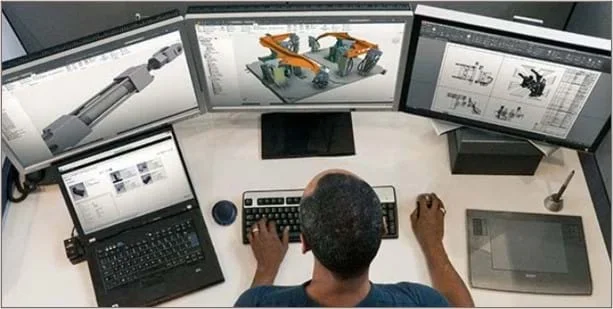 Engineers, architects, artists, and others use CAD to create precise 2D drawings and 3D models.Copyright https://damassets.autodesk.net/content/dam/autodesk/www/solutions/cad-software/mechanical-engineers-thumb-600x300.jpg
Session 2: Car Chassis Design
- Display and go through session 2 of the Tinkercad 3D Design & EV Concept Car Workshop Presentation.
- Have students follow along on their laptops using their own Tinkercad accounts to create a car chassis by going to Design > Create > 3D to make a new design
- Make the chassis
- Add wheels
- Add axles
- Align the chassis, axles, and wheels to complete the chassis
- Rename the chassis design (Tinkercad autosaves projects)
Part 2: Concept Car Body Design & Review
Session 3: Concept Car Body Design
- Display session 3 of the Tinkercad 3D Design & EV Concept Car Workshop Presentation. They now have the opportunity to be creative and dive into the third step of the engineering design process: imagine!
- Have students follow along on their laptops using their own Tinkercad accounts.
- Let students choose shapes to combine to form the custom car body using their chassis 3D project from the previous sessions.
- Have students add shapes, select holes, etc., and group objects to form their concept car body, windows, etc.
- Let students customize their concept car wheels, colors, etc.
- Ensure students group their objects as they finalize their concept car body.
- Encourage students to think out of the box and try different designs. There is no one right design!
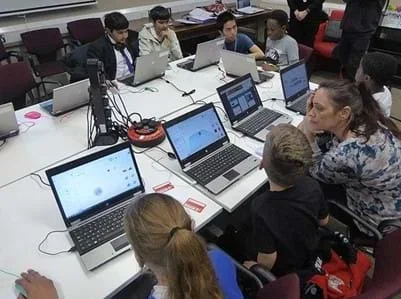 Students using Tinkercad 3D DesignCopyright 2018 Libraries TaskForce, CC BY 2.0 DEED, Wikimedia, source link.
Session 4: Concept Car Design Review
- Display and go through session 4 of the Tinkercad 3D Design & EV Concept Car Workshop Presentation.
- Have students follow along on their laptops using their own Tinkercad accounts.
- Have students share their concept car designs with the class.
- Have students reflect on the following questions:
- What was the best part of creating your design?
- What was the most challenging part of creating your design?
- How would you change your design next time?
- tinkercad
- A free web app for 3D design, electronics, and coding. We’re the ideal introduction to Autodesk, a global leader in design and make technology.
- two-dimensional (2d)
- Having or appearing to have length and breadth but no depth.
- three-dimensional (3d)
- Having or appearing to have length, breadth, and depth.
- spatial visualization
- Also called spatial intelligence, is a measure of the ability to look at a two-dimensional figure and visualize what it would look like expanded into three dimensions.
- isometric view
- Isometric view, or pictorial drawing, represents an object in three dimensions by showing 3 surfaces of the object in one drawing.
- orthographic view
- Orthographic view, or plan view drawing, represents an object in two dimensions by showing each surface of the object in its actual shape.
- axle
- A rod or spindle (either fixed or rotating) passing through the center of a wheel or group of wheels.
- chassis
- The base frame of a motor vehicle.
Pre-Activity Assessment
Ask students if they know what CAD stands for or if they have an example of how it is used. Explain the acronym CAD stands for computer-aided design and that there are many examples of CAD used in the real world, such as 3D printing, architectural and car design, fashion and interior design, medical and dental prosthetics, etc.
Activity Embedded (Formative) Assessment
Students share their 3D concept car body design with the class.
Post-Activity (Summative) Assessment
Students reflect on the following questions:
- What was the best part of creating your design?
- What was the most challenging part of creating your design?
- How would you change your design next time?
- ASPIRE Creative Engineering Design
- Creative Engineering Design: Paper Tower Design Challenge
- Creative Engineering Design: Efficient Car Design
- Creative Engineering Design: Straw Bridge Design Challenge
- Creative Engineering Design: Engineering Design Process & Design Thinking
- Creative Engineering Design: Creative Crash Testing Design Challenge
- Creative Engineering Design: Environmental Impact StoryMap Collection
- Creative Engineering Design: Mouse Trap Car Design Challenge
- Creative Engineering Design: Tinkercad 3D Design & EV Concept Car Workshop
- Creative Engineering Design: Carbon Footprints and Transportation
- Creative Engineering Design: Tinkercad Circuits & EV Motor Workshop
- Creative Engineering Design: Transportation Fuels Debate
- Creative Engineering Design: Model EV Design Challenge
Contributors
Jennifer Taylor
Supporting Program
Integrated Teaching and Learning Program, College of Engineering, University of Colorado Boulder
Acknowledgements
This curriculum was developed under National Science Foundation grant numbers 1941524 and 1941701. Any opinions, findings, and conclusions, or recommendations expressed in this material are those of the authors and do not necessarily reflect the views of the National Science Foundation.
Copyright
2023 by Regents of the University of Colorado