
Follow the Line: Programming Robots with Color Sensors
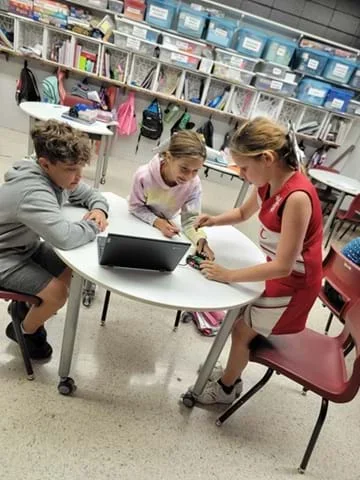 Students collaborate on a STEM robotics projectCopyright Internal photo provided by Rhonda LaCount, Black Hawk Elementary
Student groups are challenged to program robots with color sensors to follow a black line. Learning both the logic and skills behind programming robots for this challenge helps students improve their understanding of how robots both “see” and "think" and widens their appreciation for the complexity involved in programming micro:bit-Cutebot robots to do what appears to be a simple task. Part 1 includes an activity to appreciate human vision to complete simple tasks. In Part 2, they test their ideas for approaches to solve the robot challenge and ultimately learn a (provided) working programming solution. They think of real-world applications for line follower robots that use sensor input.
Engineers incorporate sensors into machines to make them perform complex, precise, and/or tedious tasks. For example, engineers who work for car manufacturers design robots that paint car parts, such as car bodies, hoods, and doors. To achieve an even coat of paint, these robots must maintain a consistent distance between the paint applicator and the part. The robots use sensors to determine the distance between the paint applicator and the surface to be painted. The line follower concept shown in this activity has applications for running mass transit systems and autonomous cars on highways, as well to deliver mail in office buildings, move items through factory assembly lines and deliver medications to hospitals.
After this activity, students should be able to:
- Explain how a color sensor works.
- Develop and explain the logic behind programs that instruct robots to use color sensor readings to make decisions.
- STEL-7I Apply the technology and engineering design process.
Grades 3-5
Do you agree with this alignment? - STEL-7J Evaluate designs based on criteria, constraints, and standards.
Grades 3-5
Do you agree with this alignment? - STEL-7R Refine design solutions to address criteria and constraints.
Grades 6-8
Do you agree with this alignment?
- 3-5-ETS1-1 Define a simple design problem reflecting a need or a want that includes specified criteria for success and constraints on materials, time, or cost.
Grades 3-5
This resource focuses on the following Three Dimensional Learning aspects of NGSS:
Science & Engineering Practices- Define a simple design problem that can be solved through the development of an object, tool, process, or system and includes several criteria for success and constraints on materials, time, or cost.Do you agree with this alignment?
Disciplinary Core Ideas- Possible solutions to a problem are limited by available materials and resources (constraints). The success of a designed solution is determined by considering the desired features of a solution (criteria). Different proposals for solutions can be compared on the basis of how well each one meets the specified criteria for success or how well each takes the constraints into account.Do you agree with this alignment?
Crosscutting Concepts- People's needs and wants change over time, as do their demands for new and improved technologies.Do you agree with this alignment?
Do you agree with this alignment? - Define a simple design problem that can be solved through the development of an object, tool, process, or system and includes several criteria for success and constraints on materials, time, or cost.
- 3-5-ETS1-2 Generate and compare multiple possible solutions to a problem based on how well each is likely to meet the criteria and constraints of the problem.
Grades 3-5
This resource focuses on the following Three Dimensional Learning aspects of NGSS:
Science & Engineering Practices- Generate and compare multiple solutions to a problem based on how well they meet the criteria and constraints of the design problem.Do you agree with this alignment?
Disciplinary Core Ideas- Research on a problem should be carried out before beginning to design a solution. Testing a solution involves investigating how well it performs under a range of likely conditions.Do you agree with this alignment?
- At whatever stage, communicating with peers about proposed solutions is an important part of the design process, and shared ideas can lead to improved designs.Do you agree with this alignment?
Crosscutting Concepts- Engineers improve existing technologies or develop new ones to increase their benefits, to decrease known risks, and to meet societal demands.Do you agree with this alignment?
Do you agree with this alignment? - Generate and compare multiple solutions to a problem based on how well they meet the criteria and constraints of the design problem.
- 3-5-ETS1-3 Plan and carry out fair tests in which variables are controlled and failure points are considered to identify aspects of a model or prototype that can be improved.
Grades 3-5
This resource focuses on the following Three Dimensional Learning aspects of NGSS:
Science & Engineering Practices- Plan and conduct an investigation collaboratively to produce data to serve as the basis for evidence, using fair tests in which variables are controlled and the number of trials considered.Do you agree with this alignment?
Disciplinary Core Ideas- Tests are often designed to identify failure points or difficulties, which suggest the elements of the design that need to be improved.Do you agree with this alignment?
- Different solutions need to be tested in order to determine which of them best solves the problem, given the criteria and the constraints.Do you agree with this alignment?
Do you agree with this alignment? - Plan and conduct an investigation collaboratively to produce data to serve as the basis for evidence, using fair tests in which variables are controlled and the number of trials considered.
- MS-ETS1-1 Define the criteria and constraints of a design problem with sufficient precision to ensure a successful solution, taking into account relevant scientific principles and potential impacts on people and the natural environment that may limit possible solutions.
Grades 6-8
This resource focuses on the following Three Dimensional Learning aspects of NGSS:
Science & Engineering Practices- Define a design problem that can be solved through the development of an object, tool, process or system and includes multiple criteria and constraints, including scientific knowledge that may limit possible solutions.Do you agree with this alignment?
Disciplinary Core Ideas- The more precisely a design task's criteria and constraints can be defined, the more likely it is that the designed solution will be successful. Specification of constraints includes consideration of scientific principles and other relevant knowledge that is likely to limit possible solutions.Do you agree with this alignment?
Crosscutting Concepts- The uses of technologies and any limitations on their use are driven by individual or societal needs, desires, and values; by the findings of scientific research; and by differences in such factors as climate, natural resources, and economic conditions.Do you agree with this alignment?
- All human activity draws on natural resources and has both short and long-term consequences, positive as well as negative, for the health of people and the natural environment.Do you agree with this alignment?
Do you agree with this alignment? - Define a design problem that can be solved through the development of an object, tool, process or system and includes multiple criteria and constraints, including scientific knowledge that may limit possible solutions.
- MS-ETS1-2 Evaluate competing design solutions using a systematic process to determine how well they meet the criteria and constraints of the problem.
Grades 6-8
This resource focuses on the following Three Dimensional Learning aspects of NGSS:
Science & Engineering Practices- Evaluate competing design solutions based on jointly developed and agreed-upon design criteria.Do you agree with this alignment?
Disciplinary Core Ideas- There are systematic processes for evaluating solutions with respect to how well they meet the criteria and constraints of a problem.Do you agree with this alignment?
Do you agree with this alignment? - Evaluate competing design solutions based on jointly developed and agreed-upon design criteria.
- MS-ETS1-4 Develop a model to generate data for iterative testing and modification of a proposed object, tool, or process such that an optimal design can be achieved.
Grades 6-8
This resource focuses on the following Three Dimensional Learning aspects of NGSS:
Science & Engineering Practices- Develop a model to generate data to test ideas about designed systems, including those representing inputs and outputs.Do you agree with this alignment?
Disciplinary Core Ideas- Models of all kinds are important for testing solutions.Do you agree with this alignment?
- The iterative process of testing the most promising solutions and modifying what is proposed on the basis of the test results leads to greater refinement and ultimately to an optimal solution.Do you agree with this alignment?
Do you agree with this alignment? - Develop a model to generate data to test ideas about designed systems, including those representing inputs and outputs.
Each group needs:
- 1 micro:bit starter kit
- 1 Elecfreaks Cutebot (https://www.adafruit.com/product/4575)
- 1 Elecfreaks Cutebot Line Follower Track (folded paper comes with the kit)
- 1 laptop or computer to program the micro:bit with (Computer needs a USB-A port. If it has a USB-C port, a USB A-to-C adapter will be needed to connect the micro:bit to the computer.)
- 1 Line Follower Challenge Pre-Quiz (PDF) per student
- 1 Line Follower Challenge Post-Quiz (PDF) per student
To share with the entire class:
- Line Follower Challenge Presentation (PPTX)
- 1 laptop or computer with projector to show the presentation
- Line Follower Presentation (pptx)
- Line Follower Presentation (pdf)
- Line Follower Challenge Pre-Quiz (docx)
- Line Follower Challenge Pre-Quiz (pdf)
- Line Follower Challenge Pre-Quiz Answer Key (docx)
- Line Follower Challenge Pre-Quiz Answer Key (pdf)
- Line Follower Challenge Post-Quiz (docx)
- Line Follower Challenge Post-Quiz (pdf)
- Line Follower Challenge Post-Quiz Answer Key (docx)
- Line Follower Challenge Post-Quiz Answer Key (pdf)
- Microbit Line Follower Hex File (hex)
Students should be familiar with
- Block-based or text-based programming.
- Logic gates or conditional statements in programming.
Today’s challenge is to design and program a robot that can follow a black line using its color sensor.
Each group will develop a program that allows its robot to reliably stay on track as it moves along a taped path. At first this may seem simple, but you’ll quickly find that the robot is constantly making small decisions: Am I still on the line? Did I drift left or right? How do I correct my movement?
So how will you make it work?
Think of the built-in color sensors as the robot’s “eyes.” These sensors are constantly reading the surface beneath the robot and sending information back to the micro:bit. This input tells the robot whether it is currently on the black line or off the line on the surrounding surface.
With this real-time feedback, the micro:bit can make decisions about how to adjust the motors. For example, if the sensor detects that the robot has drifted off the line to one side, the program can correct by slowing one motor and speeding up the other, gently steering the robot back toward the line. If it detects the line again, it adjusts accordingly.
This process repeats continuously in a loop: sense → decide → act. That feedback loop is what allows the robot to “track” the line instead of just driving forward blindly.
Your goal is to build a program that uses sensor input to keep the robot’s “eyes” centered on the black tape as it moves. When the robot is correctly tuned, it should be able to navigate the path smoothly and continuously without leaving the line.
Before the Activity
- Gather materials for each group.
- Make copies of the Line Follower Challenge Pre-Quiz (PDF) and Line Follower Challenge Post-Quiz (PDF), one each per student. (Note: The quizzes and their answers are also embedded in the presentation, so they can be presented to the class, if desired.)
- Assemble the Elecfreaks Cutebot (with micro:bit inserted) by following the instructions found in the box.
- Find a clear space on a smooth floor for one (or more) of the Elecfreaks Cutebot Line-Tracker Track, which is a folded piece of paper with a dark line for the robot to follow.
- Set up a computer/projector to show the Line Follower Presentation (PPTX)to teach and conduct the activity with the class.
- Review the solution program on Slides 11-17 to fully understand the logic used in this program and to be able to explain it to students after they have had a chance to try developing their own programs.
- Arrange for enough computers so you have one for each student group.
- Mark four paper points on the ground in the classroom (e.g., the corners of a five-foot square.) Note: You can increase the degree of difficulty by spacing the points farther apart.)
With the Students
Part I – Human Robot
- Divide the students into pairs.
- Explain the challenge: One person in each pair will close their eyes while the second team member will direct the first one around the room using verbal commands.
- The goal is to become the first group to have the member with their eyes closed touch all four points.
- After all the students have had the opportunity to touch at least a few of the points, bring the class back together to discuss what they discovered.
- Ask students questions about the exercise they just completed to begin a discussion about what happened. Example questions:
- What did you find easy/difficult?
- What was the hardest part about the exercise?
- Do you think this is a realistic way to think about a robot's computer sending outputs to tell the robot to move? Why or why not?
- Ensure students end the activity with the following takeaways:
- The important thing is for the students to discuss how the exercise is similar to or different from an actual robot.
- Expect that they will have discovered that it is difficult to command someone who is unable to sense their environment.
- It is also difficult to give thorough and precise commands without missing steps and details.
- Their experiences model the many challenges and difficulties in programming robots.
- Instructions must be very precise, with EVERY detail included.
Part II: Line Follower Challenge (with the students)
- Distribute one Line Follower Challenge Pre-Quiz (PDF) (also Slide 2 with answers on Slide 3) to each student.
- Give students 5 minutes to answer the pre-quiz questions.
- Discuss the pre-quiz answers as a class after students have filled out the sheets.
- Introduce (or review) the engineering design process and walk through the seven steps shown in Image 1.
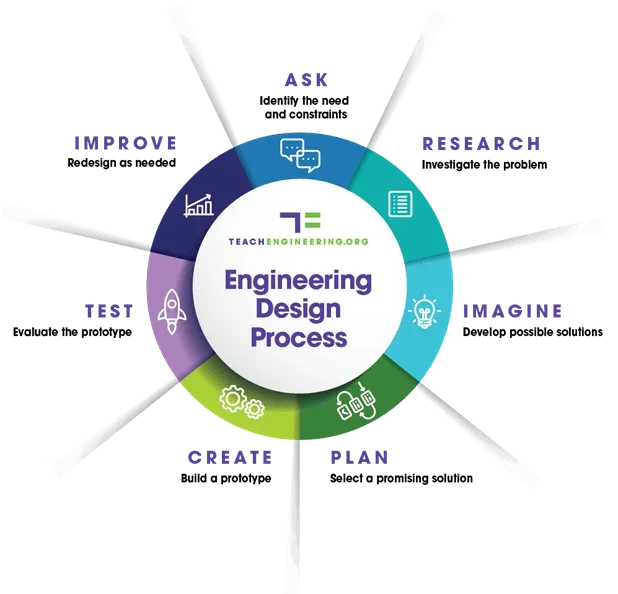 The engineering design process.Copyright Teachengineering.org
- Ask: Use Slide 4 to introduce the line follower design challenge: Program a robot to follow a black line, using color sensors as their "eyes."
- Research: Before students begin the design challenge, provide a refresher on how the color sensor works using Slides 5-8.
- Explain the reflectivity of light and how the micro:bit represents them.
- Explain that colors close to white reflect more light and colors close to black reflect less light.
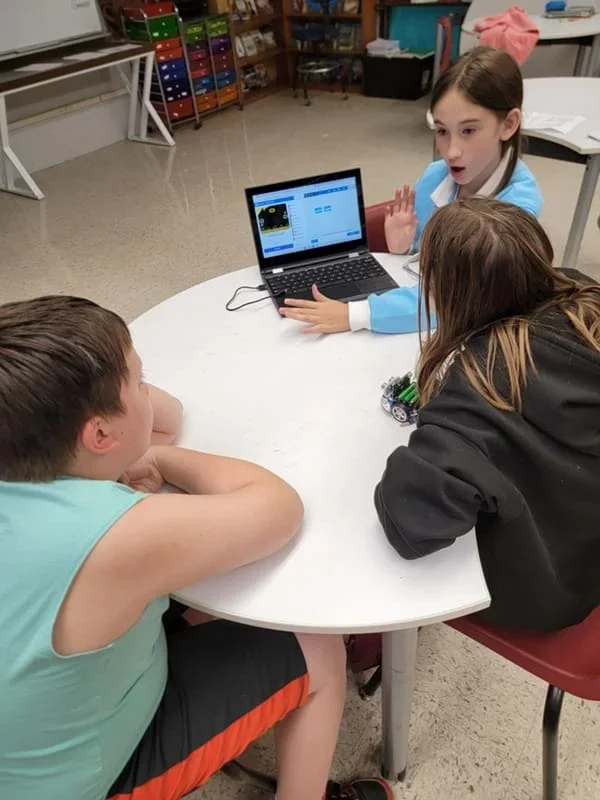 Student team members engage in a formative assessment of their code, discussing the logic of their block-based program before flashing it to the Cutebot.Copyright Internal photo provided by Rhonda LaCount, Black Hawk Elementary
- Show students the provided Elecfreaks line course on the floor as described on Slide 9.
- Divide the students into groups of three.
- Imagine and Plan: Give the groups 15-20 minutes to create their line follower programs.
- Direct groups to begin by brainstorming the logic for a program that instructs the robot to successfully follow the line.
- Encourage students to use what they have learned about programming from previous activities.
- Create:
- Provide each group with a Cutebot with batteries and micro:bit inserted.
- Have each group flash their code that they wrote on MakeCode to their robot.
Students collaborate on a STEM robotics project, using a laptop to program and troubleshoot their prototype in a classroom setting.Copyright Internal photo provided by Rhonda LaCount, Black Hawk Elementary
- Test:
- Give the groups 20-30 minutes to test their robots on the track and make changes to their program designs.
- To test a line follower program, position the robot's color sensor over the line and start the program.
- Remind students that the testing and redesign steps of the engineering design process are when engineers test their ideas to see if they meet the challenge, and re-design as necessary.
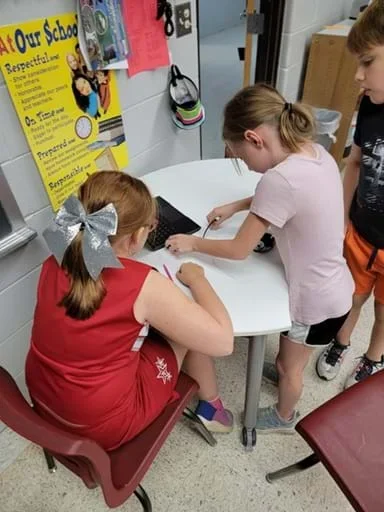 Students collaborate on a STEM robotics project, using a laptop to program their robot.Copyright Internal photo provided by Rhonda LaCount, Black Hawk Elementary
- Share Out: Gather the class together so each group can demonstrate the performance of its robot and designed program.
- Optional: Once students have attempted to complete the line follower challenge, walk them through the logic of the complex solution (on Slides 10-17), and explain how to generate the program step by step.
- Reflect: Discuss the activity as a class, particularly what students learned and any issues or problems. Specifically, ask students:
- How many groups experienced some unsuccessful program design attempts?
- What were some of your programming design ideas that did not work?
- Did the successful program design surprise you?
- Can you understand why engineers say they learn more from failures than successes?
- Administer the Line Follower Challenge Post-Quiz (PDF) (also on Slide 19 with answers on Slide 20).
- Review the answers as a class.
- Optional: Slide 21 presents vocabulary words and definitions.
- design
- Loosely defined, the art of creating something that does not exist.
- engineering
- The use of science and mathematics to solve problems to improve the world around us.
Pre-Activity Assessment
Pre-Quiz: Before starting the activity, administer the two-question Line Follower Challenge Pre-Quiz (PDF)by handing out paper copies (also on Slide 2). Use the pre-quiz to assess students' prior knowledge of how color sensors work and encourage them to brainstorm how a program for this challenge could include the robot turning. The answers are provided on the Line Follower Challenge Pre-Quiz Answer Key (PDF)(and Slide 3).
Activity Embedded (Formative) Assessment
Line Follower Challenge: Assess each group's performance in the line follower challenge using the following rubric (maximum 20 points).
- The program logic was correct. (10 points maximum) (Note: Refer to solution on Slides 10-17.)
- The group iterated several times and improved its design. (10 points maximum)
Post-Activity (Summative) Assessment
Concluding Discussion: At the end of the activity, lead a class discussion so students can share their observations, difficulties, questions, and conclusions. How many unsuccessful program design attempts did your team go through? What were some of your programming design ideas that did not work? Did the successful program design surprise you? Mention that sometimes engineers say they learn more from failures than successes. Use this opportunity to gauge student comprehension.
Post-Quiz: At the end of the activity, administer the two-question Line Follower Challenge Post-Quiz (PDF)by handing out paper copies (also Slide 15). Review students' answers to assess their individual understanding of the logic in the program solution for this challenge and ability to relate this logic to real-world engineering problems. Answers are provided on the Line Follower Challenge Post-Quiz Answer Key (PDF) (and Slide 16).
If the robot does not follow a black line, check for these common problems:
- The black line may need to be thicker; if the line is very thin, the color sensor response time might be too slow.
- The light level used in the switch statement (Step 2) might need to be raised or lowered, depending on the surface color/reflectivity of the black line. It is often helpful for debugging to view the output of the color sensor directly from the EV3, via the View menu option.
- Make sure the sensors/motors are connected to the correct ports.
- Read back through the instructions and make sure all of the properties for the commands are set correctly.
For lower grades, provide more of the micro:bit code as a starting point. For example, you might give students the basic loop structure and the logic for reading the three possible sensor outputs. Students would then focus on deciding how each sensor reading affects the speed and direction of the Cutebot wheels.
Alternatively, you could provide the motor speed values needed for turning left, turning right, and moving straight, and have students determine the logic that connects each sensor reading to the correct movement.
For older or more advanced students, provide less of the starter code. In an intermediate version of the activity, you might give students only the main loop structure and require them to develop both the decision-making logic for interpreting sensor data and the motor speed values for controlling the robot.
For the most advanced students, provide no starter code at all. Instead, guide them by identifying the key programming components or “tabs” they will need (such as input, logic, and motor control), and have them independently build the full program from scratch.
Contributors
Rhonda LaCount (Teacher / Primary Author); Dr. David Bergin; Shokhsanam Uktamova (Undergraduate Student); Jack Kidnie (Undergraduate Student); David Fague (PhD Student / Mentor); Dr. Satish S. Nair (PI)
Supporting Program
Research Experience for Teachers (RET), University of Missouri
Acknowledgements
This work is based on work supported in part by the National Science Foundation under grant no. EEC-1801666—Research Experiences for Teachers at the University of Missouri. Any opinions, findings and conclusions or recommendations expressed in this material are those of the authors and do not necessarily reflect the views of the National Science Foundation.
Copyright
2026 by Regents of the University of Colorado; original © 2024 University of Missouri