
Follow the Light
Legacy Curriculum
Hey there! This curriculum is no longer being curated or supported. It may contain materials that are no longer available or outdated information. Please use this document for reference.
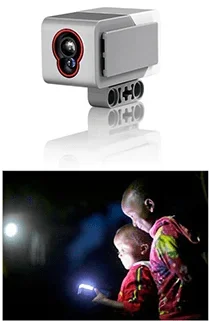 Students program LEGO robots to follow flashlight beams using EV3 color sensor input.Copyright (top) LEGO MINDSTORMS EV3; (bottom) 2009 Christian Reitter, Wikimedia Commons
http://iipdigital.usembassy.gov/st/english/article/2013/11/20131125287867.html#axzz2ll0npPnd
Students program LEGO robots to follow flashlight beams using EV3 color sensor input.Copyright (top) LEGO MINDSTORMS EV3; (bottom) 2009 Christian Reitter, Wikimedia Commons
http://iipdigital.usembassy.gov/st/english/article/2013/11/20131125287867.html#axzz2ll0npPnd
Students' understanding of how robotic color sensors work is reinforced in a design challenge involving LEGO® MINDSTORMS® EV3 robots and color sensors. Working in pairs, students program LEGO robots to follow a flashlight as its light beam moves around. Students practice and learn programming skills and logic design in parallel. They see how robots take input from color sensors and use it to make decisions to move, similar to the human sense of sight. Students also see how they perform the steps of the engineering design process in the course of designing and testing to achieve a successful program. A PowerPoint® presentation and pre/post quizzes are provided.
Color sensors are showing up in many products and devices. They can detect the ambient and reflected light of their surroundings and nearby objects, and be programmed to trigger follow-up behavior. For instance, many color sensors detect when it gets dark and "automatically" turn on streetlamps, headlights and parking lot lights. It is common to find cameras that use color sensors to monitor buildings, stores and schools. Other color sensors are used to read the numbers from swiped credit cards.
Computer programming is a component of many modern engineering designs. As students design robot programs in this activity, they begin with a "goal" or "concept" of what the program solution needs to do, before they begin writing the code. Next, the process of working on the code and "debugging" it inherently constitutes "revising and improving their designs based on the results of testing." In that sense, the thought processes required to code programs that meet problem constraints are very similar, if not identical, to the thought processes required for traditional engineering design of physical structures and products.
After this activity, students should be able to:
- Program a LEGO robot to take input from color sensors and activate motors to follow a light source.
- Explain how the program and the color sensors work.
- Relate the program (robotic response to color sensor information) to human responses to light.
- Students will develop an understanding of the attributes of design.
Grades K-12
Do you agree with this alignment? - Students will develop an understanding of engineering design.
Grades K-12
Do you agree with this alignment? - Students will develop abilities to apply the design process.
Grades K-12
Do you agree with this alignment? - STEL-3G Explain how knowledge gained from other content areas affects the development of technological products and systems.
Grades 6-8
Do you agree with this alignment?
- Describe how new technologies have helped scientists make better observations and measurements for investigations (e.g., telescopes, electronic balances, electronic microscopes, x-ray technology, computers, ultrasounds, computer probes such as thermometers)
Grade 5
Do you agree with this alignment?
- MS-ETS1-2 Evaluate competing design solutions using a systematic process to determine how well they meet the criteria and constraints of the problem.
Grades 6-8
This resource focuses on the following Three Dimensional Learning aspects of NGSS:
Science & Engineering Practices- Evaluate competing design solutions based on jointly developed and agreed-upon design criteria.Do you agree with this alignment?
Disciplinary Core Ideas- There are systematic processes for evaluating solutions with respect to how well they meet the criteria and constraints of a problem.Do you agree with this alignment?
Do you agree with this alignment? - Evaluate competing design solutions based on jointly developed and agreed-upon design criteria.
- MS-ETS1-4 Develop a model to generate data for iterative testing and modification of a proposed object, tool, or process such that an optimal design can be achieved.
Grades 6-8
This resource focuses on the following Three Dimensional Learning aspects of NGSS:
Science & Engineering Practices- Develop a model to generate data to test ideas about designed systems, including those representing inputs and outputs.Do you agree with this alignment?
Disciplinary Core Ideas- Models of all kinds are important for testing solutions.Do you agree with this alignment?
- The iterative process of testing the most promising solutions and modifying what is proposed on the basis of the test results leads to greater refinement and ultimately to an optimal solution.Do you agree with this alignment?
Do you agree with this alignment? - Develop a model to generate data to test ideas about designed systems, including those representing inputs and outputs.
Each group needs:
- LEGO MINDSTORMS EV3 robot, such as EV3 Core Set (5003400) at https://education.lego.com/en-us/products/lego-mindstorms-education-ev3-core-set/5003400#lego-mindstorms-education-ev3; while one color sensor comes in the core set, additional color sensors can be purchased separately at https://shop.lego.com/en-US/EV3-Color-Sensor-45506
- computer, loaded with EV3 software
- flashlight
- Follow the Light Pre-Quiz (PDF), one per student
- Follow the Light Post-Quiz (PDF), one per student
To share with the class:
- Follow the Light Presentation (PPTX), a Microsoft® PowerPoint® file
- computer and projector, to show the presentation
Note: This activity can also be conducted with the older (and no longer sold) LEGO MINDSTORMS NXT set instead of EV3; see below for those supplies:
- LEGO MINDSTORMS NXT robot, such as the NXT Base Set
- computer, loaded with NXT 2.1 software
- Follow the Light Presentation (pptx)
- Follow the Light Presentation (pdf)
- Follow the Light Pre-Quiz (docx)
- Follow the Light Pre-Quiz (pdf)
- Follow the Light Pre-Quiz Answer Key (docx)
- Follow the Light Pre-Quiz Answer Key (pdf)
- Follow the Light Post-Quiz (docx)
- Follow the Light Post-Quiz (pdf)
- Follow the Light Post-Quiz Answer Key (docx)
- Follow the Light Post-Quiz Answer Key (pdf)
- Experience using and programming the LEGO MINDSTORMS EV3 robot and intelligent brick (computer) so that it takes input from sensors for decision making.
- An understanding of how sound sensors work, both human and robotic, as presented in the associated lesson.
- Completion of the What Is a Computer Program? (unit 3) so students have the knowledge and experience to create LEGO programs.
- Completion of previous lessons and activities in this unit, specifically the What Is a Sensor? lesson.
You have learned how light is sensed by your eyes and robotic color sensors from the previous lesson. Now, how do we implement the "stimulus-sensor-coordinator-effector-response" framework in a LEGO robot?
Today, your design challenge is to carefully program the LEGO robot to move based on sensing light. It must use information detected from its color sensor to follow a beam of light. Let's get started!
Before the Activity
- Gather materials and make copies of the Follow the Light Pre-Quiz (PDF) and Follow the Light Post-Quiz (PDF), one each per student. The quizzes are provided as separate attachments, and also embedded in the presentation so they can be presented to the class as a whole, if desired.
- Assemble the LEGO MINDSTORMS EV3 taskbots by following instructions at https://www.youtube.com/watch?v=Dhe2jXi3Fc4 or in the core set.
- Perform the activity and become familiar with it in advance of the class. For this purpose, detailed programming solutions are provided on slides 7-15. Basics related to programming can be found in What Is a Computer Program? (unit 3), which is recommended to be conducted prior to this activity.
- Use the 19-slide Follow the Light Presentation (PPTX), a PowerPoint® file, to teach and conduct the activity. Set up a computer/projector to show the presentation to the class. Instructions for how to use each slide to teach the activity are provided below.
- Arrange for enough computers so you have one for each student group. Make sure each computer has the LEGO software loaded.
With the Students
- Administer the pre-quiz by handing out paper copies; the quiz is also on slide 2. The answers are provided for the teacher on slide 3 for discussion after students have completed the quiz.
- (slide 4) As a quick review, remind students of the parallels between human and robot designs. Your brain commands your hand to perform a task, depending on what it has seen. Similarly, the EV3 brick can command its motor to move the taskbot based on sensor input and its programming instructions.
- (slide 5) Then introduce the activity's design challenge, describing the objective: Build a LEGO taskbot with a color sensor, and program it to make the robot follow a flashlight as the light beam is moved around by a person.
- Inform (or remind) students of the engineering design process—which is a series of steps used by engineering teams to guide them as they develop new solutions, products or systems (slide 6). The basic steps of the engineering design process are: defining a problem (including its criteria and constraints), brainstorming and generating different ideas, selecting the best design solution to fit the circumstances and constraints, making and testing the solution(s), and presenting the results. For engineers, constraints are the limitations (restrictions) and requirements that must be considered when designing a workable solution to a problem. This is a cyclical process that requires engineers to test and redesign solutions or products as often necessary so they end up with reliable finished solutions or products. In your engineering challenge today, you also will be going through many of these steps, especially testing and modifying your robot program to improve so it meets the challenge objective.
- (slide 7) Get the activity started by dividing the class into groups of three students each. Distribute the assembled LEGO taskbots and the parts necessary to attach the color sensors to them. Have students in each group attach a color sensor to its taskbot, following the instructions in the LEGO core set.
- Direct students to work in their groups to come up with the logic of the program first, before they move to detailed programming. Then have them create the program using a computer, download it to the EV3 intelligent brick and test it, debugging and retesting as necessary. Slides 8-16 provide the programming solution for the teacher.
- Assist students as they work through the challenge. Make sure to check each group's plans and provide encouragement and suggestions so that they develop successful programs.
- Have each student group demonstrate that its program works successfully. Use the grading rubric provided in the Assessment section.
- At activity end, lead a class discussion about the activity, as described in the Assessment section.
- Administer the post-quiz by handing out paper copies; the quiz is also on slide 17. The answers are provided on slide 18. Slide 19 contains vocabulary terms and definitions.
- engineering design process
- A series of steps used by engineering teams to guide them as they develop new solutions, products or systems. Typically, the steps include: defining a problem (including criteria and constraints), brainstorming and generating ideas, selecting a solution, making and testing the solution(s), evaluating it, and presenting the results.
- peripheral
- Surrounding.
- sensor
- A device that converts one type of signal to another; for instance, the speedometer in a car collects physical data and calculates and displays the speed the car is moving.
- visual
- Related to seeing.
Pre-Activity Assessment
Pre-Quiz: Before starting the activity, administer the Follow the Light Pre-Quiz (PDF) (also on slide 2) to assess students' base knowledge of color sensors and the logic behind programming a robot to follow a beam of light using a color sensor. Answers are provided on the Follow the Light Pre-Quiz Answer Key (PDF) (and slide 3).
Activity-Embedded Assessment
Programming for Success: Expect students to be able to come up with the logic for the program, and then assemble the program as shown on slides 8-16. The teacher should be familiar with the entire program and should have run it successfully previously. Students successfully meet this challenge if they are able to show that their robots are able to follow the direction that the flashlight beam of light points. Use the following rubric to assess the activity (maximum 30 points):
- The two color sensors were correctly assembled on the robot (using instructions); up to 10 points
- The logic of the program worked; up to 20 points
Post-Activity Assessment
Concluding Discussion: At activity end, lead a class discussion about the activity, asking students to share their experiences and lessons learned. Ask students:
- What did you learn about programming principles?
- Describe your experiences, including any difficulties you encountered.
- How might color sensors help real-world robots perform tasks?
- Imagine how the ability to direct movement using light could be used in real-world applications. Think about this and write down at least one idea. (Then have students share their ideas with the class.)
- What might you now want to learn about color sensors?
- BONUS: Which of the steps of the engineering design process have you been participating in during this activity? (Answer: Most of the steps of the cyclical engineering design process! They include: understand and define the problem [including criteria and constraints], brainstorming and generating ideas, selecting the best solution, making and testing the solution[s], evaluating it, revising it to improve it and presenting the results.)
Post-Quiz: Administer the Follow the Light Post-Quiz (PDF)(also on slide 17) to assess students' understanding of the stimulus-to-response framework for robotic color sensors and human eyes, and their ability to explain the logic behind the program they developed in the activity. Answers are provided in the Follow the Light Post-Quiz Answer Key (PDF) (and slide 18).
Expect students who have completed the What Is a Computer Program? (unit 3) to be able to come up with the logic and detailed programming to meet the design challenge. If they have difficulty, review relevant slides from that unit (lessons 1-3), depending on which particular concepts they find difficult.
EV3 robots and sensors: https://www.lego.com/en-us/mindstorms/?domainredir=mindstorms.lego.com
EV3 Five Minute Bot https://www.youtube.com/watch?v=Dhe2jXi3Fc4
What is a transducer? http://en.wikipedia.org/wiki/Transducer
What is a sensor? http://en.wikipedia.org/wiki/Sensors
List of sensors: http://en.wikipedia.org/wiki/List_of_sensors
Contributors
Nishant Sinha; Pranit Samarth; Satish S. Nair
Supporting Program
GK-12 Program, Computational Neurobiology Center, College of Engineering, University of Missouri
Acknowledgements
This curriculum was developed under National Science Foundation GK-12 grant no. DGE 0440524. However, these contents do not necessarily represent the policies of the National Science Foundation, and you should not assume endorsement by the federal government.
Copyright
2013 by Regents of the University of Colorado; original © 2013 Curators of the University of Missouri