
Beyond Binary: Building Blocks of Digital Decisions
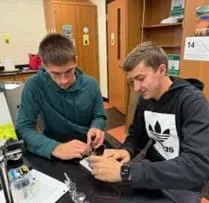 Building the integrated circuitCopyright Jennifer Stammen
Students work as teams of engineers to design solutions to one of six real-world problems by creating functional logic gates. They learn how transistors serve as the fundamental hardware that allows computational logic to produce outcomes based on inputs, and apply this knowledge by building their own gates on notecards using transistors, resistors, copper tape, masking tape, LEDs, and 9V batteries. Students plan and test their designs using truth tables, integrate individual gates into Boolean circuits, and write corresponding Boolean expressions. Along the way, they engineer compact circuit pathways, troubleshoot issues such as short circuits, and explore vertical layering and vias, similar to microchip and PCB design.
Computer engineers use transistors as the building blocks of computer chips. These transistors function as on/off switches, producing the zeros and ones of binary logic. Engineers arrange transistors to create logic gates, such as AND, OR, and NOT gates, and then combine these gates into more complex circuits capable of performing calculations and storing information. Advances in engineering have made it possible to fit billions of transistors onto a single 100 mm² chip.
After this activity, students should be able to:
- Explain how transistors function as electronic switches and serve as the fundamental building blocks of computer chips.
- Describe the flow of electricity through a logic gate circuit in its different states.
- Identify and interpret the behavior of basic logic gates (AND, OR, and NOT) using truth tables.
- Combine multiple logic gates into a functional system that solves a real-world design problem.
- CCSS.Math.Content.HSN-Q.A Reason quantitatively and use units to solve problems.
Grades 9-12
Do you agree with this alignment? - CCSS.Math.Content.HSN-Q.A.1 Use units as a way to understand problems and to guide the solution of multi-step problems; choose and interpret units consistently in formulas; choose and interpret the scale and the origin in graphs and data displays.
Grades 9-12
Do you agree with this alignment? - CCSS.Math.Content.HSN-Q.A.2 Define appropriate quantities for the purpose of descriptive modeling.
Grades 9-12
Do you agree with this alignment?
- STEL-1R Develop a plan that incorporates knowledge from science, mathematics, and other disciplines to design or improve a technological product or system.
Grades 9-12
Do you agree with this alignment? - STEL-2T Demonstrate the use of conceptual, graphical, virtual, mathematical, and physical modeling to identify conflicting considerations before the entire system is developed and to aid in design decision making.
Grades 9-12
Do you agree with this alignment? - STEL-2W Select resources that involve tradeoffs between competing values, such as availability, cost, desirability, and waste, while solving problems.
Grades 9-12
Do you agree with this alignment? - STEL-2Z Use management processes in planning, organizing, and controlling work.
Grades 9-12
Do you agree with this alignment? - STEL-7AA Illustrate principles, elements, and factors of design.
Grades 9-12
Do you agree with this alignment? - STEL-7BB Implement the best possible solution to a design.
Grades 9-12
Do you agree with this alignment? - STEL-7CC Apply a broad range of design skills to their design process.
Grades 9-12
Do you agree with this alignment? - STEL-7X Document trade-offs in the technology and engineering design process to produce the optimal design.
Grades 9-12
Do you agree with this alignment? - STEL-7Z Apply principles of human-centered design.
Grades 9-12
Do you agree with this alignment?
- HS-ETS1-2 Design a solution to a complex real-world problem by breaking it down into smaller, more manageable problems that can be solved through engineering.
Grades 9-12
This resource focuses on the following Three Dimensional Learning aspects of NGSS:
Science & Engineering Practices- Design a solution to a complex real-world problem, based on scientific knowledge, student-generated sources of evidence, prioritized criteria, and tradeoff considerations.Do you agree with this alignment?
Disciplinary Core Ideas- Criteria may need to be broken down into simpler ones that can be approached systematically, and decisions about the priority of certain criteria over others (trade-offs) may be needed.Do you agree with this alignment?
Do you agree with this alignment? - Design a solution to a complex real-world problem, based on scientific knowledge, student-generated sources of evidence, prioritized criteria, and tradeoff considerations.
- HS-ETS1-4 Use a computer simulation to model the impact of proposed solutions to a complex real-world problem with numerous criteria and constraints on interactions within and between systems relevant to the problem.
Grades 9-12
This resource focuses on the following Three Dimensional Learning aspects of NGSS:
Science & Engineering Practices- Use mathematical models and/or computer simulations to predict the effects of a design solution on systems and/or the interactions between systems.Do you agree with this alignment?
Disciplinary Core Ideas- Both physical models and computers can be used in various ways to aid in the engineering design process. Computers are useful for a variety of purposes, such as running simulations to test different ways of solving a problem or to see which one is most efficient or economical; and in making a persuasive presentation to a client about how a given design will meet his or her needs.Do you agree with this alignment?
Crosscutting Concepts- Models (e.g., physical, mathematical, computer models) can be used to simulate systems and interactions—including energy, matter, and information flows—within and between systems at different scales.Do you agree with this alignment?
Do you agree with this alignment? - Use mathematical models and/or computer simulations to predict the effects of a design solution on systems and/or the interactions between systems.
- HS-PS2-6 Communicate scientific and technical information about why the molecular-level structure is important in the functioning of designed materials.
Grades 9-12
This resource focuses on the following Three Dimensional Learning aspects of NGSS:
Science & Engineering Practices- Communicate scientific and technical information (e.g. about the process of development and the design and performance of a proposed process or system) in multiple formats (including orally, graphically, textually, and mathematically).Do you agree with this alignment?
Disciplinary Core Ideas- Attraction and repulsion between electric charges at the atomic scale explain the structure, properties, and transformations of matter, as well as the contact forces between material objects.Do you agree with this alignment?
Crosscutting Concepts- Investigating or designing new systems or structures requires a detailed examination of the properties of different materials, the structures of different components, and connections of components to reveal its function and/or solve a problem.Do you agree with this alignment?
Do you agree with this alignment? - Communicate scientific and technical information (e.g. about the process of development and the design and performance of a proposed process or system) in multiple formats (including orally, graphically, textually, and mathematically).
- HS-PS3-3 Design, build, and refine a device that works within given constraints to convert one form of energy into another form of energy.
Grades 9-12
This resource focuses on the following Three Dimensional Learning aspects of NGSS:
Science & Engineering Practices- Design, evaluate, and/or refine a solution to a complex real-world problem, based on scientific knowledge, student-generated sources of evidence, prioritized criteria, and tradeoff considerations.Do you agree with this alignment?
Disciplinary Core Ideas- Criteria and constraints also include satisfying any requirements set by society, such as taking issues of risk mitigation into account, and they should be quantified to the extent possible and stated in such a way that one can tell if a given design meets them.Do you agree with this alignment?
- At the macroscopic scale, energy manifests itself in multiple ways, such as in motion, sound, light, and thermal energy.Do you agree with this alignment?
- Although energy cannot be destroyed, it can be converted to less useful forms—for example, to thermal energy in the surrounding environment.Do you agree with this alignment?
Crosscutting Concepts- Energy cannot be created or destroyed—it only moves between one place and another place, between objects and/or fields, or between systems.Do you agree with this alignment?
- Modern civilization depends on major technological systems. Engineers continuously modify these technological systems by applying scientific knowledge and engineering design practices to increase benefits while decreasing costs and risks.Do you agree with this alignment?
Do you agree with this alignment? - Design, evaluate, and/or refine a solution to a complex real-world problem, based on scientific knowledge, student-generated sources of evidence, prioritized criteria, and tradeoff considerations.
- HS-PS3-5 Develop and use a model of two objects interacting through electric or magnetic fields to illustrate the forces between objects and the changes in energy of the objects due to the interaction.
Grades 9-12
This resource focuses on the following Three Dimensional Learning aspects of NGSS:
Science & Engineering Practices- Develop and use a model based on evidence to illustrate the relationships between systems or between components of a system.Do you agree with this alignment?
Disciplinary Core Ideas- When two objects interacting through a field change relative position, the energy stored in the field is changed.Do you agree with this alignment?
Crosscutting Concepts- Cause and effect relationships can be suggested and predicted for complex natural and human designed systems by examining what is known about smaller scale mechanisms within the system.Do you agree with this alignment?
Do you agree with this alignment? - Develop and use a model based on evidence to illustrate the relationships between systems or between components of a system.
- Waves
Grades 9-12
Do you agree with this alignment? - Electricity
Grades 9-12
Do you agree with this alignment? - Electric potential (voltage)
Grades 9-12
Do you agree with this alignment? - Electric fields and electric potential energy
Grades 9-12
Do you agree with this alignment?
Online Materials:
- Tinkercad: tinkercad.com
- (optional) LED resistor calculator: https://circuitdigest.com/calculators/led-resistor-calculator (for students who want to change/edit proposed designs)
- Google Forms (to introduce the design scenarios and guide student thinking and planning)
- Smart Pet Door Design (4 student roles)
- Automatic Headlight Control System (4 student roles)
- Small Business Security System Project (4 student roles)
- Injury Prevention System for a Mechanical Press (4 student roles)
- Chemical Production Plant Safety Device (3 student roles)
- Smart Greenhouse Ventilation System (3 student roles)
Note: Within these forms there are links to two YouTube videos to help students review logic gates and truth tables. The links to these videos are below:
- Logic Gates Explained (8:40 minutes)
- Understanding Logic Gates (7:27 minutes)
Each group needs:
- 1 roll of copper tape (each student needs approximately 30 cm)
- 7 transistors (2N2222)
- 1 9V battery
- 1 9V battery connector
- 1 roll of masking tape
- 1 pair of scissors
- assorted resistors
- assorted LED diodes
- (optional) 1 breadboard
- (optional) 30 jumper wires for breadboarding
- (optional) 1 push button for breadboard
- (optional) OR gates-premade
- (optional) AND gates-premade
- (optional) NOT gates-premade
- (optional) multimeter for checking connectivity or troubleshooting gates
Each student needs:
- 1 laptop or tablet with access to Google Forms (however, the instructions from these could be printed)
- 1-2 notecards (each student needs at least one)
- Beyond Binary Worksheet (PDF)
- Beyond Binary Quiz (PDF)
For the entire class to share:
- 1 laptop or tablet with a projector and internet access (to show YouTube videos in Beyond Binary Presentation (PPTX))
- whiteboard and dry erase markers
For the teacher:
- 1 Beyond Binary Worksheet Answer Key (PDF)
- 1 Beyond Binary Quiz Answer Key (PDF)
- 1 Logic Equations, Diagrams, and Truth Tables Slideshow (PDF)
- (optional) Google Form pdfs to create Google Forms:
- Smart Pet Door System Google Form (PDF)
- Smart Automobile Headlight Control Google Form (PDF)
- Security System for a Local Small Business Google Form (PDF)
- Injury Prevention System for a Mechanical Press Google Form (PDF)
- Chemical Manufacturing Safety System Google Form (PDF)
- Smart Greenhouse Ventilation System Controls Google Form (PDF)
- Materials necessary for building each type of gate (to better understand the construction process and anticipate potential challenges)
- Beyond Binary Presentation (pptx)
- Beyond Binary Presentation (pdf)
- Beyond Binary Worksheet (docx)
- Beyond Binary Worksheet (pdf)
- Beyond Binary Worksheet Answer Key (docx)
- Beyond Binary Worksheet Answer Key (pdf)
- Beyond Binary Quiz (docx)
- Beyond Binary Quiz (pdf)
- Beyond Binary Quiz Answer Key (docx)
- Beyond Binary Quiz Answer Key (pdf)
- Chemical Manufacturing Safety System Google Form (pdf)
- Smart Greenhouse Ventilation System Controls Google Form (pdf)
- Smart Automobile Headlight Control Google Form (pdf)
- Smart Pet Door System Google Form (pdf)
- Security System for a Local Small Business Google Form (pdf)
- Injury Prevention System for a Mechanical Press Google Form (pdf)
- Logic Equations, Diagrams, and Truth Tables Slideshow (pdf)
Students should have:
- Basic understanding of electricity and circuits.
- Familiarity with circuit components, such as conductors, insulators, and resistors.
- Basic experience reading simple diagrams, such as circuit schematics or logic gate symbols.
- Optional: Introductory exposure to logic gates (AND, OR, NOT) and simple truth tables is helpful but will also be reviewed in the activity.
(Display the Beyond Binary Presentation (PPTX). Play the “What is it?” game with students. Put students into small groups.)
All right everyone, let’s start with a quick game. In a moment, I’ll put an image on the screen. Your job is to figure out what it is. Here are the rules:
- You may only ask yes-or-no questions.
- Each team gets one question per round.
- If you think you know what it is, don’t say it out loud. Instead, ask leading (or even slightly misleading!) questions to throw other teams off.
- At the end of the rounds, each team will discuss what they think it is and then I’ll have one member from your team write your team’s final guess on the whiteboard.
Ready? Take a look. (Show Slide 2.)
(Allow questioning rounds. Facilitate quickly and keep energy up.)
Alright teams, have one member of your team come up to the whiteboard and write down your team’s final guess.
(Pause for reveal.)
This component is a transistor. Who knows what a transistor does? (Let students offer answers.) A transistor is a semiconductor device used to either switch or amplify electronic signals and electrical power.
At its simplest, a transistor is a semiconductor device used to either switch or amplify electronic signals. Imagine it as a microscopic, high-speed power switch that doesn’t need a finger to flip it. Instead of a physical handle, it uses a tiny pulse of electricity to turn a much larger flow of electricity on or off. Because it can do this millions of times every second, transistors allow computers to process information using binary code. When a transistor is 'on,' it represents a 1; when it’s 'off,' it represents a 0. By packing billions of these tiny switches onto a single silicon chip, we can build the 'brains' for everything from smartphones to gaming consoles.
Beyond just being a switch, a transistor can also act as an amplifier, which is like a volume knob for electrical signals. It takes a very weak signal, such as the tiny electrical vibration from a microphone or a Wi-Fi antenna, and uses it to control a much stronger power source, creating a boosted version of that signal. This is how your phone can take a faint signal from a cell tower and turn it into clear audio or video.
Because they are made of semiconductors like silicon, transistors are incredibly small, reliable, and efficient. This is why the transistor is widely considered the most important invention of the 20th century; it is the fundamental building block of every microchip, processor, and digital memory card in existence. Without this tiny component, the modern digital world simply wouldn't exist.
In the activity we’re about to begin, transistors are going to be very important. Let’s get started!
Background
Logic Gates
Logic gates determine the output flow of electricity based on given electrical inputs. These allow for the familiar 1s and 0s of computer programming, where 1 stands for the ‘on’ state of an electrical switch and 0 stands for the ‘off’ state. Different gates create different outputs with given inputs that can be used to make sure a device is doing what we want, when we want it to. Combining these gates creates devices that will perform certain functions if or when specific conditions are met.
How Logic Gates Work
Logic gates are the "decision-makers" of a computer. In this activity, students will analyze real-life scenarios to determine which of three primary logic gates is needed to solve a problem. Each gate follows a specific rule to turn electrical inputs into a single output:
- AND Gates: These are like a safety lock. They require both conditions to be "true" (ON) before the output turns on. For example, a microwave only starts if the timer is set AND the door is closed.
- OR Gates: These are more flexible. They only require one or the other of the conditions to be true for the output to turn on. Think of a doorbell that rings if you press the front door button OR the back door button.
- NOT Gates: These are "inverters." They simply reverse the input to give the opposite output. If the sensor says "No light," the NOT gate turns the "Night light" ON.
From Logic to Hardware: Building With Transistors
Once students use their Google Forms to identify which gate fits their scenario, they will stop being programmers and start being engineers. They will use transistors to physically build these gates on a breadboard. By wiring transistors together to follow these "If/Then" rules, students will see exactly how electricity is steered to make decisions. This process pulls back the curtain on modern technology, helping students understand that the "magic" inside their phones and computers is actually just billions of these simple logical gates working together at lightning speed.
Quick Teacher "Cheat Sheet" for Scenarios:
If students get stuck on the Google Form, you can use these quick comparisons:
- AND = Both keys must turn to launch the rocket.
- OR = Either the remote or the button on the TV will turn it on.
- NOT = When the sun goes down (Input OFF), the streetlights turn (Output ON).
Before the Activity
- It is highly recommended that you build each type of gate to understand the process and struggles to better help students troubleshoot their own designs.
- Gather materials. Decide if you want to group materials into bags for teams or have students get what they need as they need it. Organize materials as appropriate for your class.
- Decide whether teams will self-organize and choose their projects OR whether teams and projects will be assigned.
- Make copies:
- Beyond Binary Worksheet (PDF) (1 per student)
- Beyond Binary Quiz (PDF) (1 per student)
- Prepare the Google Forms:
- Option 1: Ensure each Google Form works.
- Smart Pet Door Design (4 Roles)
- Automatic Headlight Control System (4 Roles)
- Small Business Security System Project (4 Roles)
- Injury Prevention System for a Mechanical Press (4 Roles)
- Chemical Production Plant Safety Device (3 Roles)
- Smart Greenhouse Ventilation System (3 Roles)
- Option 2: Use the attached Google Form pdfs to create your own Google Forms.
- Smart Pet Door System Google Form (PDF) (pdf)
- Smart Automobile Headlight Control Google Form (PDF) (pdf)
- Security System for a Local Small Business Google Form (PDF)(pdf)
- Injury Prevention System for a Mechanical Press Google Form (PDF) (pdf)
- Chemical Manufacturing Safety System Google Form (PDF) (pdf)
- Smart Greenhouse Ventilation System Controls Google Form (PDF) (pdf)
- Note: Some projects need four gates built, while others only need three gates built. Direct groups to the projects that match the number of students in their groups. If a group of three wants to take on a four-gate challenge, then one person will need to build two gates, or the team may work together to build the fourth gate.
During the Activity
Day 1: Introduction to Transistors (50 minutes)
- Play the “What is it?” game in the Introduction and Motivation section.
- Introduce transistors and explain their importance in modern electronics.
- Display the Beyond Binary Presentation (PPTX) for the class.
- Show the YouTube video on Slide 3: How Does a Transistor Work? (5:59 minutes), instructing students to note key concepts and points.
- Facilitate a class discussion reviewing key transistor concepts (Slides 4–7).
- Show the YouTube video on Slide 8: TED-Ed How transistors work (4:53 minutes).
- Review and clarify logic gate and concepts using Slides 9–21.
- Present the design challenge (Slide 22) and explain that each team will work on one of the six scenarios.
- Explain how the activity will function:
- Student expectations and team roles (Slide 23)
- Design criteria (Slide 24)
- Review Slides 25–27 to discuss smaller electronics, vertical layering, and vias.
- End the class by summarizing the objective: Each group will analyze their scenario, determine the appropriate logic gate(s), construct the gate(s), and integrate them into a functional system meeting the specified design criteria.
Day 2: Research Circuit Design (50 minutes)
- Organize students into groups of 3–4.
- State the design challenge: Your team has been hired to design a system using logic gates to meet your client’s needs. Use your knowledge of transistors, gates, Boolean equations, and truth tables to create a design. You will prototype your system by building your own logic gates and combining them to perform the required task.
- Distribute one Beyond Binary Worksheet (PDF) to each student.
- Ensure each student has a laptop or tablet with access to Google Forms. Each student should fill in their own information but work together with their team by sharing screens, answers, and designs to complete the project.
- Assign each team a specific challenge, or allow each team to choose their challenge (Slide 22).
- Before students begin, briefly read through the instructions on Slide 28 and ensure students understand what they are supposed to do.
- Allow students to begin working through their role-specific Google Form sections, making sure to answer the first five questions in their Beyond Binary Worksheet (PDF).
- Circulate around the classroom and answer any student questions.
- Instruct each team member to complete their “Truth Table in Words. ” (Once each student chooses the correct gate type and truth table, the Google Form will take them to a schematic that will guide them on how to build their gate.)
- Once students finish their “Truth Table in Words,” encourage teams to collaborate and troubleshoot together. (Reference the Beyond Binary Worksheet Answer Key (PDF) or the Logic Equations, Diagrams, and Truth Tables Slideshow (PDF).)
- Optional: Conduct a short whole-class discussion:
- Ask 2–3 volunteers to share their “Truth Table in Words.”
- Ask: “What wording in your scenario indicates AND, OR, or NOT?”
- Clarify any misconceptions.
Day 3: Plan and Create Individual Gates (50 minutes)
- State today’s objective: Plan and build individual logic gates.
- Optional: Review the behavior of AND, OR, and NOT gates with students.
- Display Beyond Binary Presentation (PPTX) Slide 29 with a list of the materials available to students.
- Distribute notecards and components to each team.
- Have students lay out all components on their notecards.
- Instruct students to plan and sketch conductive paths for their task (where copper tape will go) before placing any tape.
- Optional: Have students using breadboards first build their gate on Tinkercad to practice converting the schematic to a working circuit.
- Remind students that a working gate should light the LED when the inputs create a TRUE output.
- Optional: Have students using breadboards or Tinkercad test their gate virtually before transferring it to the notecard.
- As students plan and sketch their gates, circulate the room, and ask students questions, such as:
- Which gate do you need to meet your criteria?
- Where might paths accidentally touch?
- How will current flow when Input A is true?
- Approve ALL student sketches BEFORE students move to tape. (Reference the Beyond Binary Worksheet Answer Key (PDF) or the Logic Equations, Diagrams, and Truth Tables Slideshow (PDF).)
- Once they verify their sketched circuit with their true tables, allow students to tape down their circuit.
- Remind students to:
- Make solid connections between component legs and the copper tape, ensuring the tape fully covers the metal.
- Avoid letting copper tape from one leg touch an adjacent leg.
- Consider how masking tape and vertical layering might help organize the circuit.
- Encourage students to create positive and negative “rails” similar to breadboards as a starting structure.
- Conduct a quick peer review so teams check each other’s planned layouts for potential shorts or missing connections.
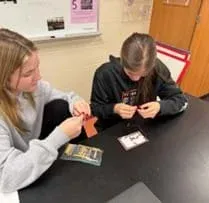 Building a notecard logic gateCopyright Jennifer Stammen
Building the integrated circuitCopyright Jennifer Stammen
Day 4: Test and Iterate Individual Gates (50 minutes)
- State today’s objective: Test and improve individual logic gates.
- If needed, let students finish building their individual logic gates using copper tape, LEDs, and transistors.
- Have students test their logic gates. (Note: Many gates may not work on the first try due to short circuits or poor connections. Students who are unable to get their designs working on notecards after several attempts can try building their design on a breadboard.)
- Encourage students to find flaws in their own design or each other's design and make corrections.
- As students test their logic gates, circulate the classroom, ask guiding questions, and help students identify design flaws. For example:
- If both inputs need to be true for a TRUE output, which gate is needed?
- How can we prevent crossing paths from shorting?
- Remind students to test their improved/modified gates against their truth table.
- As students test, take short breaks as a class to discuss common issues:
- Longer paths creating higher resistance
- LED or transistor installed backwards
- Short circuits in tight areas
- Use of positive/negative rails to help organize paths and reduce errors
- Reassure students that setbacks are expected, and support them as they iterate through challenges.
- Optional: Ask students who are having success in creating designs to give pointers to those who need assistance.
- Encourage iteration: Let students fix designs, seek help from peers, and try again.
Day 5: Complete Individual Gate Construction and Start Flow Diagrams for Full Project (50 minutes)
- State today’s objective: Finalize individual gate builds and begin integration planning.
- Ensure all teams have functional individual gates and provide extra time for any team still finishing their builds.
- Display Beyond Binary Presentation (PPTX) Slide 30.
- Once each team has functional gates, have them work together to create flow diagrams showing how their individual gates combine in the final design, using standard logic gate symbols.
- Remind the class that each student should write these on their handout.
- Walk around and listen to the discussions. Ask guiding questions and give feedback as needed to help guide the groups if they are struggling.
- Optional: Take a five-minute break to:
- Clarify misconceptions.
- Model flow diagrams for one example if needed.
- Have each team complete truth tables explaining how all individual gates work together to produce the final design output.
- Approve all team sketches and true tables. (Reference the Beyond Binary Worksheet Answer Key (PDF) or the Logic Equations, Diagrams, and Truth Tables Slideshow (PDF).)
- Emphasize that students are simulating inputs: Switches (or fingers with copper tape) represent sensors, and only the LED output matters at this stage. For AND and OR gates, closing the switch gap with a finger (or copper tape) creates a TRUE input. For NOT gates, a small wire may be needed because a large resistance difference is required for proper operation.
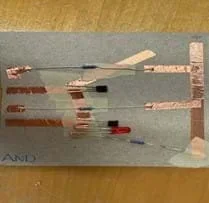 Example AND gateCopyright Jennifer Stammen
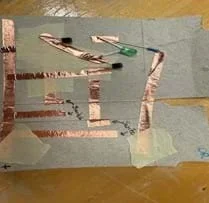 Example OR gateCopyright Jennifer Stammen
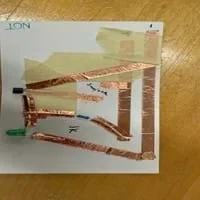 Example NOT gateCopyright Jennifer Stammen
Day 6: Integrate Gates into Final System (50 minutes)
- State the objective of today’s activity: Combine gates into a working system and verify against specific design criteria.
- If not already complete, verify team flow diagrams and truth tables before full integration.
- Have students physically connect gates using notecards or breadboards:
- Make sure they reinforce proper connections, rails, and layering.
- Encourage them to troubleshoot collaboratively.
- Have each team test their integrated system against the overall truth table, making sure outputs match the required TRUE/FALSE behavior.
- Have students document their results and adjust their designs as needed.
- Encourage ongoing iteration: Teams should refine their designs, seek peer assistance, and retest as needed.
- Once each team has completed their project design, distribute one Beyond Binary Quiz (PDF) to each student.
- Give students time to complete the Beyond Binary Quiz (PDF).
- Collect each completed Beyond Binary Quiz (PDF) before students leave class.
Day 7: Reflection, Submission, and Assessment (50 minutes)
- Have each group review their individual flow diagrams and truth tables for correctness.
- Have students submit their final project.
- Optional: Enter the super super-secret code “RET25” in the Google Form to submit their project. Students will see a success message and an animated GIF upon submission.
- Remind students that even if the physical gates didn’t fully work, they can still be assessed on flow diagrams and truth tables.
- Display Beyond Binary Presentation (PPTX) Slide 31 and lead a whole-class reflection discussion:
- What was the most challenging part of this project?
- What solutions did your team come up with to address this challenge?
- What was the most interesting or rewarding part of this challenge?
- What is something you learned from this challenge?
- What is a question you have about microchip or PCB design after completing this challenge?
- Optional: Show exemplary student diagrams or circuits as models for future reference.
- Optional: Have each team present a short demo of their project design.
- Summarize the overall learning objectives: Students analyzed scenarios, selected and built appropriate logic gates, integrated them into functional systems, and documented their reasoning through flow diagrams and truth tables.
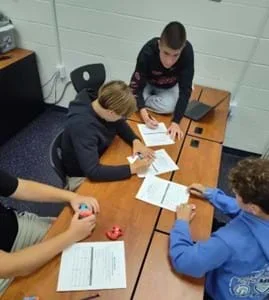 Students working through gate paperworkCopyright Jennie Bertke
- and
- A basic digital logic gate that implements the logical conjunction (∧) from mathematical logic. AND gates behave according to their truth table.
- binary code
- The representation of text and data using only the digits 1 and 0.
- boolean
- A logical calculus of truth values.
- breadboard
- Also known as a solderless breadboard or protoboard, a construction base used to build semi-permanent prototypes of electronic circuits.
- circuit
- A complete electrical network with a closed-loop, giving a return path for current.
- computer
- A machine that can be programmed to automatically carry out sequences of arithmetic or logical operations.
- input
- Any data entered into a computer or data processing system.
- lead
- Also known as a pin, an electrical connector consisting of a length of wire or a metal pad (surface-mount technology) that is designed to connect two locations electrically.
- led
- A light-emitting diode, a semiconductor device that emits light when current flows through it; this component has polarity and must be installed in the correct orientation.
- logic gate
- A device that performs a Boolean function, a logical operation performed on one or more binary inputs that produces a single binary output.
- microchip
- Also known as an integrated circuit, a compact assembly of electronic circuits formed from various electronic components—such as transistors, resistors, and capacitors—and their interconnections.
- not
- Also known as an inverter, a digital logic gate that implements logical negation by outputting the opposite of its input bit.
- or
- A digital logic gate that implements logical disjunction, outputting "true" if any of its inputs is "true"; otherwise, it outputs "false".
- output
- Also known as a result, signals or data sent from a system following processing.
- polarity
- The direction in which the electrical current would flow once a source is connected.
- printed circuit board (pcb)
- Also called printed wiring board (PWB), a laminated sandwich structure of conductive and insulating layers, each with a pattern of traces, planes, and other features (similar to wires on a flat surface) etched from one or more sheet layers of copper laminated onto or between sheet layers of a non-conductive substrate.
- resistor
- A passive two-terminal electronic component that implements electrical resistance as a circuit element.
- schematic
- A designed representation of the elements of a system using abstract, graphic symbols rather than realistic pictures.
- transistor
- A semiconductor device used to amplify or switch electrical signals and power; one of the basic building blocks of modern electronics.
- truth table
- A mathematical table used in logic—specifically in connection with Boolean algebra, Boolean functions, and propositional calculus—that sets out the functional values of logical expressions on each of their functional arguments, i.e., for each combination of values taken by their logical variables.
- vertical layering
- A process of determining the location of components on top of each other with insulation as required so that connections are by design only. Used in PCB construction and design. A way of fitting more components on a small footprint.
- via
- Holes that pass through the printed circuit board acting similar to an over or underpass on a highway to prevent intersection of connections.
Pre-Activity Assessment
“What is it?” Game: As an informal pre-assessment, student teams play the “What is it?” game. Instructions are on Slide 2 of the Beyond Binary Presentation (PPTX). This activity probes students’ background knowledge of transistors in a low-stakes, fun way. You may provide extra background knowledge if needed or skip some transistor and logic gate videos if students already have strong prior knowledge.
Activity Embedded (Formative) Assessment
Truth Tables and Individual Gate Sketches: Students show understanding by completing Google Form questions, their Beyond Binary Worksheets (PDF), and building working gates. You can reference the Beyond Binary Worksheet Answer Key for sample answers and troubleshooting guidance.
Post-Activity (Summative) Assessment
Final Project Design: Student teams create final flow diagrams and truth tables for their project scenario. Your approval is required before they proceed to full system construction.
Post Project Debrief: Conduct a whole-class discussion using the questions on Slide 31 as an informal assessment of learning.
Post-Assessment Quiz: The Beyond Binary Quiz (PDF) can be used to formally assess comprehension and retention.
(Optional) Final Project Presentation: Teams present their designs via slideshow or demonstration, explaining their challenge, design process, obstacles faced, and solutions. This reinforces learning but is optional due to time constraints.
- If students clip leads (optional), eye protection should be worn.
- Handle LEDs carefully to avoid breaking them.
Common Issues
- Incomplete connections or short circuits: Most problems occur when connections are not complete or copper tape pieces accidentally touch each other.
- Switch operation
- For AND and OR gates, closing the switch gap with a finger (or a finger with a small strip of copper tape) is usually enough.
- For NOT gates, a jumper wire may be needed because the switch requires a very low-resistance connection to work correctly.
- Component orientation: Pay attention to the orientation of transistor and LED leads so they match the schematic. Reversing them can prevent the gate from working.
Testing and Verification
- Use multimeters or a single test LED to check connectivity section by section. This helps identify incomplete connections before powering the circuit.
- Test individual components if needed, especially LEDs, which can break if exposed to too much voltage. A small button battery can be used for quick testing.
- Excessive path length can increase resistance, though this is usually not an issue on a single notecard.
Polarity and Orientation
- Ensure LEDs and transistors are correctly oriented according to the schematic. Polarity is important and can be verified using a battery.
- Short circuits often occur in tight spaces between transistor leads.
Circuit Organization Tips
- Create positive and negative “rails.” similar to a breadboard setup, as a starting structure. This helps organize paths and reduce accidental shorts.
For lower grades or beginner students:
- Direct students to which gate they should build for each scenario.
- Provide working examples for students to copy.
- Use breadboards to make connections easier to verify.
- Focus on building a single functioning gate rather than a full system.
- Consider going through one of the six scenarios together (using Google Forms), without building the gates, as a practice round to familiarize students with the thought process.
- Afterward, group students to work on one of the remaining five scenarios, including gate construction.
For older or advanced students:
- Connect individual gates to create the final integrated circuit design.
- Because notecard-built gates can be finicky, it’s best to use premade AND, OR, and NOT gates with a breadboard for more reliable testing.
- If cost is an issue, these components are available on Tinkercad, allowing students to build the integrated circuit virtually at no extra cost.
- High-achieving students can design custom PCBs and have them printed to accomplish the design challenge.
https://circuitdigest.com/article/npn-transistors
https://www.tinkercad.com/dashboard
https://www.circuit-diagram.org
https://news.mit.edu/2024/mit-engineers-grow-high-rise-3d-chips-1218
https://www.nano.gov/nanotech-101/what/nano-size#:~:text=A%20sheet%20of%20paper%20is,fingernail%20grows%20in%20one%20second
https://www.asml.com/en/technology/all-about-microchips/microchip-basics
By Cepheiden - self made (from university scripts and scientific papers), CC BY 2.5, https://commons.wikimedia.org/w/index.php?curid=1445444
https://learn.sparkfun.com/tutorials/pcb-basics/all
https://learn.sparkfun.com/tutorials/light-emitting-diodes-leds
https://www.ledsupply.com/blog/how-does-a-5mm-led-work/?srsltid=AfmBOopgzRk10e2-PgzxEQhwMixh_aekDvhvoG-ZXRoksJ4k1KKRqgD8
Contributors
Jennifer Stammen; Jennifer Bertke; Heidi Stammen; Dr. Augustus Morris; Dr. Daniel Young; Matt Kijowski; Dr. Leanne Petry; Dr. Andrew Sarangan; Marjorie Hill Langston; Tyler Bruns; Doug Picard; Dana Roskey; Caleb Grammel; Kaila Powers
Supporting Program
Research Experience for Teachers (RET), Wright State University, Clark State University, and the University of Dayton
Acknowledgements
This material is based on work supported by the National Science Foundation under Award No. 2419116, 2419117, 2419118 as part of the National Science Foundation Collaborative Research Experiences for Teachers (RET): Teacher POWER (Preparing Our Workforce through Electronics and Research). Any opinions, findings, and conclusions or recommendations expressed in this material are those of the author(s) and do not necessarily reflect the views of the National Science Foundation.
Copyright
2026 by Regents of the University of Colorado; original © 2025 University of Central State, Wright State, & University of Dayton