
All Charged Up: Optimizing a Homemade Capacitor
 Wrapping the capacitorCopyright Taken by author
Students explore capacitance and capacitors through hands-on experiments and design challenges. They construct and test capacitors with common materials, measuring how changes in plate area, separation, and electrolyte affect capacitance. Using their results, students design, build, and optimize a capacitor prototype, reflect on performance, and propose improvements. Throughout the process, they apply the engineering design process, make predictions, and compare outcomes to their expectations. This activity helps students understand how capacitors store electrical energy, how design choices influence performance, and how these principles apply to real-world electronics and engineering applications.
Capacitors are used by a wide range of engineers who work with electrical energy and electronic systems. Electrical and electronics engineers use them in circuits for energy storage, filtering, and signal processing, while power engineers rely on large capacitors to stabilize voltage and improve efficiency in power grids. Aerospace and automotive engineers incorporate capacitors in spacecraft, satellites, and electric vehicles for energy management and regenerative systems. Biomedical engineers use them in medical devices such as defibrillators and imaging equipment, and mechanical engineers working in mechatronics or robotics use capacitors to support actuators and motors. Any engineer involved in designing or managing electrical circuits, energy storage, or electronic devices will interact with capacitors in their work.
After this activity, students should be able to:
- Explain how capacitors store and release electrical energy using correct scientific vocabulary.
- Identify and describe the key variables that affect capacitance, including plate area, plate separation distance, and dielectric material.
- Design, build, and test a working capacitor using common materials.
- Use evidence from data to justify design decisions and optimize a capacitor for maximum capacitance.
- CCSS.Math.Content.HSN-Q.A.3 Choose a level of accuracy appropriate to limitations on measurement when reporting quantities.
Grades 9-12
Do you agree with this alignment?
- STEL-7CC Apply a broad range of design skills to their design process.
Grades 9-12
Do you agree with this alignment? - STEL-7X Document trade-offs in the technology and engineering design process to produce the optimal design.
Grades 9-12
Do you agree with this alignment? - STEL-7Y Optimize a design by addressing desired qualities within criteria and constraints.
Grades 9-12
Do you agree with this alignment?
- HS-ETS1-2 Design a solution to a complex real-world problem by breaking it down into smaller, more manageable problems that can be solved through engineering.
Grades 9-12
This resource focuses on the following Three Dimensional Learning aspects of NGSS:
Science & Engineering Practices- Design a solution to a complex real-world problem, based on scientific knowledge, student-generated sources of evidence, prioritized criteria, and tradeoff considerations.Do you agree with this alignment?
Disciplinary Core Ideas- Criteria may need to be broken down into simpler ones that can be approached systematically, and decisions about the priority of certain criteria over others (trade-offs) may be needed.Do you agree with this alignment?
Do you agree with this alignment? - Design a solution to a complex real-world problem, based on scientific knowledge, student-generated sources of evidence, prioritized criteria, and tradeoff considerations.
- HS-ETS1-3 Evaluate a solution to a complex real-world problem based on prioritized criteria and trade-offs that account for a range of constraints, including cost, safety, reliability, and aesthetics, as well as possible social, cultural, and environmental impacts.
Grades 9-12
This resource focuses on the following Three Dimensional Learning aspects of NGSS:
Science & Engineering Practices- Evaluate a solution to a complex real-world problem, based on scientific knowledge, student-generated sources of evidence, prioritized criteria, and tradeoff considerations.Do you agree with this alignment?
Disciplinary Core Ideas- When evaluating solutions it is important to take into account a range of constraints including cost, safety, reliability and aesthetics and to consider social, cultural and environmental impacts.Do you agree with this alignment?
Crosscutting Concepts- New technologies can have deep impacts on society and the environment, including some that were not anticipated. Analysis of costs and benefits is a critical aspect of decisions about technology.Do you agree with this alignment?
Do you agree with this alignment? - Evaluate a solution to a complex real-world problem, based on scientific knowledge, student-generated sources of evidence, prioritized criteria, and tradeoff considerations.
- HS-PS3-5 Develop and use a model of two objects interacting through electric or magnetic fields to illustrate the forces between objects and the changes in energy of the objects due to the interaction.
Grades 9-12
This resource focuses on the following Three Dimensional Learning aspects of NGSS:
Science & Engineering Practices- Develop and use a model based on evidence to illustrate the relationships between systems or between components of a system.Do you agree with this alignment?
Disciplinary Core Ideas- When two objects interacting through a field change relative position, the energy stored in the field is changed.Do you agree with this alignment?
Crosscutting Concepts- Cause and effect relationships can be suggested and predicted for complex natural and human designed systems by examining what is known about smaller scale mechanisms within the system.Do you agree with this alignment?
Do you agree with this alignment? - Develop and use a model based on evidence to illustrate the relationships between systems or between components of a system.
- Charging objects (friction, contact and induction)
Grades 9-12
Do you agree with this alignment? - DC circuits
Grades 9-12
Do you agree with this alignment?
- Define and describe technology, including its core concepts of systems, resources, requirements, processes, controls, optimization and trade-offs.
Grades K-12
Do you agree with this alignment? - Identify a problem and use an engineering design process to solve the problem.
Grades K-12
Do you agree with this alignment? - Evaluate designs using functional, aesthetic and creative elements.
Grades K-12
Do you agree with this alignment?
Each group needs:
- 1 laptop or tablet with access to https://phet.colorado.edu/sims/html/capacitor-lab-basics/latest/capacitor-lab-basics_all.html
- Exploring Capacitors PhET Worksheet (PDF) (1 per student)
- Create a Capacitor EDP Packet (PDF) (1 per student)
- Analysis and Reflection Worksheet (PDF)(1 per student)
- 1 Data Recording Sheet (PDF)
- writing utensil (1 per student)
- 2 paper/plastic cups of different sizes
- large sheet of aluminum foil (approx. 30 cm × 30 cm)
- 3 different metals (see below for examples)
- 2 different electrolyte solutions
- salt water (cold)
- salt water (warm)
- oil
- rubbing alcohol
- 1 ruler
- 1 scissors
- 1 tape (clear or masked)
- (optional) 1 9V battery (Needed if using a multimeter. Note: More than one battery will allow for stacking, thus creating a larger voltage.)
For the class to share:
- access to various metals (each group needs at least 3 different metals), such as:
- aluminum foil
- metal nails
- metal knives/spoons
- soda cans
- copper foil strips
- copper wire (thick gauge, shaped into a cylinder)
- metal strips or rods
- 2-5 LCR meters or multimeters (ideally each group would have 1 LCR meter)
- The LCR meter directly measures capacitance.
- The multimeter can measure voltage, which indirectly shows that plates are charged.
- Examples of these tools:
- Proster LCR Meter Digital LCR Multimeter Capacitance Resistance Inductance Measuring Meter with LCD Over-Range Display : Industrial & Scientific
- CAMWAY LCR Meter LCD Capacitance Inductance Resistance Tester Measuring Meter Self-Discharge pF nF μF with Overrange Display: Amazon.com: Industrial & Scientific
- ALLmeter BM4070 LCR Meter Capacitance Inductance Resistance Self-Discharge Digital Instrument with LCD Display 1999 and Data Hold Function for Capacitance Resistance Inductance Measuring Meter: Amazon.com: Industrial & Scientific
- GOLDCHAMP 2000pF~200μF Capacitor Tester, 20Ω~2000MΩ Ohm Meter, Capacitance Meter, hFE Test Multimeter, Manual Range, Back Light, Auto Power Off, Testing Meter Tool: Amazon.com: Industrial & Scientific (Note this has a smaller range of capacitance.)
- AstroAI Multimeter Tester 2000 Counts Digital Multimeter with DC AC Voltmeter and Ohm Volt Amp Meter; Measures Voltage, Current, Resistance; Tests Live Wire, Continuity: Amazon.com: Tools & Home Improvement
- hot plate or microwave to warm water
- Create a Capacitor EDP Packet (docx)
- Create a Capacitor EDP Packet (pdf)
- Create a Capacitor EDP Packet Answer Key (docx)
- Create a Capacitor EDP Packet Answer Key (pdf)
- Data Recording Sheet (docx)
- Data Recording Sheet (pdf)
- Exploring Capacitors PhET Worksheet (docx)
- Exploring Capacitors PhET Worksheet (pdf)
- Exploring Capacitors PhET Worksheet Answer Key (docx)
- Exploring Capacitors PhET Worksheet Answer Key (pdf)
- Analysis and Reflection Worksheet (docx)
- Analysis and Reflection Worksheet (pdf)
- Analysis and Reflection Worksheet Answer Key (docx)
- Analysis and Reflection Worksheet Answer Key (pdf)
Students should have:
- An ability to measure and calculate lengths, areas, and surface areas of rectangles and cylinders.
- A basic understanding of atomic structure and electric charge, including the role of electrons.
- A basic understanding of voltage, current, and simple electric circuits.
- An ability to organize, record, and analyze data in tables and graphs.
Good morning, class! Today we are going to talk about one of the unsung heroes of the electronics world: the capacitor! While some of you may not have heard of capacitors before, they play a critical role in many technologies we use every day.
Take 30 seconds to turn and talk with your seat partner and discuss this question: What do you think “capacitance” means in terms of electricity? Try to come up with at least one idea. (After discussion, invite a few student responses. You might hear answers like: “how much electricity something can hold.”)
Great thinking! In simple terms, capacitance is a measure of how much electric charge can be stored per unit of voltage. Another way to think about it is how well a device can store electrical energy. You can almost think of capacitors as temporary batteries. They absorb electrical charge, hold onto it for a short time, and then release it when needed.
For example, your car’s turn signals use capacitors. They store charge and release it in quick bursts to create the blinking effect. Capacitors can even be lifesaving. The AED devices you may have seen near the gym use very large capacitors to deliver a powerful jolt of energy that can help restart someone’s heart.
Today, we are going to explore how changing the design of a capacitor affects its performance.
Here is a picture of a basic capacitor. (Either draw a picture similar to the one found in Image 1 or post the image on a screen).
We can see that a capacitor is made of two metal plates and a material between them called a dielectric.
Now, take one minute to brainstorm with your partner: What are at least two things we could change in this design that might affect the capacitance? Then I want you to predict how each change would affect the capacitance. (After brainstorming, guide discussion toward key variables.)
The main design factors we will be exploring are:
- The area of the metal plates.
- The distance between the plates.
- The type of dielectric material.
Here is what we expect:
- Increasing the plate area → increases capacitance
- Decreasing the distance between plates → increases capacitance
- Changing the dielectric material → changes capacitance, depending on the material’s permittivity. In general, materials that are better insulators lead to greater capacitance.
Let’s put these ideas to the test through our investigation!
Background
The basic design of a capacitor involves two metal electrodes with areas (A1 and A2) separated by a small distance, . A pictorial representation of this design is shown in Figure 1.
Capacitance is defined as:
C = Q / V
where C is the capacitance, Q is the amount of charge stored on the plates, and V stands for the voltage supplied by the battery.
From this equation, we can think of capacitance as the amount of charge two plates can store for a given voltage. A higher capacitance means the capacitor can store more charge using the same voltage source.
A battery can be used to charge a capacitor. In traditional electric circuit theory, current is defined as the direction positive charges move, although in reality, electrons (negative charges) are the particles that actually flow.
When a battery is connected to a capacitor, electrons are pushed onto one plate, making it negatively charged, while electrons are pulled away from the opposite plate, making it positively charged. As charge builds up, the electric field between the plates increases, which eventually prevents additional charge from accumulating. At this point, the capacitor is fully charged. The capacitor can then release its stored energy when connected to another component, such as a light bulb.
When designing a capacitor, we can calculate the capacitance, C with the following relationship:
C = (ԑA) / d
where A is the area of the capacitor (in the case of a rectangular plate, A = lw), d is the separation distance, and ԑ is the dielectric constant (permittivity) of the insulating material between the plates. Even air has its own dielectric constant!
From this equation, we can see that an increase in plate area or an increase in the dielectric constant will increase capacitance, while an increase in the separation distance will actually decrease capacitance. It is important that the plates do not touch, because contact would allow charge to flow freely, effectively turning the capacitor into a simple conducting wire.
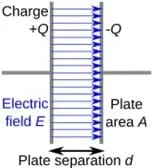 Figure 1. Two parallel plates of a capacitor have a buildup of opposite charges. They are separated by a distance d, and have areas of A. The electric field passes from the plate with positive charge to the plate with negative charge.Copyright https://commons.wikimedia.org/w/index.php?search=capacitor+diagram&title=Special%3AMediaSearch&go=Go&type=image
Although Figure 1 shows the most basic representation of a capacitor, the capacitor your students will design more closely resembles the shape shown in Image 2. In this design, the capacitor consists of two cylindrical conducting surfaces separated by a dielectric layer. This can be found by:
Acylinder = 2πr x l
where r is the radius and l is the length of the capacitor. Figure 2 illustrates the measurements needed to determine these values.
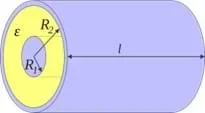 Figure 2. Two conducting cylinders or Radius R1 and R2 are shown. Notice how there is a gap filled by the dielectric material between the cylinders. It is essential that something be between the two sheets, even if it is just air.Copyright https://commons.wikimedia.org/w/index.php?search=capacitor+diagram&title=Special:MediaSearch&go=Go&type=image
Before the Activity
- Make copies of the following:
- Exploring Capacitors PhET Worksheet (PDF)(1 per student)
- Create a Capacitor EDP Packet (PDF)(1 per student)
- Analysis and Reflection Worksheet (PDF)(1 per student)
- Data Recording Sheet (PDF)(1 per group)
- Collect various metals that each group can use for their capacitors, such as the following:
- aluminum foil
- metal nails
- metal knives/spoons
- soda cans
- copper foil strips
- copper wire (thick gauge, shaped into a cylinder)
- metal strips or rods
- Prepare different electrolyte solutions:
- Warm salt water
- Warm the water on a heating element/stove or put it in the microwave PRIOR to mixing.
- Add salt. (If you want to saturate the water, it can hold about 357 grams per liter of water. You can adjust the mass for any amount of water that seems appropriate [e.g., 178.5 g for 0.5 L of water].)
- Cold salt water
- Add salt. (If you want to saturate the water, it can hold about 357 grams per liter of water. You can adjust the mass for any amount of water that seems appropriate [e.g., 178.5 g for 0.5 L of water].)
- Cool water with ice.
- Gather and group materials needed by each group. (Alternatively, place group materials at student tables.):
- 2 paper/plastic cups of different sizes
- 1 ruler
- (optional) 1 9V battery (Optionally, more than one battery will allow for stacking, thus creating a larger voltage.)
- Create a common supply area that includes the following materials:
- 2-5 LCR meters (or multimeters and 9V batteries, if necessary)
- various metals (see above)
- various electrolyte solutions (see above)
During the Activity
Day 1: Introduction to Capacitance and Capacitors (50 minutes)
- Introduce capacitance and capacitors using the Introduction and Motivation section.
- Distribute one Exploring Capacitors PhET Worksheet (PDF) to each student.
- Divide the students into pairs.
- Give each pair 20 minutes to work through the Exploring Capacitors PhET Worksheet (PDF) using their laptop or tablet to access PHET.
- As a class, go over the answers of the worksheet. (Reference the Exploring Capacitors PhET Worksheet Answer Key (PDF).)
- Distribute one Create a Capacitor EDP Packet (PDF) to each student.
- Review the engineering design process.
- Have students fill out the Ask section of the Create a Capacitor EDP Packet (PDF).
- Have students research and define the vocabulary terms in the Research section of the Create a Capacitor EDP Packet (PDF). (Optionally, this can be assigned as homework.)
Day 2: Creating a Capacitor (50 minutes)
- Divide the class into groups of 2-4 students, depending on class size.
- Ensure each student has their Create a Capacitor EDP Packet (PDF).
- Distribute one Data Recording Sheet (PDF)to each group.
Preparing the Electrodes
- Have students select two metal objects from the class supply area to serve as electrodes.
For the aluminum foil electrode:
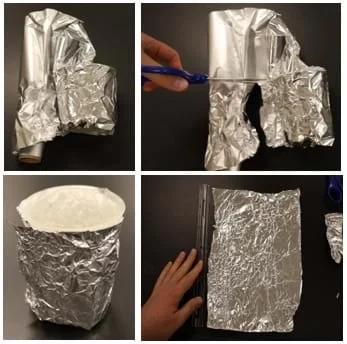
- Instruct students to wrap their aluminum foil sheet around the outside of the cup to determine how much foil is needed. (See Figure 3.)
- Have students measure the length and width of the foil using a ruler so the surface area can be calculated later. Record these measurements in the Data Recording Sheet (PDF).
Figure 3. (a) First wrap the object completely so you can see the outline. (b) Cut out the material so you only have enough to wrap around the cup. (c) Ensure that the whole cup is covered. (d) Unravel it to measure the length and width of the sheet.Copyright Taken by author
For the second metal object:
- Have students measure whatever dimensions are needed to calculate its surface area of their second metal object:
- If it is a cylindrical object (e.g., screw or nail), measure the radius and length/height. A ruler can be used, but calipers will provide more accurate results.
- If it is another type of foil, wrap it into the shape it will take inside the cup (likely a cylinder), then measure its length and width. (See Figure 4.)
- If it is a rectangular metal strip, measure the length and width directly.
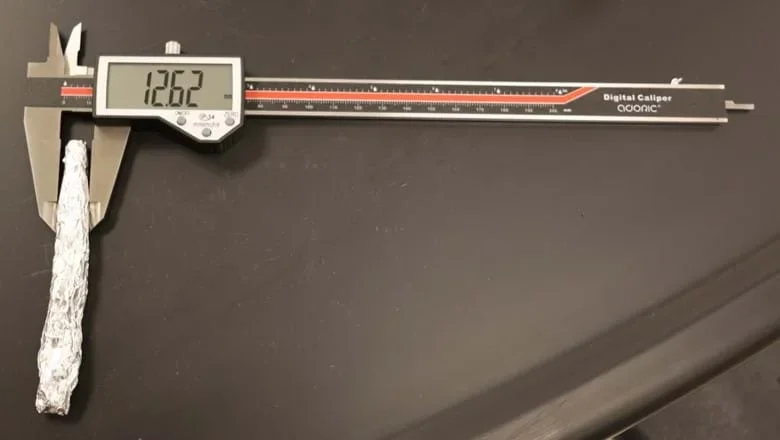 Figure 4. If you only have foil, you can roll it up into a cylinder to be used as the second metal. In this case, you will need to find the diameter using either calipers or a ruler.Copyright Taken by author
Assembling the Capacitor
- Have students follow the instructions in their Create a Capacitor EDP Packet (PDF) (also listed below).
- Take one plastic cup.
- Wrap the outside completely with aluminum foil.
- Fill the cup 75–90% with the chosen electrolyte (e.g., salt water).
- Place the second metal object in the center of the electrolyte fluid.
- If testing a second foil, wrap it around a small stone or mass before placing it in the cup (See Figure 5 for guidance on the experimental setup.)
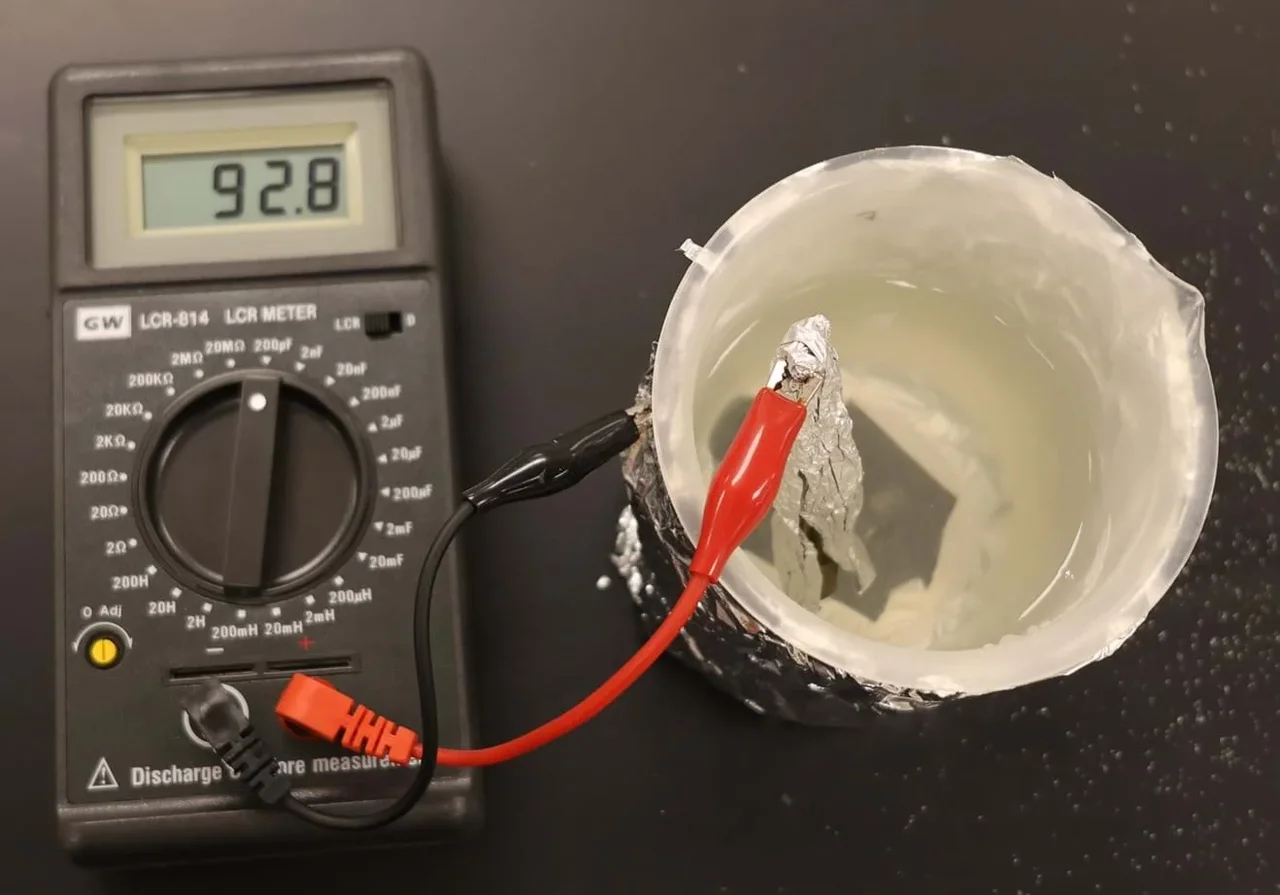 Figure 5. An example of how to measure capacitance. Notice how the dial is set to read capacitance. You will need one clip on each metal in the setup.Copyright Taken by author
Taking Measurements
- With their capacitor assembled, instruct students to:
- Measure the distance between the two metal electrodes and record it in their Data Recording Sheet (PDF).
- Use an LCR meter to measure the capacitance of the capacitor.
- Set the LCR meter to 200 µF.
- If the meter displays a “1,” the capacitance is too large for that setting. Switch to the next highest range until a consistent reading is obtained.
- Pay attention to the unit setting. For example, 200 µF means the reading is in microfarads, where 1 µF = 1 × 10⁻⁶ F.
- Alternative method: If an LCR meter is unavailable, connect the capacitor to a 9 V battery for one minute, then use a multimeter to measure the voltage across the capacitor. This provides an indirect method for evaluating capacitance.
- Record all readings.
Reflecting and Revising
- Instruct students to choose one parameter to change (e.g., area, distance, or electrolyte material).
- Have each group make a prediction about how this change will affect capacitance.
- Have them record the prediction in their Data Recording Sheet (PDF).
- Remind students to only change one variable at a time.
- Ensure students perform at least two trials for each parameter they choose to change
- All measurements should be recorded in the Data Recording Sheet (PDF).
- Note that this results in a total of 8 capacitor experiments. Cups may be reused.
- Optional: To save time, split groups of four into two pairs to divide the experiment trials.
- Ensure that all measurements and observations are recorded in the data table (see Table 1 for an example).
Day 3: Design Capacitor to Maximize Capacitance (50 minutes)
Imagine: Develop Potential Solutions
- Instruct students to review their experimental data.
- Have students brainstorm and imagine design solutions that could maximize capacitance.
- Instruct students to individually sketch FOUR different design solutions on their Create a Capacitor EDP Packet (PDF).
- Remind them to label all parts and materials and include rough predicted measurements
Plan: Select a Solution
- Have each team member share their brainstormed designs with their team.
- As a team, have each group select ONE design believed to store the greatest amount of electrical charge (i.e., maximize capacitance).
- Instruct students to draw and label the final team design in their Create a Capacitor EDP Packet (PDF), including:
- Clearly labeled parts and materials.
- Predicted measurements (before building).
Create: Build the Prototype
- After each team has a plan, give them time to use their final design plan to construct their optimized capacitor.
- Remind students to update their design plan with the prototype’s final measured values.
Test: Measure Capacitance and Collect Data
- Instruct students to set up the capacitor for testing and then measure the capacitance:
- Remind students to record the measurements on their data table.
- Ensure each group repeats their measurement/test at least twice for accuracy.
Analyze: Reflect on Performance and Compare to Predictions
- Have students answer the questions in the Analyze section of their packet.
Reflect & Redesign: Iterate to Improve the Design
- Ask students to consider changes that could increase capacitance further (e.g., larger plates, smaller separation, different dielectric, parallel plate stacking).
- Have students draw or describe a modified design and explain why it would improve performance.
- Optional: Have students share their results and capacitor with the class.
- Distribute one Analysis and Reflection Worksheet (PDF) to each student.
- Have students complete the Analysis and Reflection Worksheet (PDF)to complete the activity. (Optionally, this can be assigned as homework.)
- charge
- The physical property of matter that causes it to experience a force when placed in an electromagnetic field.
- capacitance
- The capability of a material object or device to store electric charge.
- capacitor
- A device that stores electrical energy by accumulating electric charges on two closely spaced surfaces that are insulated from each other.
- electric field
- The physical field that surrounds electrically charged particles.
Pre-Activity Assessment
Discussion / Questioning: Check students’ understanding during the Introduction and Motivation section (e.g., “What do you think affects a capacitor’s capacitance?”).
Ask Section: Students articulate the problem and their goals in the Create a Capacitor EDP Packet (PDF), demonstrating understanding of the design challenge before hands-on work.
Vocabulary Research: Students complete the Research section of Create a Capacitor EDP Packet (PDF), demonstrating their understanding of key terms (e.g., capacitor, electrode, dielectric, etc.).
Activity Embedded (Formative) Assessment
Group Work Observations: Monitor collaboration, proper use of materials, and adherence to instructions as student groups build and test their capacitors.
Group Capacitance Data Collection: Each group records experimental data in their Data Recording Sheet (PDF). The accuracy and completeness of their measurements (plate area, separation distance, capacitance readings) provide a formative assessment of procedural skills and conceptual understanding.
Prototype Design Sketches: Students’ brainstorming and labeled sketches indicate their ability to analyze data and apply scientific principles to engineering design solutions.
Team Selection of Final Design: Teams’ final design choices provide evidence of reasoning, justification, and collaborative decision-making when selecting a design that maximizes capacitance.
Post-Activity (Summative) Assessment
Analysis and Reflection Worksheet: Students complete structured questions assessing conceptual understanding, reasoning, and application of the engineering design process.
(Optional) Class Sharing / Presentation: Student groups present their designs and findings, providing opportunities for oral assessment, peer feedback, and effective communication.
- Electrical safety:
- Use only low-voltage sources (e.g., 9 V batteries).
- Never connect capacitors to wall outlets or high-voltage power supplies.
- Avoid charging capacitors for extended periods.
- Chemical safety:
- Only use safe, classroom-approved electrolyte solutions.
- If acids are used as electrolytes, keep them very dilute.
- Be aware that some metals, especially magnesium and aluminum, can react with acids if they are concentrated or if protective coatings are removed.
- Provide goggles and gloves if acidic solutions are used.
- Sharp materials:
- Handle metal edges, foil, screws, and nails carefully to prevent cuts.
- Provide gloves if necessary.
- Spill hazards:
- Clean liquid spills immediately to prevent slipping and electrical hazards.
- Keep liquids away from electronic equipment when not in use.
- No capacitance reading on the meter:
- Check that both meter leads are making solid contact with the metal electrodes.
- Ensure the two metal electrodes are not making physical contact with each other, as this can short-circuit the capacitor and result in inaccurate readings.
- Try a different capacitance range setting on the LCR or multimeter.
- Verify the electrolyte is conductive (e.g., salt fully dissolved in water).
- Inconsistent or unstable readings:
- Ensure electrodes are stable and not moving in the liquid.
- Use glassware or cups with flat bottoms so the metal electrodes can stand upright.
- Check for air bubbles between the electrode and electrolyte.
- Repeat measurements and average results for accuracy.
- Make sure the separation distance remains consistent across trials.
- Floating or shifting electrodes:
- If materials such as aluminum foil tend to float, wrap them around a small stone or other heavier object to weigh them down.
- Ideally, choose a weight that is non-conductive to prevent electrical interference.
- Unexpectedly low capacitance values:
- Increase electrode surface area.
- Decrease the separation distance between electrodes.
- Use a higher-permittivity dielectric or electrolyte.
- Improve electrode alignment and symmetry.
- Meter protection and charging precautions:
- Avoid charging capacitors with a battery if using an LCR meter. Many LCR meters contain sensitive electronics that can be damaged if a charged capacitor discharges through the meter.
- If charging is required for alternate testing methods, disconnect the battery before connecting the meter.
Extensions
- Electrolyte Investigation: Students can experiment with varying the amount of salt dissolved in water to determine whether changing ionic concentration affects capacitance.
- Material Science Extension: Test different dielectric materials (paper, plastic wrap, oil, air, water, saltwater) and compare performance.
- Data Science Integration: Have students graph capacitance vs. plate area and capacitance vs. distance and analyze trends.
- Engineering Constraints Challenge: Impose constraints such as limited materials, size restrictions, or cost limitations.
Enrichment
- 3D Design and Fabrication: Students can design and fabricate their own capacitors using 3D printing, allowing them to explore how geometry and shape affect performance. Alternatively, students can construct capacitor chambers using differently shaped containers as a budget-friendly option.
- Multi-Layer Capacitor Design: Students can explore practical capacitor construction by building multi-layer capacitors, such as stacking cups within cups or wrapping alternating layers of paper and aluminum foil together, mimicking commercial capacitor designs.
- Student-Designed Data Tables: Instead of providing pre-made data tables, have students design their own data collection tables, encouraging deeper reasoning about experimental organization and variable control. You may remove or modify the worksheet tables accordingly.
- Research Extension: Investigate ultracapacitors (supercapacitors) and the role of nanomaterials in increasing surface area.
For Introductory Students:
- Limit exploration to only surface area changes and plate separation distance. This reduces the total number of experimental trials and allows students to focus on the two parameters most commonly addressed in high school physics texts.
- If time is limited or if students have motor impairments, consider pre-constructing stock capacitors so students can focus primarily on measurement, data collection, and interpretation rather than on physical construction.
- In place of precise quantitative measurements, students can make qualitative observations, such as noting whether electrode surface area is larger or smaller and whether electrodes are closer together or farther apart and then observe how those changes affect capacitance.
For Advanced Students:
- Require students to design and conduct controlled experiments that isolate and test multiple variables, including plate area, distance, and dielectric material.
- Incorporate mathematical modeling using the capacitance equation: C = εA / d
- Introduce experimental uncertainty and error analysis.
wikiHow. (2021, October 6). How to build a capacitor. wikiHow. https://www.wikihow.com/Build-a-Capacitor
Wikimedia Foundation. (2024, June 7). Electric charge. Wikipedia. https://en.wikipedia.org/wiki/Electric_charge
Wikimedia Foundation. (2024a, April 25). Capacitance. Wikipedia. https://en.wikipedia.org/wiki/Capacitance
wikiHow. (2021, October 6). How to build a capacitor. wikiHow. https://www.wikihow.com/Build-a-Capacitor
Contributors
Dillon Cray Zimmerman; Dr. Mohammed Abouheaf; Dr. Mohammad Mayyas; MD Islam Zahabul; MD Sarder
Supporting Program
Research Experience for Teachers (RET) Robotics and Advanced Manufacturing Educator Program
Acknowledgements
The curriculum was developed under National Science Foundation RET grant number 2206952. Any opinions, findings, and conclusions or recommendations expressed in this material are those of the authors and do not necessarily reflect the views of the National Science Foundation.
Copyright
2026 by Regents of the University of Colorado; original © 2025 Bowling Green State University