
Rush Hour Mayhem: Engineering Efficient Routes With Logic Gates
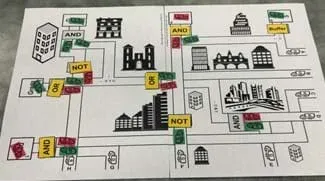 Students engineer efficient routes with logic gatesCopyright Tyler Bruns
Students are introduced to logic gates and problem solving through a real-world scenario in which delivery trucks must be efficiently routed through a congested downtown area. Students adjust gate types (AND, OR, NOT, Buffer, etc.) and inputs (colored delivery trucks) to produce desired outputs and ensure correct deliveries. Students progress from a simple road map to a more complex system as they build and apply their skills. In a final design challenge, students research additional logic gates and create their own optimized map, aiming to design the simplest and most efficient gate system possible.
Engineers use logic gates as the fundamental building blocks of digital systems to make decisions, process information, and control actions using simple true/false (1/0) logic. Computer engineers use logic gates to design circuits found on semiconductors and microprocessors, enabling computers to perform calculations, store data, and follow instructions. Software engineers and programmers apply the same logical principles when writing code and improving operating systems, using conditional statements that mirror AND, OR, and NOT decisions. Similar logic is also used in civil engineering, where engineers design road systems and manage traffic flow by planning for conditions such as when vehicles should move, stop, or be rerouted, making logic gates a unifying concept across multiple engineering disciplines.
After this activity, students should be able to:
- Use logic gates to solve a problem with “city planning.”
- Understand how logic gates connect to computer programming.
- Be able to connect logic gates to their every life.
- STEL-2U Diagnose a flawed system embedded within a larger technological, social, or environmental system.
Grades 9-12
Do you agree with this alignment? - STEL-7X Document trade-offs in the technology and engineering design process to produce the optimal design.
Grades 9-12
Do you agree with this alignment? - STEL-7Y Optimize a design by addressing desired qualities within criteria and constraints.
Grades 9-12
Do you agree with this alignment?
- HS-ETS1-3 Evaluate a solution to a complex real-world problem based on prioritized criteria and trade-offs that account for a range of constraints, including cost, safety, reliability, and aesthetics, as well as possible social, cultural, and environmental impacts.
Grades 9-12
This resource focuses on the following Three Dimensional Learning aspects of NGSS:
Science & Engineering Practices- Evaluate a solution to a complex real-world problem, based on scientific knowledge, student-generated sources of evidence, prioritized criteria, and tradeoff considerations.Do you agree with this alignment?
Disciplinary Core Ideas- When evaluating solutions it is important to take into account a range of constraints including cost, safety, reliability and aesthetics and to consider social, cultural and environmental impacts.Do you agree with this alignment?
Crosscutting Concepts- New technologies can have deep impacts on society and the environment, including some that were not anticipated. Analysis of costs and benefits is a critical aspect of decisions about technology.Do you agree with this alignment?
Do you agree with this alignment? - Evaluate a solution to a complex real-world problem, based on scientific knowledge, student-generated sources of evidence, prioritized criteria, and tradeoff considerations.
- HS-ETS1-4 Use a computer simulation to model the impact of proposed solutions to a complex real-world problem with numerous criteria and constraints on interactions within and between systems relevant to the problem.
Grades 9-12
This resource focuses on the following Three Dimensional Learning aspects of NGSS:
Science & Engineering Practices- Use mathematical models and/or computer simulations to predict the effects of a design solution on systems and/or the interactions between systems.Do you agree with this alignment?
Disciplinary Core Ideas- Both physical models and computers can be used in various ways to aid in the engineering design process. Computers are useful for a variety of purposes, such as running simulations to test different ways of solving a problem or to see which one is most efficient or economical; and in making a persuasive presentation to a client about how a given design will meet his or her needs.Do you agree with this alignment?
Crosscutting Concepts- Models (e.g., physical, mathematical, computer models) can be used to simulate systems and interactions—including energy, matter, and information flows—within and between systems at different scales.Do you agree with this alignment?
Do you agree with this alignment? - Use mathematical models and/or computer simulations to predict the effects of a design solution on systems and/or the interactions between systems.
Each group (2-3 students) needs:
- 1 laptop/tablet with access to PowerPoint or Google Slides (for group presentation)
- 1 City Layout #1 - Version A, composed of
- 1 City Layout #1 - Version B, composed of
- 1 City Layout #2, composed of
- 1 (Blank) City Layout #2, composed of
- 1 Printable Cars & Gates (PDF)
- 20 green cars
- 20 red cars
- 2 pairs of scissors
- 1 roll of clear tape
- (optional) 2 colored pencils/markers, if not laminating maps. Preferably green and red.
- (optional) 2 dry-erase markers, if using laminated maps. Preferably green and red.
- (optional) colored copier paper (to print Printable Cars & Gates (PDF))
Each student needs:
- 1 Gate Handout #1 (PDF)
- 1 Gate Handout #2 (PDF)
- (optional) 1 Student Presentations Grading Rubric (PDF)
- (optional) 1 Summative Quiz (PDF)
For the class to share:
- laptop/computer connected to a projector to display Logic Gates Presentation (PPTX)
Teacher Resources
- 1 Logic Gates Cheat Sheet (PDF)
- 1 City Layout #1 - Version A Answer Key (PDF)
- 1 City Layout #1 - Version B Answer Key (PDF)
- 1 City Layout #2 Answer Key (PDF)
- 1 Gate Handout #1 Answer Key (PDF)
- 1 Gate Handout #2 Answer Key (PDF)
- 1 Student Presentations Grading Rubric (PDF)
- (optional) 1 Summative Quiz Answer Key (PDF)
- Logic Gates Presentation (pptx)
- Logic Gates Presentation (pdf)
- Printable Cars & Gates (docx)
- Printable Cars & Gates (pdf)
- City Layout #1 - Left Side - Version A (docx)
- City Layout #1 - Left Side - Version A (pdf)
- City Layout #1 - Right Side - Version A (docx)
- City Layout #1 - Right Side - Version A (pdf)
- City Layout #1 - Left Side - Version B (docx)
- City Layout #1 - Left Side - Version B (pdf)
- City Layout #1 - Right Side - Version B (docx)
- City Layout #1 - Right Side - Version B (pdf)
- City Layout #2 - LL Quad (docx)
- City Layout #2 - LL Quad (pdf)
- City Layout #2 - LR Quad (docx)
- City Layout #2 - LR Quad (pdf)
- City Layout #2 - UL Quad (docx)
- City Layout #2 - UL Quad (pdf)
- City Layout #2 - UR Quad (docx)
- City Layout #2 - UR Quad (pdf)
- (Blank) City Layout #2 - UL Quad (docx)
- (Blank) City Layout #2 - UL Quad (pdf)
- (Blank) City Layout #2 - UR Quad (docx
- (Blank) City Layout #2 - LL Quad (docx)
- (Blank) City Layout #2 - LL Quad (pdf)
- (Blank) City Layout #2 - LR Quad (docx)
- (Blank) City Layout #2 - LR Quad (pdf)
- Gate Handout #1 (docx)
- Gate Handout #1 (pdf)
- Gate Handout #1 Answer Key (docx)
- Gate Handout #1 Answer Key (pdf)
- Gate Handout #2 (docx)
- Gate Handout #2 (pdf)
- Gate Handout #2 Answer Key (docx)
- Gate Handout #2 Answer Key (pdf)
- City Layout #1 - Version A Answer Key (docx)
- City Layout #1 - Version A Answer Key (pdf)
- City Layout #1 - Version B Answer Key (docx)
- City Layout #1 - Version B Answer Key (pdf)
- City Layout #2 Answer Key (docx)
- City Layout #2 Answer Key (pdf)
- Student Presentations Grading Rubric (docx)
- Student Presentations Grading Rubric (pdf)
- Logic Gates Summative Quiz (docx)
- Logic Gates Summative Quiz (pdf)
- Logic Gates Cheat Sheet (docx)
- Logic Gates Cheat Sheet (pdf)
(Prepare and post Slide 2 of the Logic Gates Presentation (PPTX).)
Good morning, class! Today we have a challenge. Our local mayor has hired you as city planners to help reduce the terrible congestion caused by rush hour traffic in the downtown area. However, it is essential that all of the various businesses downtown receive the correct shipments of goods from the red and green delivery trucks that are coming into the city.
(Proceed to Slide 3.)
To do this, we will need to strategically implement some special “gates” throughout the city.
The four gates that we have to work with are called “Buffer,” “NOT,” “OR,” and “AND.” Each of these gates works a little differently to help us control traffic.
(Proceed to Slide 4.)
Buffer and NOT are “single gates.” This means that one truck goes into the gate, and one truck goes out of the gate. OR and AND are “dual gates.” This means that TWO trucks go into the gate, but only one truck goes out of the gate.
We are now going to work through some examples to better describe how each of these four gates works
Background
Understanding of logic gates especially in terms of 0/1 true/false. Knowing the truth tables for the basic gates would also be very helpful. A helpful “cheat sheet” is included with the activity materials.
Logic gates are the fundamental building blocks of digital systems, including computers, sensors, and microcontrollers. They operate using binary logic, which relies on two possible values: 0 and 1. In this context, 0 typically represents “false,” “off,” or “no signal,” while 1 represents “true,” “on,” or “signal present.” Logic gates take one or more binary inputs and produce a single binary output based on a specific rule. This simple true/false decision-making process allows digital systems to store information, make comparisons, and control actions.
Each type of logic gate follows a predictable pattern of behavior that can be represented using a truth table. A truth table lists all possible combinations of inputs (0s and 1s) and shows the resulting output for each combination. Truth tables are an essential tool for understanding and predicting how a logic gate will behave in a circuit. Once students understand how to read a truth table, they can analyze more complex systems made up of multiple connected gates.
The most common basic logic gates include AND, OR, and NOT. An AND gate outputs a 1 only when all of its inputs are 1, similar to requiring multiple conditions to be true at the same time. An OR gate outputs a 1 when at least one input is 1. A NOT gate works differently from the others because it has only one input; it simply inverts the input, turning a 1 into a 0 and a 0 into a 1. These gates model everyday decision-making logic, such as “both conditions must be met” or “either condition is acceptable.”
Additional commonly used gates include NAND, NOR, and XOR. NAND and NOR gates are the opposites of AND and OR gates, meaning they flip the output of those gates. XOR (exclusive OR) outputs a 1 only when the inputs are different—exactly one input is 1. These gates are especially important in computing and engineering because they enable more complex operations such as memory storage, error checking, and arithmetic processing.
A logic gate truth table cheat sheet is provided with the activity materials to support teachers and students during instruction. This reference allows quick comparison of gate behavior and helps reinforce the connection between binary values (0/1) and logical reasoning (false/true). Using the cheat sheet alongside hands-on circuit building or simulations helps students bridge abstract logic concepts with real-world digital technology.
Before the Activity
Consider the following tips:
- TIP: Laminating the Cars, Gates, and Maps can increase their longevity and allow for repeated use. This also allows you to make a single class set of maps/cars that can be reused each period.
- TIP: Printing the green and red cars on colored paper can also help as an additional visual cue.
- TIP: Using colored pencils/dry-erase markers to allow students to trace the paths of the trucks can be helpful on the more complicated maps.
- TIP: If not laminating, you will need a copy of each map, for each group, for each class.
- Ensure each group has a copy of the following documents:
- City Layout #1 - Left Side - Version A (PDF)
- City Layout #1 - Right Side - Version A (PDF)
- City Layout #1 - Left Side - Version B (PDF)
- City Layout #1 - Right Side - Version B (PDF)
- City Layout #2 - LL Quad (PDF)
- City Layout #2 - LR Quad (PDF)
- City Layout #2 - UL Quad (PDF)
- City Layout #2 - UR Quad (PDF)
- (Blank) City Layout #2 - UL Quad (DOCX)
- (Blank) City Layout #2 - UR Quad (DOCX)
- (Blank) City Layout #2 - LL Quad (PDF)
- (Blank) City Layout #2 - LR Quad (PDF)
- Make copies of the following documents:
- Gate Handout #1 (PDF) (1 per student)
- Gate Handout #2 (PDF)(1 per student)
- (optional) Student Presentations Grading Rubric (PDF)(1 per student)
- (optional) Summative Quiz (PDF)(1 per student)
- Review and have each answer key on hand.
- Print out enough paper cars and paper gates using the Printable Cars & Gates (PDF)for the number of groups you plan to have.
- Each page of red cars is enough for about 9 groups.
- Each page of green cars is enough for about 9 groups.
- Each page of gates is enough for about 5 groups.
During the Activity
Day 1 (50 minutes)
Introduction and Handout #1
- Read the Introduction and Motivation section using Slides 1-4 in the Logic Gates Presentation (PPTX).
- Distribute one Gate Handout #1 (PDF) to each student.
- Divide the class into groups of 2-3 students.
- Display and read Slide 5.
- Have each group complete the handout:
- Have students examine the four truth tables provided and try to match the truth tables to the gates based on their names. Note: The Buffer’s truth table has been labeled as an example.
- If students need a hint, have them think about what the words “not, or, and” mean when matching them to the truth tables.
- Once confident in their answers, have each student write 1-4 sentences explaining their reasoning in the space provided.
- Circulate around the room providing support and encouragement as students work through the handout. Use the Gate Handout #1 Answer Key (PDF) for reference.
- As a class, review and discuss the correct answers when every group has finished.
- When students have correctly labeled the truth tables and completed their explanations, proceed to Slide 6 and review “Single Gates”: “So, we saw that the buffer gates do not actually change the color of the delivery truck; the color is just “repeated,” hence they are sometimes called “repeaters.” The NOT gates flip the color of the truck, so they are often called “inverter” gates.”
- Proceed to Slide 7 and review “Dual Gates”:
“When thinking about the “AND” gates, I like to ask myself the question “Are both trucks green?” If the answer is no, then a red truck comes out (is the output). If the answer is yes, then a green truck comes out.
When thinking about the “OR” gates, I like to ask myself the question “Is either of the trucks green?” If the answer is no, then a red truck comes out (is the output). If the answer is yes, then a green truck comes out.
Remember, for both of these gates, two trucks come into the gate, but only ONE truck comes out of the gate.”
- Proceed to Slide 8 and conduct the “Extra Check” as a class.
Activity - City Layout #1 - Version A
- Display Slide 9.
- Hand out the City Layout #1 - Version A Map to each group. Note that this map is made of two pieces of paper: City Layout #1 - Left Side - Version A (PDF) and City Layout #1 - Right Side - Version A (PDF).
- Have students cut along the dotted lines and tape the map sections together.
- Give each group 8-10 red cars and 8-10 green cars. Note: These can be physical cars or paper cars you print out from Printable Cars & Gates (PDF).
- Instruct students to recognize that the colors of the trucks coming into the city on roads A-H have been assigned a color (green or red) and that each gate also has been assigned a gate type.
- Using this map and information, have students determine the color of the delivery trucks that reach each drop-off point.
- Have students check their answers with the teacher or another group. (See City Layout #1 - Version A Answer Key (PDF).)
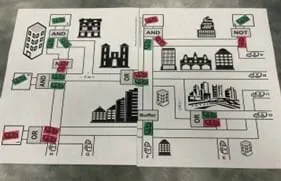 City Layout 1 - Version A with red trucks and green trucks.Copyright Tyler Bruns
- Collect each group’s completed City Layout #1 - Version A Map.
Activity - City Layout #1 - Version B
- Display Slide 10.
- Distribute the City Layout #1 - Version B Map to each group. Note that this map is made of two pieces of paper: City Layout #1 - Left Side - Version B (PDF) and City Layout #1 - Right Side - Version B (PDF).
- Have students cut along the dotted lines and tape the map sections together.
- Ensure each group still has 8-10 red cars and 8-10 green cars.
- Explain that this time students must determine which gate types are needed so that the incoming trucks reach the drop-off points with the correct colors.
- Have students check their answers with the teacher or another group. (See City Layout #1 - Version B Answer Key (PDF).)
City Layout 1 - Version B with red trucks, green trucks, and yellow gates.Copyright Tyler Bruns
- Collect each group’s completed City Layout #1 - Version B Map.
- Proceed to Slide 11 when the students have finished this activity.
Day 2 (50 minutes)
- Finish City Layout #1 - Version B, if necessary.
Handout #2
- Display Slide 12 and distribute one Gate Handout #2 (PDF)to each student.
- Have each group complete the handout.
- As a class, review and discuss the correct answers once every group has finished. Reference the Gate Handout #2 Answer Key (PDF).
- Display Slide 13 and review “Other Dual Gates.”
- Proceed to Slide 14 and conduct the “Extra Check” as a class.
Activity - City Layout #2
- Display Slide 15.
- Distribute one City Layout #2 to each small group. (Note: This map consists of FOUR pieces of paper: City Layout #2 - LL Quad (PDF), City Layout #2 - LR Quad (PDF), City Layout #2 - UL Quad (PDF), and City Layout #2 - UR Quad (PDF).
- Have students cut along the dotted lines and tape the four map sections together.
- Give each group an additional 10 cars of each color.
- Instruct students to recognize that the colors of the trucks coming into the city on roads A-U have been assigned a color (green or red) and that each gate also has been assigned a gate type.
- Using this information, have students determine the color of the delivery trucks that reach each drop-off point.
- Check students’ answers or have them check their answers with another group. (See City Layout #2 Answer Key (PDF).)
Activity - Engineering Design Challenge - Part 1
- Display Slide 16 and read the engineering design challenge and its design constraints.
- Provide one blank City Layout #2 to each group. Note: This map consists of FOUR pieces of paper (City Layout #2 - LL Quad (PDF), City Layout #2 - LR Quad (PDF), City Layout #2 - UL Quad (PDF), and City Layout #2 - UR Quad (PDF).)
- Have students cut along the dotted lines and tape the map sections together.
- Ensure each group still has 18-20 cars of each color.
- Instruct students to recognize that the colors of the trucks coming into the city on roads A-U have been assigned a color (green or red) and that each output has been assigned as well.
- Have students work on their designs. Encourage students to use pencils rather than pens so they can revise their designs as needed.
- Remind students of the design constraints listed on the slides.
- When finished, have students to get their answers checked by their teacher or check their answers with another group.
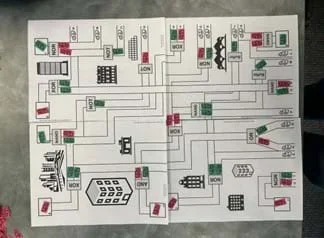 City Layout 2 with red trucks and green trucks.Copyright Tyler Bruns
Day 3 (50 minutes)
Connection to Logic Gates
- Read Slides 17-20 with the class; these relate the activity to logic gates.
Activity - Engineering Design Challenge - Part 2
- Go to Slide 21 to introduce Part 2 of the design challenge: Find a way to remove at least three gates from the map made in Engineering Design Challenge - Part 1.
- Display Slide 22 and instruct students to brainstorm in their groups how they will adjust their Part 1 maps. They should write these changes down on a separate piece of paper.
- Once brainstorming is complete, instruct each group to swap their map and noted changes with another team.
- Give students 5-10 minutes to review their peers’ maps and notes per the instructions on Slide 22.
- Display Slide 23 and go over the presentation requirements.
- Display Slide 24 and review the Student Presentations Grading Rubric (PDF).
- Display Slide 25.
- Remind students that each group member must describe at least one gate change and create those related slides.
- Let students work on their presentations.
Day 4 (50 minutes)
Presentations
- Have each group present their slide deck. Use the Student Presentations Grading Rubric (PDF)for grading.
Optional: Final Assessment - Quiz
- Distribute one Logic Gates Summative Quiz (PDF) to each student.
- Give students time to complete the quiz.
Pre-Activity Assessment
Not applicable.
Activity Embedded (Formative) Assessment
Group feedback: Each group checks their completed City Layout #1 - Version A Map and their City Layout #1 - Version B Map with a neighboring group. If groups do not agree on the answer, they should work together to figure out the correct answer. Additionally, they can ask the teacher for assistance.
Teacher Check: Each group has the teacher check their completed City Layout #1 - Version A Map and their City Layout #1 - Version B Map to determine whether they have the correct answers. When mistakes are found, it is important that the teacher talk through the logic of why the answer was incorrect and why the correct answer is the correct answer. Whenever possible, the teacher should use questions to lead students to the right answer rather than just giving them the answer.
Post-Activity (Summative) Assessment
Group Presentations: At the end of the Engineering Design Challenge Part 2, each group presents the changes that they made to their design. The Student Presentations Grading Rubric (PDF) can be used for grading.
Post Assessment Quiz: Optionally, students may take the Logic Gates Summative Quiz (PDF) as an alternative or additional assessment of the activity.
After handing out the Version A maps, it may be helpful to allow the students to color the red and green cars (labeled A-H and labeled R or G) on their maps with red and green colored pencils, markers, etc. Alternatively, if planning to use the maps over multiple years. and, if able, it may be helpful to laminate the maps and give each group a handful of green and red expo markers to mark on their maps while they are working.
It may be helpful to print (KEY) and color the boxes 1-5 with a red or green marker, colored pencil, etc. according to what is typed in the boxes, to make it easier for you (or your student aid, student teacher, etc.) to check each station's work in Version A.
- For lower grades, students can be taken through the process more slowly and using less Boolean (ones and zeros) and more logic through processing. For example, the first exercise can be used the same way, but have the students explain “if this is red and this is green, are both of the cars green?” Then the student can reason their way through the whole process and grasp the same concepts.
- For older/advanced students, we could extend their knowledge and allow students to create their own logic gates. Students can also start to read wiring diagrams and start to apply their experiences with hands-on applications such as using a breadboard.
Free SVG. (2014/2019/2020). https://freesvg.org
Need Pix. (2025). https://needpix.com
Public Domain Vectors. (2016/2020). https://publicdomainvectors.org
Raw Pixel. (2025). https://www.rawpixel.com
Vector Portal. (2015/2022). https://vectorportal.com
Wannapik. (2015) https://www.wannapik.com
Wikimedia Commons. (2011/2016/2021) https://commons.wikimedia.org
Wong, T. G. (2022). Introduction to classical and quantum computing. Rooted Grove.
Contributors
Tyler Bruns; Marjorie Langston; Caleb Grammel; Jennifer Bertke (Tester); Dr. Leanne Petry (Principal Investigator, Central State University); Dr. Henry Young (Principal Investigator, Wright State University); Dr. Andrew Sarangan (Principal Investigator, University of Dayton)
Supporting Program
Research Experience for Teachers (RET) through University of Central State, Wright State, & University of Dayton
Acknowledgements
This curriculum was developed under National Science Foundation RET grant numbers #2419116, #2419117, and #2419118. Any opinions, findings, and conclusions or recommendations expressed in this material are those of the authors and do not necessarily reflect the views of the National Science Foundation.
Special thanks to Jennifer Bertke for also testing this lesson with her students. Also, a special thank you to Dr. Augustus Morris, Dr. Gopalakrishnan Krishnasamy, and Dr. Mohammadreza Hadizadeh of Central State University for their support.
Copyright
2026 by Regents of the University of Colorado; original © 2025 University of Central State, Wright State, & University of Dayton